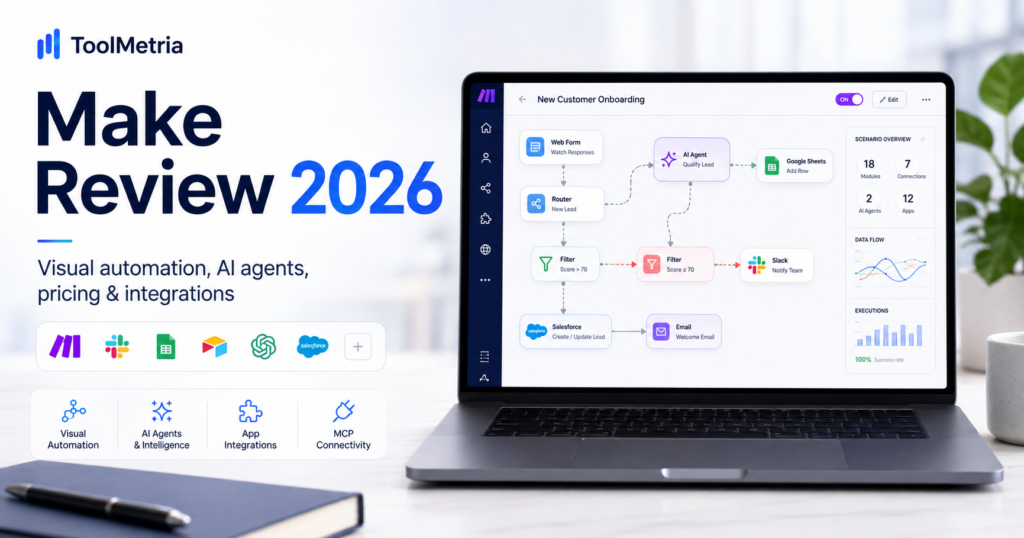
Make has become one of the most capable visual automation platforms in 2026, combining traditional no-code workflows with AI agents, MCP connectivity, automation observability and a new conversational building experience called Maia.
The product is especially interesting for businesses that have outgrown simple “when this happens, do that” automations and want more control over branching, data transformation, error handling, reusable logic and AI-driven decisions.
Make currently supports more than 3,000 apps and prices most plans around monthly credits. On the standard 10,000-credit configuration, current list pricing starts at $12/month for Core, $21/month for Pro and $38/month for Teams, while the Free plan includes up to 1,000 credits per month.
In 2026, Make also expanded its AI stack significantly with the next generation of Make AI Agents, Make MCP Server, Make Grid and Maia by Make, a conversational co-worker that can help users build automations and agents from plain language.
In this Make review, we examine pricing, credits, scenarios, AI Agents, Maia, MCP, Make Grid, integrations, reliability, team features, best use cases, limitations and how Make compares with Zapier for small businesses and automation teams.
ToolMetria testing status: This review uses Make’s current 2026 pricing, documentation and official product announcements. We will add a numerical ToolMetria Score after completing a standardized hands-on automation benchmark.
Make Review: Quick Verdict
Make is one of the strongest visual automation platforms for businesses that want more control and transparency than a basic trigger-action tool.
Its biggest strengths are:
- visual scenario building;
- 3,000+ app integrations;
- routers and filters;
- advanced branching;
- data transformation;
- AI Agents inside the scenario canvas;
- Maia for conversational automation building;
- MCP connectivity;
- Make Grid for automation observability;
- strong value at lower usage levels.
The biggest weakness is complexity.
Make can be much more powerful than simple automation tools, but the learning curve is also steeper. Users need to understand modules, bundles, routers, filters, mappings, execution history and credit consumption.
For simple workflows, Zapier may feel easier.
For more complex workflows, Make can be substantially more flexible.
Read our related Zapier Agents Review.
Make at a Glance
| Area | ToolMetria view |
|---|---|
| Best for | Visual multi-step automation, operations, agencies and technical no-code teams |
| Free plan | 1,000 credits/month |
| Core | $12/month at 10,000 credits |
| Pro | $21/month at 10,000 credits |
| Teams | $38/month at 10,000 credits |
| Enterprise | Custom pricing |
| Apps | 3,000+ |
| AI apps | 350+ AI applications in the ecosystem |
| AI Agents | Available across plans in current open beta configuration |
| Maia | Conversational automation builder |
| MCP | Make MCP Server + MCP toolboxes |
| Automation map | Make Grid |
| Main strength | Visual control and flexibility |
| Main drawback | Steeper learning curve than simpler automation platforms |
What Is Make?
Make is a visual automation and integration platform.
Users create automated workflows called scenarios.
A scenario can connect several applications and include:
- triggers;
- actions;
- routers;
- filters;
- iterators;
- aggregators;
- data transformations;
- webhooks;
- API calls;
- AI models;
- AI Agents.
This makes Make useful for both simple automation and much more complex business processes.
Make Pricing in 2026
Make prices plans according to monthly credits and plan capabilities.
At the current 10,000-credit configuration:
| Plan | Current price | Main fit |
|---|---|---|
| Free | $0 | Testing and light automation |
| Core | $12/month | Basic business automation |
| Pro | $21/month | Advanced workflows and higher-performance execution |
| Teams | $38/month | Collaborative automation teams |
| Enterprise | Custom | Large organizations and advanced governance |
Make also offers higher monthly credit allocations as usage grows.
Businesses should therefore compare both:
- plan features;
- monthly credit requirement.
What Is a Make Credit?
Make’s pricing model is based on credits.
For many normal automation modules, one module action consumes one credit.
Examples can include:
- reading data from an app;
- creating a row;
- sending a message;
- updating a CRM record;
- calling another module.
A single scenario execution can therefore consume several credits.
Simple example
Imagine this workflow:
- new form submission;
- create CRM contact;
- add row to Google Sheets;
- send Slack notification;
- send confirmation email.
That run can consume multiple credits because several modules execute.
This is why businesses should estimate credits per successful workflow, not just the number of times a scenario runs.
Free Plan
Make’s Free plan currently includes:
- up to 1,000 credits per month;
- visual no-code scenario builder;
- 3,000+ apps;
- routers and filters;
- customer support;
- 15-minute minimum scheduled interval.
This is enough to learn the platform and test several low-volume workflows.
The main limitations appear when a company needs:
- more frequent schedules;
- higher volume;
- API access;
- advanced variables;
- team collaboration;
- priority execution.
Core Plan
Core currently starts at $12/month for 10,000 credits.
Compared with Free, it adds:
- unlimited active scenarios;
- scheduled scenarios down to one-minute intervals;
- larger data-transfer limits;
- Make API access.
For many small businesses, Core is the first serious production plan.
Pro Plan
Pro currently starts at $21/month for 10,000 credits.
It adds features such as:
- priority scenario execution;
- custom variables;
- full-text execution-log search;
- advanced AI and automation functionality.
This is the plan we would shortlist for users managing more complex or business-critical scenarios.
Teams Plan
Teams currently starts at $38/month for 10,000 credits.
It adds collaborative features including:
- teams;
- team roles;
- shared automation workflows;
- stronger organizational separation.
It is aimed at companies where automation is no longer the responsibility of one individual.
Enterprise
Enterprise uses custom pricing.
Make currently highlights features such as:
- custom functions;
- enterprise app integrations;
- 24/7 Enterprise support;
- Value Engineering support;
- overage protection;
- advanced security functionality.
The Visual Scenario Builder
The visual canvas is Make’s defining feature.
Instead of reading a long list of actions, users can see the workflow as a connected diagram.
This becomes especially useful when scenarios include:
- multiple branches;
- filters;
- loops;
- fallback paths;
- AI decisions;
- several applications.
For complex automation, visual structure is not merely aesthetic.
It helps with debugging, documentation and maintenance.
Routers and Filters
Routers let one workflow split into different paths.
Filters determine which path a piece of data should follow.
For example:
New lead → evaluate country → send to correct regional sales team.
Or:
Support request → evaluate category → route billing issues to finance and technical issues to support.
This is one of the areas where Make is especially strong compared with basic linear automation tools.
If-Else and Merge
Make expanded scenario logic in 2026 with If-Else and Merge.
This lets users:
- split logic based on conditions;
- run different paths;
- reconnect those branches later in the scenario.
For business processes with conditional logic, this can make scenarios easier to understand and maintain.
Make AI Agents
Make significantly redesigned its AI Agents in 2026.
The new version places agents directly inside the same visual scenario canvas used for ordinary automation.
This matters because the agent is no longer an isolated black box.
Users can combine:
- deterministic automation;
- AI reasoning;
- connected apps;
- knowledge;
- tools;
- sub-agents.
How Make AI Agents Work
An AI agent can interpret input, decide what to do and use approved tools.
Typical agent workflows could include:
- lead qualification;
- ticket triage;
- research;
- customer-support routing;
- content processing;
- operations decisions;
- inventory management.
Make’s key design choice is visibility.
Its Reasoning panel helps builders review how the agent selected tools and made decisions.
AI Agents Are Not the Same as Traditional Automation
Traditional automation is deterministic.
If condition A happens, action B happens.
AI agents are adaptive.
They can interpret ambiguous information and choose between possible actions.
That makes agents useful when rules would become too complicated to maintain.
But it also makes them less predictable.
A good automation architecture therefore often combines both:
AI for judgment + deterministic modules for execution.
Sub-Agents
Make added sub-agent support to the new AI Agent system in July 2026.
A parent agent can use specialized sub-agents as tools.
This makes it possible to build a system where different agents handle different responsibilities.
For example:
- research agent;
- sales agent;
- support agent;
- data-validation agent.
The main agent can then coordinate them inside a larger workflow.
Maia by Make
One of Make’s most important August 2026 releases is Maia by Make.
Maia is a conversational co-worker built directly into the scenario builder.
Instead of manually assembling every automation module, users can describe what they want in natural language.
Maia can then build automation steps visually in front of them.
Make positions this as a way to reduce the technical learning curve without hiding the underlying automation logic.
Why Maia matters
Automation platforms have traditionally required users to understand:
- triggers;
- module mapping;
- API fields;
- filters;
- connections;
- data structures.
Maia can translate a business request into a first working scenario while still showing the user how the workflow is constructed.
This could make Make significantly easier for beginners.
Make MCP Server
Make supports Model Context Protocol through Make MCP Server.
MCP lets compatible AI clients use Make scenarios and account resources as tools.
Make currently documents compatibility with AI clients such as:
- Claude;
- ChatGPT;
- other MCP-compatible clients.
This means a user can ask an AI assistant to run a Make scenario without opening Make manually.
What Can Make MCP Do?
Depending on scopes and plan, MCP clients can perform actions such as:
- run activated scenarios;
- inspect resources;
- work with data stores;
- manage scenarios;
- manage webhooks;
- manage teams;
- perform supported Make account actions.
All plans can use scenario-run scopes, while paid plans gain access to management scopes.
MCP Toolboxes
Make also supports MCP toolboxes.
A toolbox exposes a selected set of scenarios rather than the broader account.
This is useful when:
- different employees need different tools;
- clients need limited access;
- security requires tighter tool boundaries;
- an organization wants separate AI tool collections.
Make Grid
Make Grid is a visual map of an organization’s automation ecosystem.
As a company adds more scenarios, agents and integrations, understanding dependencies becomes increasingly difficult.
Grid helps teams see:
- scenarios;
- connections;
- dependencies;
- errors;
- usage;
- AI data flows;
- external automation systems.
This is an observability and governance feature rather than an automation-building feature.
External Automation Visibility in Make Grid
In 2026, Make expanded Grid to support third-party automation and AI systems such as:
- n8n;
- Claude Managed Agents;
- Relevance AI.
This is strategically important.
Make is positioning Grid as a broader map of the company’s automation landscape rather than only a map of Make scenarios.
3,000+ Apps
Make currently advertises more than 3,000 app integrations.
Typical categories include:
- CRM;
- email;
- spreadsheets;
- project management;
- databases;
- marketing;
- ecommerce;
- AI;
- developer tools;
- finance.
Make also highlights more than 350 AI applications in its ecosystem.
API and Webhooks
Make is especially powerful when an application does not provide exactly the module a user needs.
Users can work with:
- HTTP requests;
- APIs;
- webhooks;
- JSON;
- custom app connections;
- developer tools.
This makes Make useful beyond the prebuilt integration catalog.
Error Handling
Reliable automation requires more than a successful happy-path demo.
Make provides error-handling tools that can help scenarios:
- retry;
- ignore specific failures;
- route errors;
- store incomplete executions;
- recover workflows.
For business-critical scenarios, this is essential.
Execution History
Execution history helps users understand what happened during a scenario run.
Teams can inspect:
- module inputs;
- module outputs;
- errors;
- execution paths;
- data bundles.
Pro also includes full-text execution-log search, which becomes valuable as automation volume grows.
Make for Marketing Automation
Marketing teams can use Make for:
- lead capture;
- CRM updates;
- email workflows;
- content distribution;
- reporting;
- campaign-data synchronization;
- social workflows;
- AI content processing.
Make for Sales
Sales automation examples include:
- lead enrichment;
- CRM routing;
- pipeline notifications;
- meeting follow-up;
- AI lead qualification;
- proposal workflows;
- database synchronization.
Make for Operations
Operations is one of Make’s strongest use cases.
Teams can automate:
- onboarding;
- approvals;
- inventory updates;
- report generation;
- data synchronization;
- vendor workflows;
- exception handling;
- internal notifications.
Make for Agencies
Agencies can use Make to manage workflows across several clients.
Typical agency automations include:
- lead routing;
- client onboarding;
- report generation;
- content workflows;
- CRM synchronization;
- billing data;
- AI research and content processing.
The Teams plan becomes particularly useful when multiple employees maintain the automation stack.
Make for Ecommerce
Ecommerce businesses can automate:
- order data;
- inventory;
- customer records;
- support workflows;
- fulfillment notifications;
- marketing segmentation;
- reporting.
Make vs Zapier
Make and Zapier are often compared because both connect apps and automate workflows.
| Area | Make | Zapier |
|---|---|---|
| Ease for beginners | More learning required | Usually easier |
| Visual workflow design | Winner | More linear |
| Complex branching | Winner | Strong but different approach |
| App ecosystem | 3,000+ | Broader overall catalog |
| AI agents | Integrated into scenario canvas | Dedicated Zapier Agents product |
| MCP | Make MCP Server + toolboxes | Zapier MCP |
| Observability | Make Grid | Different management tooling |
| Best fit | Complex visual automation | Fast setup and broad app reach |
Read our Zapier Agents Review.
Make vs Notion Automation
Notion Business has become much more powerful for internal workflow automation through Custom Agents and Workers.
Make remains stronger when automation needs to span many unrelated external applications.
Notion is strongest when the workflow is centered on:
- Notion databases;
- projects;
- knowledge;
- meeting notes.
Make is strongest when the workflow is centered on:
- cross-app data movement;
- APIs;
- webhooks;
- complex business logic.
Read our Notion Business Review.
Make with ChatGPT and Claude
Make does not need to replace ChatGPT or Claude.
Through MCP and app integrations, AI assistants can use Make as an execution layer.
A workflow could look like:
Claude or ChatGPT decides what should happen → Make executes the approved scenario across business applications.
Read our ChatGPT Business Review and Claude Team Review.
Pros and Cons
Pros
- Excellent visual scenario builder.
- 3,000+ app integrations.
- Strong routers, filters and branching.
- Free plan includes 1,000 credits.
- Core starts at a relatively low $12/month for 10,000 credits.
- AI Agents are integrated into the same automation canvas.
- Maia lowers the barrier to building automations.
- MCP Server connects Make to AI clients such as Claude and ChatGPT.
- Make Grid adds automation observability.
- Strong API, webhook and data-transformation capabilities.
- Good fit for complex operational automation.
Cons
- Steeper learning curve than simpler automation tools.
- Credit usage can become difficult to estimate in complex scenarios.
- Large scenarios can become visually complicated.
- AI Agents are still evolving and some features remain in beta.
- Teams need governance as automation volume grows.
- Debugging advanced data mapping requires technical comfort.
- Some advanced organizational features require higher plans.
Who Should Use Make?
We would shortlist Make for:
- small businesses with several SaaS tools;
- operations teams;
- agencies;
- marketing operations;
- sales operations;
- technical no-code users;
- automation consultants;
- businesses that need branching and data transformation;
- teams building AI-assisted workflows.
Who Should Probably Skip Make?
Make may be overkill when:
- you only need one or two simple automations;
- nobody on the team wants to learn automation logic;
- your workflows are extremely low volume and already covered by native integrations;
- you need the absolute simplest possible automation interface.
Is Make Worth It in 2026?
For businesses that need more than simple trigger-action workflows, yes.
Make’s value comes from how much logic can be placed inside one visual automation system.
Instead of paying for separate tools for:
- integration;
- workflow automation;
- AI routing;
- webhooks;
- API logic;
- agent orchestration;
- automation mapping;
Make can cover a large portion of the stack.
Which Make Plan Should You Choose?
Free
Choose Free to learn Make and validate one or two low-volume workflows.
Core
Choose Core when the automation is now production work and you need more frequent schedules, API access and unlimited active scenarios.
Pro
Choose Pro for more serious automation teams that need priority execution, variables and stronger execution-log tools.
Teams
Choose Teams when several employees need to build, maintain and govern automation together.
How We Would Start with Make
- Start on Free.
- Automate one repetitive process.
- Measure credits per successful workflow.
- Learn filters and routers before building large scenarios.
- Add error handling.
- Document important scenarios.
- Test Maia for faster scenario creation.
- Use AI Agents only when judgment is actually required.
- Use deterministic modules for critical execution steps.
- Use Make Grid once the automation estate becomes difficult to understand.
What ToolMetria Will Test Hands-On
Our standardized Make benchmark will measure:
- account setup;
- first scenario build time;
- Google Sheets / Gmail workflow;
- CRM-style workflow;
- routers and filters;
- data mapping;
- webhooks;
- AI Agent setup;
- Maia;
- MCP integration;
- credit consumption;
- error handling;
- Make Grid;
- overall value.
Frequently Asked Questions
How much does Make cost in 2026?
At the current 10,000-credit configuration, Core starts at $12/month, Pro at $21/month and Teams at $38/month. Free includes up to 1,000 credits per month. Enterprise uses custom pricing.
What is a Make credit?
A credit is Make’s usage unit. For many ordinary modules, one module action counts as one credit, so one scenario run can consume several credits.
How many apps does Make support?
Make currently advertises more than 3,000 app integrations and more than 350 AI applications in its ecosystem.
Does Make have AI agents?
Yes. The new Make AI Agent system is integrated directly into the scenario builder and can combine AI reasoning with tools, knowledge, modules, scenarios and sub-agents.
What is Maia by Make?
Maia is Make’s conversational automation co-worker. Users describe the workflow they want and Maia helps build the scenario visually inside Make.
What is Make MCP Server?
Make MCP Server lets compatible AI clients such as Claude and ChatGPT access Make scenarios and resources as tools.
What is Make Grid?
Make Grid is a visual map of an organization’s automation and AI landscape. It helps teams understand dependencies, usage, errors and connections across scenarios and supported external systems.
Is Make easier than Zapier?
Usually not for beginners. Zapier is often easier for very simple workflows. Make provides more visual control and flexibility for complex multi-step automation.
Can Make replace Zapier?
For many companies, yes. The better choice depends on app availability, workflow complexity, pricing and how much control the team wants over automation logic.
Can Make work with ChatGPT or Claude?
Yes. Make integrates with AI models directly and also supports MCP connections that let compatible AI assistants use Make scenarios as tools.
Final Verdict
Make is one of the most complete automation platforms available to small and mid-sized businesses in 2026.
Its visual builder remains the core advantage, but the product is becoming much broader.
Make AI Agents add adaptive decision-making.
Maia reduces the learning curve.
MCP turns Make into an execution layer for external AI assistants.
Make Grid adds visibility over increasingly complex automation environments.
The trade-off is complexity. Make rewards users who are willing to learn how workflows actually operate.
For companies that need real multi-step automation rather than a few simple app connections, Make is currently one of ToolMetria’s strongest automation-platform candidates for 2026.
ToolMetria preliminary verdict: Best candidate for visual complex automation and AI orchestration. Final score pending standardized hands-on testing.