ChatGPT Business has become much more than a shared version of ChatGPT for teams.
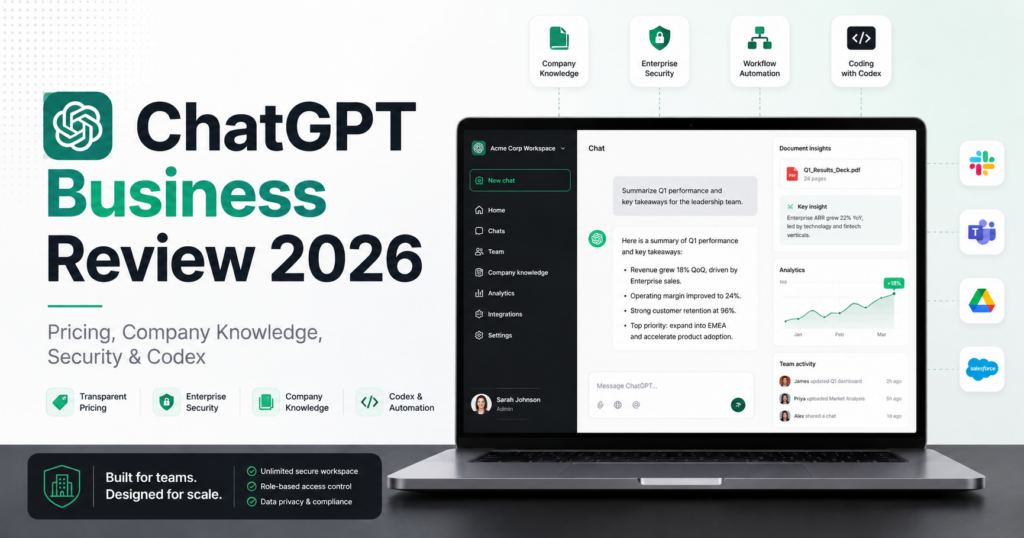
In 2026, OpenAI positions the plan as a secure AI workspace that combines ChatGPT, Codex, company context, connected tools, team agents, centralized administration, analytics, budgeting controls, SAML SSO, MFA, and business privacy protections.
The pricing also changed in 2026. OpenAI reduced the standard ChatGPT Business seat price in April, and the current plan costs $20 per user per month when billed annually or $25 per user per month when billed monthly, with a minimum of two standard seats.
That makes the real entry cost $40 per month on annual billing for a two-person team — or $50 on monthly billing.
So is it worth paying for?
In this ChatGPT Business review, we examine the current 2026 product, including pricing, Company Knowledge, plugins and connected apps, Codex, security, privacy, administration, team agents, limitations, and the types of businesses that are most likely to get value from it.
ToolMetria testing status: This review uses current official OpenAI product and help-center documentation together with our editorial evaluation of practical business use cases. We will add a final numerical ToolMetria Score after completing a standardized hands-on team workflow test.
ChatGPT Business Review: Quick Verdict
ChatGPT Business is currently our leading all-round AI workspace for small and growing teams.
The reason is breadth.
A single ChatGPT Business workspace can support:
- writing and editing;
- research;
- data analysis;
- file analysis;
- coding through ChatGPT and Codex;
- company knowledge search;
- connected business tools;
- custom team agents;
- internal documentation;
- planning and reporting;
- workflow automation;
- team administration and controls.
For a team that already uses ChatGPT every day, Business can make more sense than paying for separate individual accounts because it adds organizational context, administration, privacy controls, centralized billing and company-oriented workflows.
The biggest drawback is the two-seat minimum. A solo founder may be better served by an individual plan until the business genuinely needs shared administration and company context.
For our wider recommendations, see Best AI Tools for Small Business in 2026.
ChatGPT Business at a Glance
| Area | ToolMetria view |
|---|---|
| Best for | Small and growing teams that want one broad AI workspace |
| Annual price | $20/user/month |
| Monthly price | $25/user/month |
| Minimum standard seats | 2 |
| ChatGPT | Included |
| Codex | Included with standard ChatGPT Business seats |
| Company Knowledge | Included |
| Connected tools | Microsoft 365, Google Drive, Slack, GitHub, Linear, Figma and more |
| Team agents | Supported through custom plugins and company context |
| Administration | Centralized billing, analytics, budgeting and spend controls |
| Security | SAML SSO and MFA |
| Training policy | Business data is not used for training by default |
| Main strength | Very broad capability in one workspace |
| Main drawback | Minimum two seats and potential overlap with existing software |
What Is ChatGPT Business?
ChatGPT Business is OpenAI’s self-service team workspace for growing companies.
OpenAI describes it as a secure workspace with company context and tools for teams.
The current standard Business seat includes access to ChatGPT and Codex across supported desktop and mobile applications, while the workspace adds business-oriented administration and company context on top.
This is important because the main difference between a business AI workspace and a collection of personal accounts is not simply access to a chatbot.
It is the organizational layer around that AI.
ChatGPT Business Pricing in 2026
OpenAI changed Business pricing in April 2026.
The current standard ChatGPT Business seat costs:
| Billing option | Price per standard user | Minimum standard seats |
|---|---|---|
| Annual billing | $20/month | 2 |
| Monthly billing | $25/month | 2 |
That means the minimum standard-seat cost is:
- $40/month equivalent when two users are billed annually;
- $50/month when two users are billed monthly.
OpenAI notes that usage is described as unlimited subject to abuse guardrails.
The official billing documentation also explains that Business now supports different license types, including standard ChatGPT seats and Codex-focused seats.
August 2026 seat-billing change
OpenAI also changed the timing of charges for additional Business seats in August 2026.
When a paid seat is added, the workspace is now charged immediately for the remaining portion of the current billing period rather than waiting for a later invoice.
The total cost is not higher because of this change; the timing of the charge changed.
What Do You Get for $20 per User?
The current Business plan includes much more than standard chat.
OpenAI lists:
- ChatGPT;
- Codex;
- AI for chat, coding, analysis and workflows;
- connections to common business tools;
- company context;
- custom team agent plugins;
- centralized billing and administration;
- usage analytics;
- budget planning;
- spend controls;
- SAML SSO;
- MFA;
- business privacy protections.
The value therefore depends on whether the team uses ChatGPT as an occasional chatbot or as a working environment.
Company Knowledge: One of the Most Important Business Features
Company Knowledge allows ChatGPT to use information from connected organizational tools to answer questions in the context of the business.
This is a significant shift from the normal chatbot workflow.
Without company context, a user may have to manually upload documents, paste messages, explain projects and recreate background information in each conversation.
With Company Knowledge, ChatGPT can retrieve information from eligible connected applications and combine it into an organization-specific answer.
Example: preparing for a client call
A team could ask ChatGPT to prepare a briefing before a customer meeting.
The relevant information may be spread across:
- Slack conversations;
- emails;
- Google Drive documents;
- project files;
- support information;
- source-code repositories;
- other connected business systems.
Company Knowledge can bring eligible information together and provide citations back to the original sources.
For knowledge-heavy businesses, this can be much more valuable than generating generic marketing copy.
Plugins and Apps in ChatGPT Business
OpenAI’s terminology changed in July 2026.
The app directory was migrated into the plugin directory, which is now the primary place for discovering workflow capabilities across ChatGPT and Codex.
A plugin can include:
- skills;
- apps;
- app templates.
Apps remain the underlying integrations that connect ChatGPT or Codex with external data and actions.
OpenAI’s current business plugins directory includes categories around collaboration, file sharing, project management, go-to-market, data, development, design and finance.
Examples of connected tools
OpenAI’s Business pricing documentation currently highlights integrations such as:
- Microsoft 365;
- Google Drive;
- Slack;
- GitHub;
- Linear;
- Figma;
- and additional business services.
This is one of the most important reasons to consider Business instead of evaluating ChatGPT only as a writing tool.
Can ChatGPT Business Take Actions in Other Apps?
Some connected apps and plugins can do more than search for information.
OpenAI’s current app documentation says supported integrations may be able to:
- search and reference information;
- run deep research across multiple sources;
- show interactive experiences;
- sync information into a workspace knowledge base;
- take supported actions on the user’s behalf.
The exact capabilities depend on the specific app, permissions and workspace configuration.
This means businesses should evaluate integrations individually rather than assume every connected service has the same level of access.
Custom Team Agents
OpenAI positions custom team agents as another core Business capability.
The idea is to create reusable AI workflows that understand company context and can help teams perform repeatable tasks.
Examples could include:
- a sales-preparation agent;
- a marketing research agent;
- an internal policy assistant;
- a project briefing agent;
- a support knowledge assistant;
- a software-development workflow;
- a finance reporting assistant.
The most valuable agents are usually not generic “do everything” assistants.
They are narrowly defined workflows built around a recurring business process.
Codex in ChatGPT Business
Codex is included with standard ChatGPT Business seats.
This makes Business relevant to software teams even if the company’s main reason for buying ChatGPT is not programming.
Potential uses include:
- reviewing code;
- understanding unfamiliar repositories;
- writing and editing code;
- debugging;
- technical documentation;
- software maintenance;
- agentic development workflows.
OpenAI also introduced dedicated Codex license options in 2026, allowing organizations to manage coding-focused access separately where appropriate.
Data Analysis and Files
For many non-technical companies, data analysis may be one of the easiest ways to justify ChatGPT Business.
Teams can use AI to help:
- summarize spreadsheets;
- identify patterns;
- explain metrics;
- clean data;
- create calculations;
- draft reports;
- analyze uploaded documents;
- compare files;
- turn raw information into presentations or decisions.
This does not remove the need to verify important calculations.
AI should accelerate analysis, not eliminate financial, legal or operational review.
Business Privacy: Is Your Data Used for Training?
OpenAI states that business data is not used to train its models by default in ChatGPT Business.
This is one of the most important differences to verify before a company places internal information into an AI workspace.
The current Business plan also includes a secure team workspace with SAML SSO and MFA.
Organizations with more advanced requirements — such as custom data retention, SCIM, enterprise key management, domain verification, role-based access controls or data residency — may need ChatGPT Enterprise rather than Business.
ChatGPT Business Security and Administration
Business adds centralized controls that personal accounts do not provide in the same organizational format.
Current features include:
- centralized billing;
- workspace administration;
- usage analytics;
- budget planning;
- spend controls;
- SAML SSO;
- MFA;
- plugin and app administration.
These controls become increasingly important as the number of AI users in a company grows.
Company Knowledge Permissions
Company Knowledge respects the permissions users already have in the connected systems.
This means ChatGPT should not simply give every employee unrestricted access to every connected source because the organization enabled an integration.
Users authenticate connected apps, and workspace administrators can manage which apps are enabled and how they are configured.
Business workspaces currently have eligible apps enabled by default, while individual users still need to authenticate the apps they use unless an administrator-managed connection applies.
Important Company Knowledge Limitation
One current limitation is platform availability.
OpenAI’s current Company Knowledge help documentation says the feature is available on ChatGPT Web and is not currently supported in the desktop or mobile ChatGPT apps.
For teams that work heavily from mobile devices, this is worth understanding before Company Knowledge becomes part of a core workflow.
ChatGPT Business for Sales
Sales teams can use ChatGPT Business to reduce preparation work.
Potential workflows include:
- account research;
- meeting briefings;
- summaries of recent customer activity;
- proposal drafts;
- call preparation;
- follow-up drafts;
- CRM-supported research through eligible integrations;
- competitive analysis.
The strongest use cases involve company context rather than generic cold-email generation.
ChatGPT Business for Marketing
Marketing teams can use the workspace across:
- content planning;
- campaign research;
- competitor analysis;
- drafting;
- editing;
- SEO research;
- data analysis;
- creative briefs;
- reporting;
- connected project workflows.
The biggest risk is generic output.
AI-generated marketing still requires strong brand context, real customer insight and editorial judgment.
ChatGPT Business for Operations
Operations teams may find some of the highest-value workflows because repetitive knowledge work is often spread across several systems.
Examples include:
- policy questions;
- internal process documentation;
- meeting summaries;
- project status reporting;
- vendor comparisons;
- document analysis;
- knowledge retrieval;
- workflow support through plugins.
ChatGPT Business for Software Teams
The combination of ChatGPT, Codex, GitHub connections and company knowledge can make Business particularly useful for software companies.
Possible workflows include:
- codebase questions;
- issue analysis;
- technical documentation;
- release-note drafting;
- repository research;
- bug investigation;
- project context retrieval;
- development agents.
ChatGPT Business vs Individual ChatGPT Accounts
The correct question is not whether the AI model writes better simply because it is in a Business workspace.
The main value is organizational.
Business makes more sense when you need:
- at least two team users;
- central billing;
- administrative controls;
- business privacy defaults;
- company context;
- connected work tools;
- team agents;
- SSO;
- usage and spending visibility.
If only one person uses ChatGPT occasionally, a Business workspace can be unnecessary overhead.
ChatGPT Business vs Enterprise
Business is built for growing companies that want a self-service secure workspace.
Enterprise is aimed at larger organizations that need additional controls and support.
OpenAI currently lists Enterprise-only or expanded capabilities around:
- larger context and file limits;
- SCIM;
- enterprise key management;
- role-based access controls;
- domain verification;
- custom data-retention policies;
- data residency;
- priority support and service-level agreements;
- custom legal terms;
- volume discounts.
For most small businesses, Enterprise would be unnecessary unless compliance or scale requirements demand it.
ChatGPT Business Pros and Cons
Pros
- Broad all-round AI capability.
- ChatGPT and Codex in one business workspace.
- Company Knowledge can search organizational context.
- Connections to widely used business tools.
- Custom team agents and plugins.
- Business data is not used for training by default.
- SAML SSO and MFA.
- Centralized billing and administration.
- Usage analytics, budgeting and spend controls.
- Competitive $20/user annual price after the 2026 price reduction.
Cons
- Two standard seats minimum.
- Can overlap with software the company already pays for.
- Employees still need training to use AI effectively.
- AI output requires verification.
- Company Knowledge is currently Web-only.
- Some advanced security/compliance controls require Enterprise.
- Integration capabilities vary by plugin/app.
Who Should Buy ChatGPT Business?
We would shortlist ChatGPT Business for:
- teams with two or more regular AI users;
- professional-services firms;
- software companies;
- marketing teams;
- sales organizations;
- operations teams;
- agencies;
- research-heavy companies;
- companies that already use Slack, Drive, GitHub, Microsoft 365 or similar systems;
- businesses that want one broad AI platform before adding specialist tools.
Who Should Probably Skip It?
ChatGPT Business is less compelling when:
- only one person needs AI;
- the team barely uses AI today;
- a Google- or Microsoft-native AI suite already covers the required workflows;
- the business needs highly specialized tools rather than a general workspace;
- enterprise compliance requirements exceed the Business plan;
- there is no plan for training employees or measuring AI adoption.
Is ChatGPT Business Worth $20 per User?
For a team that uses it heavily, yes.
The math is simple.
A $20-per-user monthly subscription only needs to save a small amount of employee time to pay for itself.
But that does not mean every AI subscription automatically generates a return.
The business should identify repeatable workflows such as:
- client preparation;
- research;
- analysis;
- reporting;
- coding;
- document review;
- knowledge retrieval;
- content production;
- operational support.
If employees only use ChatGPT for occasional brainstorming, the organizational plan may be harder to justify.
How We Would Roll Out ChatGPT Business
A small company should avoid giving every employee access and simply saying “use AI.”
We would use a simple rollout:
- Identify three to five recurring workflows.
- Choose the employees who perform those workflows.
- Connect only the business apps required.
- Create clear privacy and verification guidelines.
- Build reusable prompts or agents.
- Track usage and time saved.
- Expand seats only when adoption is proven.
This approach makes the subscription easier to evaluate financially.
What ToolMetria Will Test Hands-On
Our standardized ChatGPT Business test will measure:
- workspace setup time;
- seat administration;
- Company Knowledge setup;
- connected-app usefulness;
- source citation quality;
- document analysis;
- data analysis;
- marketing workflows;
- Codex workflows;
- custom team agents;
- privacy/admin configuration;
- time saved on recurring tasks;
- overall value.
We will add screenshots, measured timings and a numerical ToolMetria Score after completing that test.
Frequently Asked Questions
How much is ChatGPT Business in 2026?
ChatGPT Business currently costs $20 per standard user per month when billed annually or $25 per user per month when billed monthly.
How many users does ChatGPT Business require?
OpenAI currently requires a minimum of two standard ChatGPT Business seats.
Does ChatGPT Business include Codex?
Yes. Standard ChatGPT Business seats currently include access to ChatGPT and Codex.
Does OpenAI train on ChatGPT Business data?
OpenAI states that business data is not used for model training by default.
What is Company Knowledge?
Company Knowledge lets ChatGPT retrieve context from eligible connected organizational tools and produce company-specific answers with citations to the original sources.
Can ChatGPT Business connect to Google Drive and Slack?
Yes. OpenAI currently highlights integrations including Google Drive, Slack, Microsoft 365, GitHub, Linear and Figma, among others.
Can ChatGPT Business take actions in connected apps?
Some plugins and apps can support actions in addition to search and retrieval. Exact capabilities depend on the integration and the permissions granted.
Is Company Knowledge available on mobile?
OpenAI’s current documentation says Company Knowledge is available on ChatGPT Web and is not currently supported in the desktop or mobile applications.
Is ChatGPT Business better than ChatGPT Enterprise?
They target different customers. Business is the self-service option for growing teams. Enterprise adds more advanced security, governance, support and compliance controls for larger organizations.
Final Verdict
ChatGPT Business is one of the easiest business AI products to recommend because it can address many different workloads before a company needs to buy specialist AI software.
At $20 per user per month on annual billing, it is inexpensive relative to employee time — but only if the company actually integrates it into recurring work.
The strongest reasons to upgrade are not simply “better AI.”
They are:
- Company Knowledge;
- connected business tools;
- ChatGPT and Codex;
- team agents;
- central administration;
- business privacy defaults;
- SSO and MFA;
- usage and spending controls.
The two-seat minimum makes it less attractive for solo users, and larger regulated organizations may need Enterprise.
But for a small or growing team that wants one broad AI platform, ChatGPT Business is currently ToolMetria’s leading all-round AI workspace candidate for 2026.
ToolMetria preliminary verdict: Best overall AI workspace for small and growing teams. Final score pending standardized hands-on testing.