Pipedream is one of the most interesting automation platforms for developers and technical teams in 2026 because it sits between visual no-code automation and full custom software.
You can build a workflow visually using prebuilt triggers and actions, then drop into JavaScript or Python whenever the workflow needs custom logic.
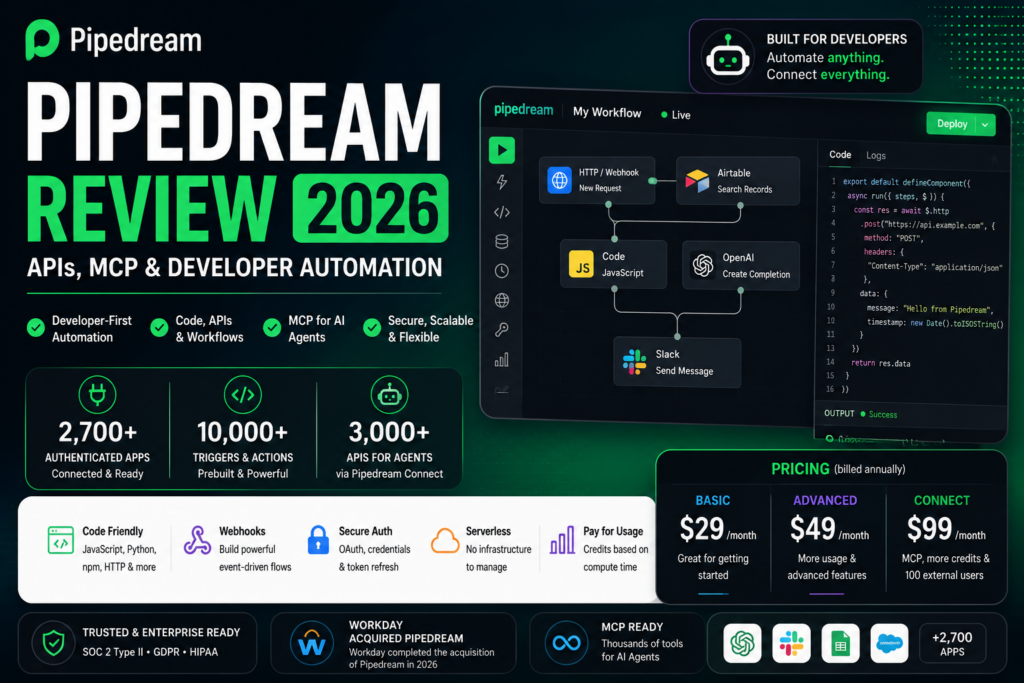
Pipedream’s broader integration platform now spans thousands of APIs, more than 10,000 prebuilt tools, triggers and actions, managed authentication, hosted MCP servers and infrastructure designed specifically for AI agents.
The company also became part of Workday in 2026 after Workday completed its acquisition of Pipedream, describing it as an integration platform for AI agents with more than 3,000 prebuilt connectors to business applications.
Pricing is more developer-oriented than many traditional automation products. Pipedream Workflows uses compute credits rather than charging for every workflow step. At the default 256 MB memory allocation, one credit currently represents up to 30 seconds of compute time per workflow segment.
Current public pricing starts with a Free plan, followed by Basic at $29/month billed annually, Advanced at $49/month billed annually, Connect at $99/month billed annually, and custom Business pricing.
In this Pipedream review, we examine pricing, credits, workflows, JavaScript and Python, branching, APIs, Pipedream Connect, managed authentication, MCP, AI-agent integrations, security, best use cases and how Pipedream compares with n8n, Make and Zapier.
ToolMetria testing status: This review uses Pipedream’s current 2026 documentation, public pricing information and official Workday disclosures. We will add a numerical ToolMetria Score after completing a standardized hands-on automation benchmark.
Pipedream Review: Quick Verdict
Pipedream is one of the best automation platforms for developers who want fast integrations without giving up code-level control.
Its biggest strengths are:
- visual workflows;
- JavaScript and Python steps;
- thousands of connected APIs;
- 10,000+ prebuilt triggers, actions and tools;
- managed OAuth and credential storage;
- npm package support;
- HTTP and webhook workflows;
- compute-based rather than step-based billing;
- Pipedream Connect for embedding integrations;
- hosted MCP infrastructure for AI agents;
- strong developer experience.
The main weakness is positioning.
Pipedream is easier than building every integration yourself, but it is more technical than Zapier and often more code-oriented than Make.
For non-technical teams, Zapier may be easier.
For visual automation specialists, Make may feel more intuitive.
For self-hosting and deeper workflow infrastructure control, n8n may be more attractive.
Read our Zapier Review, Make Review and n8n Review.
Pipedream at a Glance
| Area | ToolMetria view |
|---|---|
| Best for | Developers, technical automation teams, SaaS integrations and AI agents |
| Free | $0 |
| Basic | $29/month billed annually |
| Advanced | $49/month billed annually |
| Connect | $99/month billed annually |
| Business | Custom pricing |
| Free credits | 100/month on current public pricing |
| Basic credits | 2,000/month |
| Connect credits | 10,000/month |
| Connect external users | 100 included on current plan |
| Workflow integrations | 2,700+ instantly authenticated apps advertised on Workflows |
| Connect / MCP reach | 3,000+ APIs and 10,000+ tools |
| Code | JavaScript and Python with package support |
| Billing model | Compute credits, not per workflow step |
| MCP | Hosted MCP server and developer MCP infrastructure |
| Parent company | Workday |
| Main strength | Developer control without building auth and integrations from scratch |
| Main drawback | More technical than mainstream no-code automation |
What Is Pipedream?
Pipedream Workflows is a hosted automation environment for connecting applications, databases, APIs and custom code.
A workflow can contain:
- app triggers;
- prebuilt actions;
- JavaScript;
- Python;
- HTTP requests;
- webhooks;
- branching;
- delays;
- data stores;
- AI models;
- API integrations.
The key idea is:
use no-code when it is faster, and code when it is more powerful.
Pipedream Is Now Part of Workday
Workday completed its acquisition of Pipedream during fiscal 2026.
Workday describes Pipedream as an integration platform for AI agents with more than 3,000 prebuilt connectors to business applications.
The strategic logic is clear.
AI agents need three things:
- reasoning;
- business context;
- the ability to take action in external software.
Pipedream supplies much of the third layer.
For existing Pipedream users, the acquisition does not automatically change the core value proposition today, but it makes Pipedream particularly important in the enterprise-agent market.
Pipedream Pricing in 2026
Current public pricing is structured around several tiers.
| Plan | Current displayed annual-billing price | Main fit |
|---|---|---|
| Free | $0 | Testing and low-volume workflows |
| Basic | $29/month | Developer automation with modest production use |
| Advanced | $49/month | More workflows, premium apps and advanced control flow |
| Connect | $99/month | Embedding integrations and auth into apps or agents |
| Business | Custom | High-volume and enterprise deployment |
Pricing can change according to usage and Pipedream has modified its pricing structure several times historically, so buyers should confirm the live pricing page before subscribing.
Free Plan
The current Free plan includes a small amount of production usage and is primarily useful for development and testing.
Current public limits include approximately:
- 100 credits per month;
- three active workflows;
- three connected accounts;
- 1 million AI tokens;
- unlimited workflow testing;
- Pipedream Connect in development mode.
Pipedream does not charge workflow compute credits during development and testing.
This is useful because developers can iterate extensively before deploying a workflow.
Basic Plan
Basic currently starts at $29/month billed annually.
Current published limits include:
- 2,000 credits per month;
- 10 active workflows;
- five connected accounts;
- 20 million AI tokens;
- unlimited workflow testing.
Basic is appropriate for developers running a limited number of production automations.
Advanced Plan
Advanced currently starts at $49/month billed annually.
It adds features such as:
- unlimited workflows;
- unlimited connected accounts;
- control-flow operators;
- premium apps;
- GitHub Sync;
- 50 million AI tokens.
For a technical automation team using Pipedream as a real development platform, Advanced is the more interesting Workflows tier.
Pipedream Connect Plan
Connect currently starts at $99/month billed annually.
Connect is fundamentally different from ordinary Workflows.
It is designed for developers who want to embed integrations inside their own application or AI agent.
Current Connect pricing includes:
- 10,000 credits per month;
- production access to Pipedream Connect;
- managed authentication for external users;
- 100 external users included;
- additional external users currently charged separately.
What Is Pipedream Connect?
Pipedream Connect is an integration toolkit for software products and AI agents.
Instead of asking customers to manually create OAuth integrations with every app, a developer can use Pipedream to handle:
- OAuth authorization;
- API-key connections;
- token storage;
- token refresh;
- prebuilt actions;
- triggers;
- MCP tools;
- user-level permissions.
This can eliminate a large amount of integration infrastructure.
3,000+ APIs and 10,000+ Tools
Pipedream’s current Connect and MCP pages advertise:
- 3,000+ APIs/apps;
- 10,000+ prebuilt tools;
- managed authentication;
- production-ready MCP servers.
Its Workflows page currently describes instant authentication for more than 2,700 apps.
The exact catalog varies by product surface, but the main point is that Pipedream has a large integration library and can extend beyond it through custom API requests.
How Pipedream Workflow Credits Work
Pipedream Workflows uses compute credits.
At the default 256 MB memory setting:
1 credit = up to 30 seconds of compute time per workflow segment.
This is very different from Zapier.
Pipedream does not normally charge according to how many steps exist inside the workflow.
Example
A workflow can contain:
- webhook;
- JavaScript transformation;
- API request;
- database lookup;
- Slack action;
- CRM update;
- email.
If the workflow runs as one short linear segment in less than 30 seconds at 256 MB, it can consume one compute credit despite containing several steps.
Memory Changes Credit Usage
Credits scale with memory.
If a workflow is configured with more memory, it consumes more credits for the same execution time.
For example:
- 256 MB = base credit rate;
- 512 MB = approximately 2× base compute rate;
- 1 GB = approximately 4× base compute rate.
This means Pipedream is attractive for lightweight integrations, but compute-intensive workflows still need cost planning.
Branches Can Create Additional Workflow Segments
Although Pipedream does not charge per workflow step, branching and pauses can create additional billable workflow segments.
A workflow that runs before a branch, enters a branch and then resumes in the parent flow can consume more than one credit even when each section is short.
So the correct statement is not:
every Pipedream workflow always costs one credit.
It is:
Pipedream charges based on compute segments, duration and memory rather than the raw number of steps.
No Credits During Development and Testing
One useful Pipedream policy is that normal workflow development and testing do not consume production workflow credits.
This lets developers:
- test triggers;
- inspect payloads;
- debug code;
- build integrations;
- iterate repeatedly;
without paying for every test run.
JavaScript Steps
Pipedream has historically been especially strong for Node.js / JavaScript automation.
A developer can use code to:
- transform data;
- call APIs;
- validate inputs;
- implement custom logic;
- work with files;
- use npm packages.
The ability to import packages directly makes Pipedream significantly more flexible than automation platforms with heavily restricted scripting environments.
Python Support
Pipedream also supports Python in workflows.
Python is useful for:
- data processing;
- API calls;
- custom calculations;
- AI workflows;
- developer utilities.
This gives technical teams freedom to use the language that best fits a step.
No-Code Actions
Pipedream is not purely a coding platform.
Users can select prebuilt actions for thousands of services.
This makes simple integrations fast.
The developer only needs to write code when the prebuilt action does not solve the requirement.
Managed Authentication
Authentication is one of the most expensive parts of building integrations.
Pipedream manages authentication for a large number of apps.
This includes areas such as:
- OAuth;
- credential storage;
- refresh tokens;
- API-key connections;
- user-level account connections.
For SaaS builders, this can save weeks or months compared with creating every integration internally.
HTTP Requests
Pipedream can work directly with APIs when a prebuilt action is missing.
Developers can send custom HTTP requests and use connected credentials.
This means the integration library is a starting point rather than a hard limit.
Webhooks
Pipedream can expose HTTP endpoints and receive webhook events.
Common use cases include:
- payment events;
- website forms;
- internal APIs;
- GitHub events;
- custom SaaS products;
- AI-agent callbacks.
Event Sources
Pipedream supports reusable event sources that poll or subscribe to external services.
When a public Pipedream source triggers a workflow, Pipedream currently provides favorable credit treatment for the source itself so users are not automatically charged once for the source and again for the workflow’s core logic.
Pipedream MCP
Pipedream has become particularly relevant because of Model Context Protocol.
The current hosted Pipedream MCP server can expose thousands of API integrations to compatible AI assistants.
Current supported setup documentation includes clients such as:
- ChatGPT;
- Claude;
- Cursor;
- VS Code;
- other MCP clients.
What Can Pipedream MCP Do?
Pipedream MCP can give an AI assistant access to tools from connected applications.
Examples might include:
- create an issue;
- send a message;
- retrieve data;
- create a page;
- update a record;
- trigger a workflow;
- call an API.
The exact tools depend on the connected app and permissions.
10,000+ Tools Through One MCP Layer
Pipedream currently markets its MCP developer infrastructure as a way to expose 10,000+ tools across 3,000+ APIs to an AI agent.
This is strategically important.
An agent developer no longer has to implement and maintain every individual OAuth flow and API tool.
Pipedream can act as the integration layer underneath the agent.
MCP Inside ChatGPT
Pipedream currently provides configuration instructions for using its MCP server with supported ChatGPT plans.
The general architecture is:
- connect Pipedream MCP to the AI client;
- authorize Pipedream;
- connect individual business accounts;
- expose approved tools;
- let the AI call those tools when required.
Pipedream MCP for Developers
Developers building their own agent can use Pipedream’s remote MCP infrastructure with a Pipedream project and API credentials.
Pipedream handles:
- authentication;
- tool definitions;
- connected accounts;
- credential management;
- API execution.
The developer can focus more on the agent’s behavior and less on integration plumbing.
Connect Credit Model
Pipedream Connect also uses credits.
Current documentation states that one credit generally represents up to 30 seconds of compute for eligible Connect operations.
Credit-consuming Connect operations include:
- action executions;
- MCP tool calls;
- trigger emits delivered to subscribers;
- Connect Proxy requests.
Management operations such as listing apps or listing accounts generally do not consume the same execution credits.
External Users
Connect pricing has a second dimension: external users.
An external user is an end user of your application who connects one or more accounts through Pipedream.
The current Connect plan includes approximately 100 external users.
Current public pricing information lists additional external users at $2 each beyond the included allowance.
This is important for SaaS companies because the cost grows with both:
- API / tool usage;
- active connected users.
AI Tokens Included in Plans
Pipedream’s current public pricing also includes AI-token allowances.
Current advertised allocations include:
- Free: 1 million AI tokens;
- Basic: 20 million;
- Advanced: 50 million.
Businesses should still verify which AI capabilities consume those allowances before designing a large-scale production workflow.
GitHub Sync
Advanced currently includes GitHub Sync.
This is valuable for development teams because workflow changes can fit more naturally into a software-development lifecycle.
Version control is increasingly important when automations become production infrastructure.
Dedicated Workers
Pipedream supports dedicated workers for workloads that need more predictable compute behavior.
Dedicated workers incur credits while they remain active.
This is useful for certain production workloads but changes the cost model significantly compared with ordinary event-driven workflows.
Compute Budgets
Paid users can define compute budgets to help control workspace-wide workflow credit usage.
This is useful because paid tiers can continue running beyond included credits and generate additional usage charges.
A budget can reduce the risk of unexpected runaway automation cost.
Pipedream for AI Agents
AI agents are one of Pipedream’s clearest 2026 use cases.
An agent needs tools to do useful work.
Pipedream can provide:
- managed authentication;
- tool definitions;
- MCP;
- API execution;
- thousands of integrations;
- workflows for deterministic operations.
This can turn a language model from an assistant that only answers into an agent that can act.
Pipedream for SaaS Products
Pipedream Connect is particularly interesting for SaaS companies that want users to connect external tools.
Instead of building:
- Slack OAuth;
- Google OAuth;
- HubSpot OAuth;
- Notion OAuth;
- GitHub OAuth;
- token refresh systems;
- credential vaulting;
the company can use one integration platform.
Pipedream for Developers
Developers are the clearest target audience.
Strong capabilities include:
- Node.js;
- Python;
- npm packages;
- APIs;
- webhooks;
- GitHub Sync;
- managed auth;
- serverless execution;
- MCP.
Pipedream for Internal Automation
Pipedream can also automate ordinary company workflows.
Examples include:
- CRM synchronization;
- notifications;
- data pipelines;
- finance alerts;
- developer operations;
- support routing;
- AI enrichment.
However, non-technical employees may prefer a more guided tool such as Zapier.
Pipedream for Data Workflows
Because code and API requests are first-class parts of the system, Pipedream is useful for lightweight data engineering.
Examples include:
- extracting API data;
- transforming JSON;
- enriching records;
- loading a database;
- triggering analytics pipelines;
- moving files.
Pipedream vs Zapier
| Area | Pipedream | Zapier |
|---|---|---|
| Beginner ease | More technical | Winner |
| Developer control | Winner | Code available but more constrained |
| App ecosystem | Thousands of APIs | Winner by mainstream app count |
| Billing model | Compute credits | Successful action tasks |
| JavaScript/Python | Winner | Supported through Code steps |
| Embedded integrations | Winner with Connect | Different product focus |
| MCP | Strong developer toolkit | Huge app-action layer |
| Best for | Developers and SaaS builders | Business users and fast SaaS automation |
Read our Zapier Review 2026.
Pipedream vs n8n
| Area | Pipedream | n8n |
|---|---|---|
| Hosted developer experience | Winner | Strong Cloud option |
| Self-hosting | Not core Workflows model | Winner |
| Code | Excellent | Excellent |
| Visual orchestration | Strong | Winner for complex workflow visibility |
| Billing | Compute duration/memory | Full workflow executions |
| MCP | Excellent integration toolkit | Excellent workflow-control MCP |
| Best for | Managed developer integrations | Technical automation and self-hosting |
Read our n8n Review 2026.
Pipedream vs Make
| Area | Pipedream | Make |
|---|---|---|
| Visual workflow design | Functional | Winner |
| Custom code | Winner | More no-code focused |
| Developer audience | Winner | Broader business audience |
| Integration reach | Thousands + API flexibility | 3,000+ apps |
| Embedded SaaS integrations | Winner | Not primary positioning |
| Best for | Developer-controlled integrations | Complex visual business automation |
Read our Make Review 2026.
Pipedream vs Microsoft Power Automate
Power Automate is stronger when the company is deeply invested in Microsoft 365 or needs desktop RPA.
Pipedream is stronger for developer-led API integration and SaaS products.
Read our Microsoft Power Automate Review 2026.
Security
Pipedream states that its platform is designed around modern security requirements.
Current Pipedream Connect materials highlight:
- SOC 2 Type II;
- GDPR compliance;
- HIPAA support;
- secure credential management.
Enterprise requirements can differ, so organizations should verify the exact certifications and contract terms that apply to their plan and workload.
Pros and Cons
Pros
- Excellent developer experience.
- JavaScript and Python support.
- npm package access.
- Thousands of app/API integrations.
- 10,000+ prebuilt tools and actions.
- Managed OAuth and credential storage.
- Workflow billing is based on compute, not raw step count.
- Development and testing are generally free of workflow compute charges.
- Pipedream Connect is powerful for SaaS products.
- Strong MCP infrastructure for AI agents.
- GitHub Sync on Advanced.
- Now strategically backed by Workday.
Cons
- More technical than Zapier.
- Less visually intuitive than Make for large workflows.
- No n8n-style free self-hosted Community Edition.
- Compute-credit pricing requires understanding memory and workflow segments.
- Connect pricing adds an external-user dimension.
- Paid usage can exceed included credits unless budgets are configured.
- Pricing has changed several times, so buyers need to verify current live terms.
Who Should Use Pipedream?
We would shortlist Pipedream for:
- developers;
- SaaS companies;
- AI-agent developers;
- technical startups;
- developer tooling teams;
- API-heavy businesses;
- technical automation consultants;
- companies embedding third-party integrations into their product.
Who Should Probably Skip It?
Pipedream may not be the best first option when:
- the automation builder is completely non-technical;
- the company only needs a few basic SaaS connections;
- self-hosting is mandatory;
- the team prefers a highly visual canvas;
- desktop RPA is required.
Which Pipedream Plan Should You Choose?
Free
Choose Free to prototype workflows, test integrations and experiment with Connect in development.
Basic
Choose Basic when a developer needs a small number of production workflows and connected accounts.
Advanced
Choose Advanced when workflows become real production infrastructure and need unlimited workflow count, premium apps, advanced control flow and GitHub Sync.
Connect
Choose Connect when you are building a SaaS application or AI agent and need end users to securely connect external accounts.
Business
Choose Business for higher-volume embedded integration workloads, enterprise support and contractual requirements.
How We Would Start with Pipedream
- Start on Free.
- Create one webhook workflow.
- Use a prebuilt action first.
- Add one JavaScript or Python step.
- Measure compute credits at the default memory level.
- Learn how branches and delays affect segments.
- Test custom API requests.
- Use a compute budget before scaling.
- Evaluate Connect separately if integrations are customer-facing.
- Test MCP only with carefully scoped accounts and tools.
What ToolMetria Will Test Hands-On
Our standardized Pipedream benchmark will measure:
- account setup;
- first workflow build time;
- webhook workflow;
- JavaScript step;
- Python step;
- npm package usage;
- custom HTTP request;
- branching;
- credit consumption;
- managed authentication;
- MCP configuration;
- Connect development experience;
- debugging;
- overall value.
Frequently Asked Questions
How much does Pipedream cost in 2026?
Current public pricing starts with Free, followed by Basic at $29/month billed annually, Advanced at $49/month billed annually, Connect at $99/month billed annually and custom Business pricing. Buyers should confirm the live pricing page because Pipedream pricing can change.
How do Pipedream credits work?
For Workflows, one credit currently represents up to 30 seconds of compute per workflow segment at the default 256 MB memory setting. More memory, longer execution or additional workflow segments can consume more credits.
Does Pipedream charge per workflow step?
No. Workflows are primarily billed based on compute duration, memory and execution segments rather than the raw number of steps.
Does Pipedream support JavaScript?
Yes. JavaScript is one of Pipedream’s major strengths, including support for npm packages.
Does Pipedream support Python?
Yes. Python can be used for custom workflow logic and data processing.
What is Pipedream Connect?
Pipedream Connect is a developer toolkit for embedding thousands of third-party integrations, authentication flows and tools into a SaaS product or AI agent.
What is Pipedream MCP?
Pipedream MCP exposes tools from thousands of APIs to compatible AI clients through Model Context Protocol while Pipedream handles much of the authentication and API integration infrastructure.
How many integrations does Pipedream support?
Pipedream currently advertises more than 2,700 instantly authenticated apps for Workflows and more than 3,000 APIs/apps in its broader Connect and MCP infrastructure, with 10,000+ prebuilt tools.
Is Pipedream better than n8n?
Pipedream is particularly strong for managed developer integrations and embedded authentication. n8n is stronger when self-hosting and full workflow-infrastructure control are priorities.
Is Pipedream better than Zapier?
Pipedream is stronger for developers and custom code. Zapier is generally easier for non-technical users and has a larger mainstream SaaS automation ecosystem.
Final Verdict
Pipedream occupies an unusually useful position in the automation market.
It is not purely no-code.
It is not purely infrastructure.
It gives developers enough abstraction to avoid rebuilding integrations, OAuth and serverless execution from scratch while still allowing code-level control.
Pipedream Connect and MCP are particularly important in 2026 because AI agents increasingly need authenticated access to real business software.
The Workday acquisition reinforces that strategic role.
For non-technical business automation, Zapier or Make may be easier.
For self-hosted technical automation, n8n may be stronger.
But for developers building integrations, SaaS products or AI agents, Pipedream is currently one of ToolMetria’s strongest developer-automation candidates for 2026.
ToolMetria preliminary verdict: Best candidate for managed developer integrations, embedded auth and MCP-based AI tooling. Final score pending standardized hands-on testing.