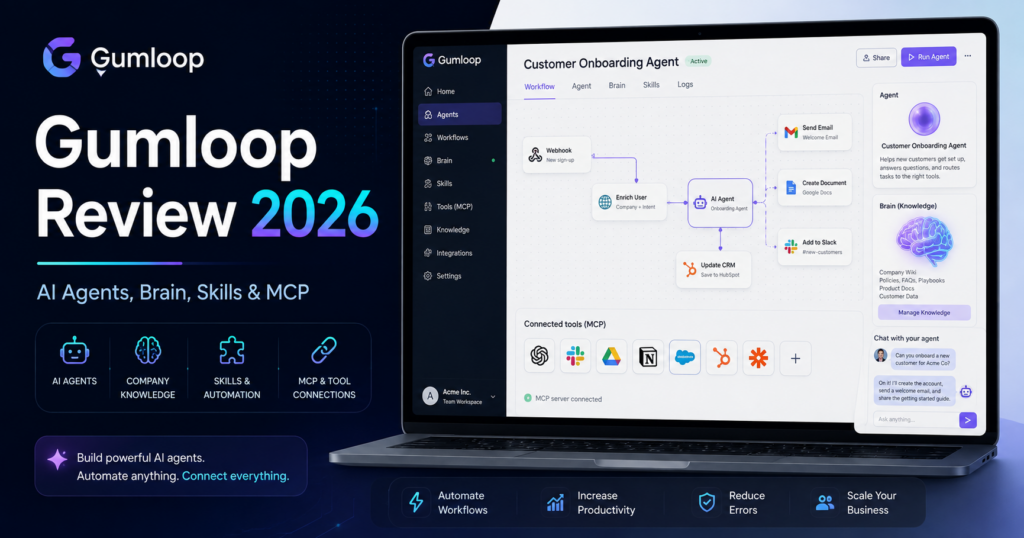
Gumloop has changed significantly in 2026.
What started as an AI workflow builder has evolved into a platform for building, deploying, sharing and governing AI agents that can actually perform work across business applications.
Its current product combines agents, workflows, Model Context Protocol connections, skills, company knowledge, sub-agents, Slack and Microsoft Teams deployment, usage controls, open-weight models and enterprise governance.
Gumloop has also made a major pricing change in August 2026. Rather than hiding AI infrastructure cost inside large credit markups, Gumloop now says it passes through model tokens and compute at cost and adds a base 8% orchestration fee.
The current Pro plan starts at $37 per month and includes 20,000 monthly credits, unlimited agents, unlimited seats and teams, access to 35+ models, bring-your-own API keys, Company Brain, MCP hosting and collaborative features. Enterprise pricing is custom.
Gumloop also raised a $50 million Series B led by Benchmark in March 2026, reflecting how quickly enterprise interest in AI-agent infrastructure has grown.
In this Gumloop review, we examine pricing, agents, workflows, Gumloop Brain, Skills, sub-agents, MCP, integrations, open-weight models, Slack and Teams deployment, security, best use cases and how Gumloop compares with n8n, Make, Zapier and Activepieces.
ToolMetria testing status: This review uses Gumloop’s current August 2026 pricing, documentation and official product announcements. We will add a numerical ToolMetria Score after completing our standardized hands-on automation and AI-agent benchmark.
Gumloop Review: Quick Verdict
Gumloop is one of the most interesting platforms for companies that want AI agents to become shared operational tools rather than isolated personal chatbots.
Its biggest strengths are:
- purpose-built AI agents;
- unlimited agents on Pro;
- unlimited Pro seats and teams;
- 35+ AI models;
- bring-your-own API keys;
- Gumloop Brain for shared company knowledge;
- agent Skills;
- sub-agents and parallel work;
- 100+ MCP server ecosystem;
- agents inside Slack and Microsoft Teams;
- workflow tools that agents can call;
- open-weight model options;
- AI spend analytics and usage controls;
- enterprise VPC and governance options.
The biggest limitation is cost predictability for beginners.
Gumloop’s new pricing is more transparent, but agents are inherently variable. Cost depends on the models used, token consumption, compute and tools called.
Traditional deterministic automation can still be easier to budget in platforms such as Make, n8n or Activepieces.
Read our Make Review, n8n Review and Activepieces Review.
Gumloop at a Glance
| Area | ToolMetria view |
|---|---|
| Best for | AI agents for sales, marketing, support, operations and enterprise knowledge work |
| Pro | Starts at $37/month |
| Enterprise | Custom pricing |
| Included Pro credits | 20,000/month |
| Orchestration fee | 8% base fee on underlying token and compute costs |
| Agents | Unlimited on Pro and Enterprise |
| Models | 35+ on Pro; Enterprise also supports custom proxy options |
| Seats | Unlimited on current Pro |
| Teams | Unlimited on current Pro |
| BYOK | Supported on Pro |
| MCP server hosting | 1 on Pro, custom on Enterprise |
| Workflow concurrency | 5 on Pro |
| Agent concurrency | 25 concurrent chats on Pro |
| Company knowledge | Gumloop Brain |
| Agent improvement | Skills, reflections and evals |
| Main strength | Deployable business AI agents with company context |
| Main drawback | Agent usage costs can vary substantially |
What Is Gumloop?
Gumloop is an AI automation and agent platform.
Its core idea is that employees should be able to build AI workers without needing to create their own agent infrastructure from scratch.
A Gumloop agent can combine:
- AI models;
- connectors;
- MCP tools;
- company knowledge;
- Skills;
- workflows;
- sub-agents;
- web research;
- business applications;
- human instructions.
The result is closer to an AI employee for a specific business process than a simple chatbot.
Gumloop Pricing in 2026
Gumloop’s current public pricing is centered around Pro and Enterprise.
| Plan | Current price | Main fit |
|---|---|---|
| Pro | Starts at $37/month | Individuals and teams deploying AI agents |
| Enterprise | Custom | Large organizations needing governance, security and custom scale |
Gumloop currently offers a 14-day trial for Pro.
What Pro Includes
The current Pro plan includes:
- 20,000 credits per month;
- unlimited agents;
- 35+ models;
- bring-your-own API keys;
- Company Brain;
- GitHub Skill Sync;
- unlimited seats;
- unlimited teams;
- shared credentials;
- email support;
- agent-scoped connector policies and guardrails;
- one hosted MCP server;
- MCP server proxying;
- AI Spend Insights;
- Usage Analytics Agent;
- Gumloop MCP;
- Gumloop CLI;
- five concurrent legacy workflow runs;
- 25 concurrent agent chats.
This is unusually collaborative for a plan starting at $37, particularly because current Pro pricing lists unlimited seats.
Enterprise
Enterprise pricing is custom.
It adds or expands features such as:
- custom credit capacity;
- custom MCP hosting;
- organization-wide connector policies;
- role-based access control;
- SCIM and SAML;
- admin dashboard;
- audit logs;
- custom data-retention rules;
- security reporting;
- data exports;
- Incognito Mode;
- AI model access controls;
- virtual private cloud deployment;
- workflow queuing;
- custom concurrency;
- dedicated Slack support;
- optional embedded Gumloop expert.
The New August 2026 Pricing Model
On August 5, 2026, Gumloop announced a major change to how it thinks about pricing.
The company says it now:
- passes model tokens through at cost;
- passes compute through at cost;
- adds a base 8% orchestration fee.
The goal is to make Gumloop behave more like infrastructure rather than a SaaS product hiding large margins inside usage credits.
Why the 8% Orchestration Fee Matters
Many AI platforms bundle model costs into opaque credits.
That can make it difficult to know whether a workflow is expensive because:
- the model itself is expensive;
- the platform charges a large markup;
- the workflow is inefficient;
- too many tools are being called.
Gumloop’s new model is designed to expose those components separately.
For companies running large amounts of AI work, that transparency can materially improve cost optimization.
Gumloop Credits
Credits remain the platform’s internal usage unit.
Workflows and agents consume credits differently.
Workflows
Traditional workflows are comparatively predictable.
The same deterministic workflow should normally produce similar credit usage each time.
Agents
Agent cost is variable.
It can depend on:
- conversation length;
- selected AI model;
- reasoning;
- tool calls;
- sub-agents;
- knowledge retrieval;
- compute.
This is the natural trade-off for giving an agent freedom to decide what it needs to do.
Bring Your Own API Key
Pro supports bring-your-own LLM API keys.
Gumloop currently supports keys from providers such as:
- OpenAI;
- Anthropic;
- Google Gemini;
- Perplexity;
- xAI;
- DeepSeek;
- Fireworks AI.
Under Gumloop’s current documentation, BYOK can reduce the Gumloop credit portion associated with AI-model usage because the user pays the model provider directly.
This is particularly useful for high-volume organizations that already have negotiated model pricing or dedicated provider accounts.
35+ AI Models
Pro currently includes access to more than 35 AI models.
This lets users choose models based on:
- quality;
- speed;
- cost;
- context window;
- coding ability;
- reasoning;
- open-weight preference.
Gumloop has increasingly emphasized that not every business task needs the most expensive frontier model.
Open-Weight Models
During 2026, Gumloop has expanded support for open-weight AI models, including through its partnership with Fireworks AI.
The strategy is cost optimization.
Many agent steps involve relatively simple work such as:
- classification;
- extraction;
- summarization;
- routing;
- formatting.
Using a lower-cost open-weight model for those steps can reduce total automation cost significantly.
What Is a Gumloop Agent?
A Custom Agent is a purpose-built AI worker.
The builder can define:
- system instructions;
- approved tools;
- connectors;
- Skills;
- workflows it can invoke;
- knowledge sources;
- sharing permissions.
The agent can then be shared with colleagues or deployed into communication tools.
Gumloop /chat
Gumloop also provides a general-purpose personal agent experience.
The difference is:
/chat = general personal assistant with broad access to connected tools.
Custom Agent = specialized worker with specific instructions, tools and deployment options.
This lets one user maintain a general assistant while the organization builds reusable specialized agents.
Agent Use Cases
Gumloop currently highlights agent patterns including:
- CRM Agent;
- Data Analysis Agent;
- Support Agent;
- Lead Generation Agent;
- Lead Qualification Agent;
- Meeting Preparation Agent;
- Call Analysis Agent;
- Competitor Analysis Agent;
- SEO automation;
- content creation;
- ad campaign management;
- Shopify operations.
Skills
Gumloop introduced Skills in February 2026.
A Skill is a reusable folder of:
- instructions;
- scripts;
- resources;
- domain knowledge.
Skills let an agent learn how an organization wants a specific task completed.
Example
A sales agent could have Skills such as:
- Salesforce administration;
- call analysis;
- outbound prospecting;
- pipeline review;
- company-specific qualification rules.
Instead of injecting every instruction into every prompt, the agent loads the relevant Skill when needed.
GitHub Skill Sync
Gumloop now lets organizations sync Skills from GitHub.
A GitHub repository can contain Skill folders with SKILL.md files.
Gumloop imports those Skills and keeps them synchronized as the repository changes.
This is particularly useful for engineering-led organizations that want AI-agent instructions managed like code.
Agents Can Improve Themselves
Gumloop has also been developing agent reflection and evaluation systems.
The broader idea is that an agent should not remain static.
It can:
- execute work;
- reflect on the result;
- learn from evaluation signals;
- improve its instructions and Skills.
Built-in evals help teams measure whether changes make the agent better or accidentally reduce quality.
Sub-Agents
Gumloop introduced sub-agents in May 2026.
An agent can delegate work to other agents or clone itself to process separate parts of a task in parallel.
Example
A market-research agent could create:
- one sub-agent for competitors;
- one for pricing;
- one for customer reviews;
- one for market trends.
The parent agent can then combine the results.
This can reduce latency and avoid overloading one context window with an entire complex assignment.
Gumloop Brain
One of the most important August 2026 releases is Gumloop Brain.
Brain is a searchable knowledge index for company information.
It can connect sources such as:
- Notion;
- Google Drive;
- Slack;
- GitHub;
- Confluence;
- Zendesk;
- Gong;
- other connected data sources.
The system indexes content and keeps it synchronized.
Brain vs Live Connectors
The distinction is important.
Brain is primarily read-oriented company knowledge.
Connectors let agents take actions and read live application data.
For example:
- Brain might tell an agent the company’s refund policy;
- a connector might let the agent actually update a support ticket.
Citations and Permissions
Gumloop Brain can provide citations back to the underlying company source.
Knowledge sources can also be scoped at different levels such as:
- organization;
- team;
- personal.
This helps prevent every agent and employee from automatically seeing every company data source.
Any Connector as a Brain Source
In July 2026, Gumloop expanded Brain so that organizations can sync knowledge from connectors beyond the original built-in source list.
This makes the knowledge system much more extensible.
Gong in Company Brain
In August 2026, Gumloop added Gong call recaps and transcripts as Brain sources.
Sales and customer-success agents can therefore reason over customer conversations while respecting existing Gong access permissions.
MCP: A Core Gumloop Strategy
Model Context Protocol is a major part of Gumloop’s integration strategy.
Gumloop currently promotes access to 100+ MCP servers.
These can give agents tools for applications and services without requiring every integration to be built directly into one monolithic connector layer.
Use Gumloop MCP Outside Gumloop
Gumloop’s MCP infrastructure can also be used with compatible clients including:
- Claude;
- Cursor;
- ChatGPT / Codex;
- other MCP-compatible tools.
This means Gumloop can function not only as an agent platform but also as an MCP gateway for external AI assistants.
Hosted MCP Servers
Pro currently includes one hosted MCP server.
Enterprise supports custom MCP hosting requirements.
This is useful for teams that want a consistent authenticated integration layer without managing all MCP infrastructure themselves.
Managed Tunnels for Private MCP Servers
Enterprise organizations can connect MCP servers that live inside private networks using managed tunnels.
This allows an agent to use internal systems without exposing those internal MCP servers directly to the public internet.
Agents in Slack
Gumloop agents can work directly inside Slack.
Users can:
- mention an agent;
- direct-message an agent;
- ask for research;
- request actions;
- receive results inside the conversation.
Enterprise can also make agents available across an entire connected Slack workspace, including to certain teammates without their own Gumloop accounts.
Agents in Microsoft Teams
Gumloop added direct Microsoft Teams agent deployment in June 2026.
An agent can be added to a Teams channel and mentioned similarly to a colleague.
It can then:
- read the request;
- use connected tools;
- run Skills;
- perform work;
- post progress and results back to the thread.
Agent API
Agents can also be accessed programmatically.
This makes Gumloop useful when a company wants to embed agent behavior inside another application or internal workflow.
In July 2026, Gumloop expanded APIs for managing agent Skills and connectors, which can make agent provisioning more automated.
Legacy Workflows
Gumloop still supports visual workflows.
Workflows are useful when a process should remain deterministic.
For example:
- receive new lead;
- format data;
- add CRM record;
- notify Slack;
- send email.
This does not require an autonomous agent deciding what to do.
Agents Inside Flows
Gumloop has increasingly combined agents and traditional workflows.
A deterministic flow can invoke an agent when judgment is required.
The agent can then return a result and allow the flow to continue with predictable actions.
This is generally a stronger production architecture than making every workflow step agentic.
AI Spend Insights
Current Pro includes AI Spend Insights.
Teams can analyze:
- credit usage;
- model costs;
- user usage;
- agent usage;
- potential savings;
- budget forecasts.
This is increasingly important as AI agents become business infrastructure.
Model Cost Optimization
Gumloop has been emphasizing the ability to compare models and reduce cost per task.
A company can reserve expensive frontier models for work that truly needs them and use cheaper models for simpler operations.
This is one of the main reasons multi-model platforms can be more economical than forcing every workflow through one premium model.
Gumloop for Sales
Sales teams can build agents for:
- CRM hygiene;
- prospect research;
- lead qualification;
- meeting preparation;
- call analysis;
- pipeline review;
- follow-up drafting.
Gumloop for Marketing
Marketing agents can work across:
- SEO research;
- competitor monitoring;
- content workflows;
- ad campaign analysis;
- creative research;
- reporting;
- social data;
- brand Skills.
Gumloop for Support
Support teams can use agents for:
- ticket triage;
- knowledge retrieval;
- draft responses;
- escalation;
- customer research;
- Zendesk actions;
- reporting.
Gumloop itself says its small internal support team runs hundreds of thousands of support-related workflows each week.
Gumloop for Operations
Operations teams can use agents for work that contains both rules and ambiguity.
Examples include:
- vendor research;
- document review;
- CRM and database maintenance;
- internal reporting;
- workflow triage;
- cross-tool data investigation.
Gumloop vs n8n
| Area | Gumloop | n8n |
|---|---|---|
| AI-agent focus | Winner | Excellent agent workflows |
| Traditional workflow depth | Strong | Winner |
| Self-hosting | Enterprise VPC options | Winner with Community Edition |
| Code | Less code-centric | Winner |
| Company knowledge | Winner with Brain | Can build custom RAG/search systems |
| MCP | 100+ hosted MCP ecosystem | Strong workflow MCP server |
| Best for | Shared business AI agents | Technical automation |
Read our n8n Review 2026.
Gumloop vs Make
| Area | Gumloop | Make |
|---|---|---|
| AI agents | Winner for agent-centric product | Excellent agents in visual canvas |
| Visual workflows | Good | Winner |
| Company knowledge | Winner | Connect external knowledge through workflows |
| Traditional integrations | 100+ MCP + connectors | Winner by app breadth |
| Pricing style | AI infrastructure + orchestration fee | Credit-based automation |
| Best for | AI-native business teams | Complex visual automation |
Read our Make Review 2026.
Gumloop vs Zapier
Zapier remains easier for ordinary SaaS automation across a massive catalog of applications.
Gumloop is more compelling when the desired output is a persistent AI agent with:
- company knowledge;
- Skills;
- multiple tools;
- Slack/Teams deployment;
- sub-agents;
- model selection.
Read our Zapier Review 2026.
Gumloop vs Activepieces
Activepieces is stronger if open-source self-hosting and predictable standard workflow pricing are top priorities.
Gumloop is stronger if the primary goal is creating shared intelligent agents across an organization.
Read our Activepieces Review 2026.
Gumloop vs Pipedream
Pipedream is much more developer-oriented, particularly for APIs, JavaScript, Python and embedded integrations.
Gumloop is designed so non-developers and business teams can create agents that use connected tools and company context.
Read our Pipedream Review 2026.
Security and Governance
Enterprise administration includes capabilities around:
- RBAC;
- SCIM;
- SAML;
- audit logs;
- data retention;
- model controls;
- connector policies;
- security reports;
- data exports;
- VPC deployment.
This matters because the risk profile of an agent that can update Salesforce or Azure is very different from the risk profile of a chatbot that only generates text.
Connector Policies and Guardrails
Organizations can control which connectors and models agents are allowed to use.
Pro currently provides agent-scoped guardrails, while Enterprise expands controls organization-wide.
In July 2026, Gumloop also added model-access controls by custom role.
Pros and Cons
Pros
- Pro starts at $37/month.
- Unlimited agents.
- Unlimited seats and teams on current Pro pricing.
- 20,000 included monthly credits.
- 35+ models.
- Bring-your-own API keys.
- Transparent 8% orchestration fee model.
- Gumloop Brain for company knowledge.
- Skills and GitHub Skill Sync.
- Sub-agents and parallel work.
- 100+ MCP servers.
- Slack and Microsoft Teams deployment.
- Open-weight models can reduce cost.
- Strong AI-spend analytics.
- Enterprise governance and VPC options.
Cons
- Agent costs are inherently variable.
- More expensive than basic automation tools if you only need deterministic workflows.
- Traditional workflow functionality is no longer the main product focus.
- Enterprise security features require custom pricing.
- MCP and agent architecture can be conceptually complex for beginners.
- Heavy use of frontier models can still become expensive despite transparent pricing.
- Users need good governance when agents receive write access to business systems.
Who Should Use Gumloop?
We would shortlist Gumloop for:
- AI-native companies;
- sales operations;
- marketing teams;
- customer success;
- support teams;
- operations teams;
- companies deploying shared internal agents;
- organizations connecting AI to many business systems;
- teams that want agents directly in Slack or Microsoft Teams.
Who Should Probably Skip It?
Gumloop may not be the best first choice when:
- you only need simple deterministic app automation;
- self-hosting under a free community license is mandatory;
- developers want heavy inline Python or JavaScript inside every workflow;
- the organization is not ready to manage agent permissions and AI spend;
- the company needs a huge traditional app connector catalog more than AI agents.
How We Would Start with Gumloop
- Use the 14-day Pro trial.
- Build one specialized Custom Agent.
- Give it only the minimum connectors it needs.
- Start with a cost-efficient model.
- Add one Skill.
- Measure cost per completed business task.
- Connect one company knowledge source to Brain.
- Deploy the agent in Slack or Teams if employees already work there.
- Add sub-agents only when parallelization produces a clear benefit.
- Set model and connector guardrails before scaling company-wide.
What ToolMetria Will Test Hands-On
Our standardized Gumloop benchmark will measure:
- account setup;
- first agent build time;
- connector setup;
- model selection;
- Skill creation;
- workflow-as-tool setup;
- Brain indexing;
- knowledge citations;
- MCP integration;
- Slack deployment;
- sub-agent performance;
- BYOK;
- credit consumption;
- cost transparency;
- overall value.
Frequently Asked Questions
How much does Gumloop cost in 2026?
Gumloop Pro currently starts at $37 per month and includes 20,000 monthly credits. Enterprise uses custom pricing. Pro currently includes unlimited agents, seats and teams.
What is Gumloop’s orchestration fee?
Gumloop announced in August 2026 that it passes through model-token and compute costs and applies a base 8% orchestration fee on top.
Does Gumloop support multiple AI models?
Yes. Pro currently lists access to more than 35 models, and Gumloop supports models from major commercial and open-weight providers.
Can I use my own OpenAI or Anthropic API key?
Yes. Bring-your-own API keys are supported on Pro. Gumloop currently supports several major providers including OpenAI, Anthropic, Gemini, Perplexity, xAI, DeepSeek and Fireworks AI.
What is Gumloop Brain?
Gumloop Brain is a searchable company knowledge index. It can synchronize content from connected business sources and let agents answer using that knowledge with citations.
What are Gumloop Skills?
Skills are reusable packages of instructions, scripts and resources that teach an agent how to perform specialized company tasks.
Does Gumloop support sub-agents?
Yes. Agents can delegate work to other agents or create parallel clones to handle parts of a task simultaneously.
Does Gumloop support MCP?
Yes. MCP is central to Gumloop’s integration strategy. Gumloop currently promotes more than 100 MCP server integrations and can also expose its MCP tooling to compatible clients such as Claude, Cursor and ChatGPT/Codex.
Can Gumloop agents work in Slack?
Yes. Gumloop agents can be used in Slack, including direct messages and channel-based workflows. Enterprise organizations can also distribute agents more broadly across a connected workspace.
Can Gumloop agents work in Microsoft Teams?
Yes. Gumloop added Microsoft Teams agent deployment in June 2026, allowing users to interact with agents directly in Teams channels.
Final Verdict
Gumloop is no longer best understood as another no-code automation builder.
Its 2026 direction is much more ambitious.
The platform is becoming an operating layer for business AI agents.
Agents get tools through connectors and MCP.
Skills teach them company-specific procedures.
Brain gives them shared organizational knowledge.
Sub-agents let them delegate work.
Slack and Teams make them accessible where employees already communicate.
And the new cost-plus-8% pricing model is designed to make agent economics easier to understand at scale.
If your company mostly wants deterministic SaaS workflows, Make, Zapier, n8n or Activepieces may remain the better fit.
If your goal is to deploy intelligent reusable workers across departments, Gumloop is one of ToolMetria’s strongest AI-agent automation candidates for 2026.
ToolMetria preliminary verdict: Best emerging candidate for shared company AI agents, skills and knowledge-connected automation. Final score pending standardized hands-on testing.