Activepieces has become one of the most interesting open-source automation platforms in 2026.
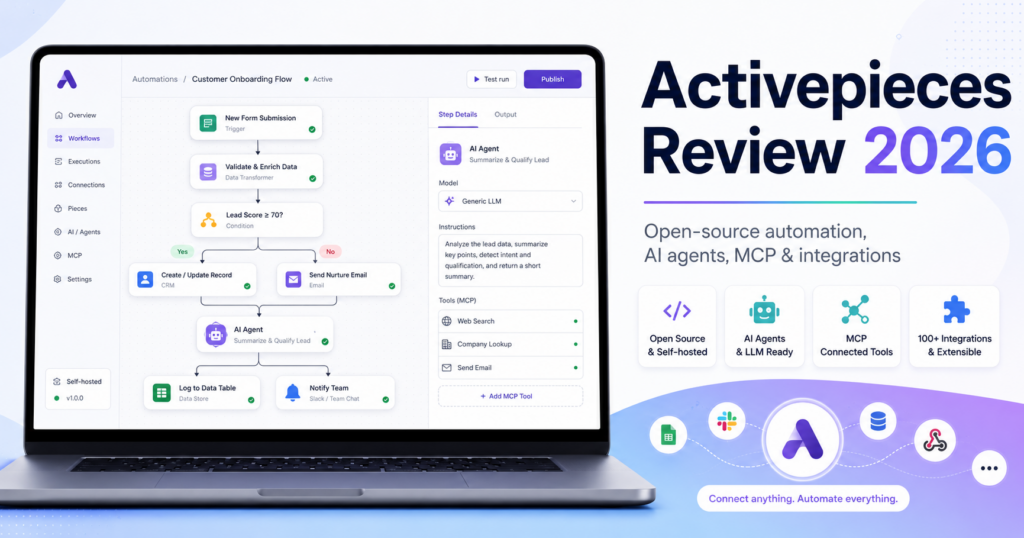
It combines a visual no-code flow builder with AI agents, built-in tables, Model Context Protocol support, more than 700 integrations, human approvals and an open-source core that can be self-hosted.
The platform is particularly interesting for businesses that like the flexibility of n8n but want an interface that feels closer to a modern no-code automation product.
Its pricing model is also unusual. A normal flow run costs one credit regardless of how many steps are inside the flow. AI actions consume additional credits depending on the model tier, while users who bring their own AI API keys can reduce AI execution to one credit under the current pricing model.
Current annual pricing starts at $16/month for Plus and $166/month for Team, while the Free plan is genuinely free and refreshes a small credit allowance daily. Activepieces also offers a free open-source Community Edition for self-hosting, although that edition does not include every commercial collaboration, agent and administration feature.
In this Activepieces review, we examine pricing, credits, open-source licensing, self-hosting, flows, AI agents, chat-to-automation, tables, MCP, integrations, human approvals, enterprise features, best use cases and how Activepieces compares with n8n, Make, Zapier and Pipedream.
ToolMetria testing status: This review uses Activepieces’ current 2026 pricing, documentation and product announcements. We will add a numerical ToolMetria Score after completing our standardized hands-on automation benchmark.
Activepieces Review: Quick Verdict
Activepieces is one of the strongest emerging choices for companies that want open-source automation without giving up a polished no-code experience.
Its biggest strengths are:
- open-source MIT-licensed automation core;
- free self-hosted Community Edition;
- 700+ integrations;
- unlimited flows on current cloud plans;
- one-credit pricing for an entire standard flow run;
- AI agents and chat;
- built-in Tables;
- built-in MCP Server;
- MCP-compatible flows that can become tools for AI clients;
- bring-your-own AI keys on Plus and above;
- human-in-the-loop approvals;
- commercial on-prem and enterprise governance options.
The biggest limitation is ecosystem maturity.
Zapier has far more mainstream integrations, Make has a very mature visual scenario ecosystem, and n8n remains extremely strong for technical self-hosting and developer-heavy automation.
But Activepieces is moving quickly and its combination of open source, AI agents and simple execution pricing makes it unusually attractive.
Read our n8n Review, Make Review and Zapier Review.
Activepieces at a Glance
| Area | ToolMetria view |
|---|---|
| Best for | Open-source automation, AI workflows, SMBs, technical operators and on-prem deployment |
| Free | $0 |
| Plus | $16/month billed annually |
| Team | $166/month billed annually |
| Ultimate | Custom pricing |
| Embed | From $36,000/year |
| Integrations | 700+; current catalog shows more than 750 pieces |
| Flows | Unlimited across current plans |
| AI Agents | Included in commercial cloud plans |
| Tables | Included |
| MCP | Built-in MCP server and MCP-enabled flow tools |
| Self-hosting | Yes |
| Open source | MIT-licensed core |
| Standard flow run | 1 credit regardless of number of steps |
| Extra credit | $0.007 under current public pricing |
| Main strength | Open source + approachable no-code + AI-native design |
| Main drawback | Smaller ecosystem and younger platform than Zapier/Make |
What Is Activepieces?
Activepieces is an automation platform that lets users connect business applications and build workflows visually.
Its integrations are called pieces.
A flow can contain:
- triggers;
- app actions;
- conditions;
- branches;
- loops;
- delays;
- webhooks;
- HTTP requests;
- AI actions;
- AI agents;
- human approval steps;
- tables;
- MCP tools.
The product aims to be usable by non-technical employees while remaining extensible for developers.
Activepieces Pricing in 2026
| Plan | Current annual-billing price | Main fit |
|---|---|---|
| Free | $0 | Learning and lightweight automation |
| Plus | $16/month | Power users and small teams |
| Team | $166/month | Collaborative automation teams |
| Ultimate | Custom | Enterprise control and governance |
| Embed | From $36,000/year | Embedding Activepieces inside another product |
Annual plans currently include two months free compared with equivalent monthly billing.
Free Plan
The Free plan is designed for experimentation and lightweight automation.
It currently includes:
- $0 pricing;
- no credit card requirement;
- daily credits that refresh;
- unlimited flows;
- Flows;
- Agents and Chat;
- Tables;
- MCPs;
- API access;
- one user.
When the daily free credit allowance is exhausted, additional runs wait until the quota refreshes.
That makes Free useful for testing, but not ideal for production processes that must run continuously.
Plus Plan
Plus currently costs $16/month billed annually.
It adds:
- a larger monthly credit allocation;
- pay-as-you-go usage beyond the included credits;
- up to five users;
- bring-your-own AI keys;
- unlimited flows;
- Agents and Chat;
- Tables;
- MCPs;
- API access.
Plus is probably the most compelling Activepieces plan for a small business or automation-focused power user.
Team Plan
Team currently costs $166/month billed annually.
It includes:
- 25 users;
- additional users at $25/user/month under current pricing;
- five times the standard credit allocation referenced by the pricing page;
- unlimited projects;
- SSO;
- standard roles;
- email support;
- global connections;
- team analytics;
- pay-as-you-go overage.
Team is a significant jump from Plus, so smaller companies should make sure they genuinely need shared projects, SSO and organizational controls before upgrading.
Ultimate Plan
Ultimate uses custom pricing.
It adds enterprise capabilities such as:
- yearly credit pools sized to usage;
- Releases and Git Sync;
- dedicated workers;
- priority execution;
- per-project execution priority;
- SCIM provisioning;
- custom RBAC;
- secret managers;
- audit logs;
- event streaming;
- private pieces;
- branding;
- platform governance;
- dedicated support.
How Activepieces Credits Work
Activepieces currently uses one credit system across ordinary automation and AI.
The most important rule is:
A standard flow run costs one credit, regardless of how many steps are inside the flow.
This is a major difference from platforms that charge each external action separately.
Example
A workflow might:
- receive a form submission;
- check a CRM;
- format data;
- write to Google Sheets;
- send a Slack message;
- send an email;
- update a database.
If those are ordinary flow steps, Activepieces currently prices the flow run as one credit rather than seven separate step credits.
AI Credit Multipliers
AI usage costs more.
Current public pricing lists:
| Action | Current credit cost |
|---|---|
| Standard flow run | 1 credit |
| Agentic action | 1 credit |
| Fast AI model | 2 credits |
| Smart AI model | 10 credits |
| Frontier AI model | 20 credits |
| Your own AI key | 1 credit |
This makes the bring-your-own-key option particularly important for companies with significant AI usage.
Pay-As-You-Go Credits
Plus and Team currently continue running after the included credit allowance is exhausted.
Additional credits are priced at $0.007 per credit under the current public pricing.
Free instead uses a hard cap until the daily allowance refreshes.
Open Source Under MIT
Activepieces’ automation core is released under the MIT license.
This is a permissive open-source license.
Businesses can inspect, modify and distribute the open-source core subject to the license terms.
The commercial and enterprise layers use a separate commercial license.
This dual-licensing approach provides transparency while letting Activepieces sell collaboration and governance features.
Free Self-Hosted Community Edition
Activepieces offers a free Community Edition that can run on your own infrastructure.
The current pricing FAQ describes the Community Edition as:
- open source;
- free forever;
- no cap on runs;
- no cap on users;
- no cap on flows.
However, this edition is the automation core rather than the full commercial platform.
Several capabilities are not included in the free Community Edition, including areas such as:
- Agents and Chat;
- Projects;
- API access;
- SSO;
- user roles;
- audit logs;
- secret managers;
- branding;
- Git Sync.
Why Pay If Activepieces Can Be Self-Hosted?
Self-hosting controls where the automation engine runs.
Commercial plans add the collaboration and governance layer.
A business may pay for:
- team permissions;
- projects;
- SSO;
- auditability;
- support;
- safe deployment workflows;
- AI Agents and Chat;
- enterprise controls.
This is similar to the broader open-core model used by several developer and infrastructure products.
Cloud or On-Prem
Activepieces positions the product for both cloud and on-prem deployment.
Self-hosting can be useful when a company needs:
- control over data location;
- private networking;
- internal-only systems;
- security review;
- compliance requirements;
- reduced vendor lock-in.
But self-hosting also means somebody must operate the infrastructure.
700+ Integrations
Activepieces currently advertises more than 700 integrations, while its live catalog shows more than 750 individual pieces.
Current pieces include popular services such as:
- Gmail;
- Google Drive;
- Google Sheets;
- Google Docs;
- Notion;
- HubSpot;
- Slack;
- Microsoft Outlook;
- Microsoft Teams;
- Stripe;
- WordPress;
- OpenAI;
- Google Gemini;
- OpenRouter;
- Supabase;
- Postgres;
- GitHub.
Pieces Are Open Source TypeScript Packages
Activepieces integrations are called pieces.
The open-source ecosystem uses TypeScript packages.
Developers can build custom pieces using the same framework used by the platform’s own integrations.
This is useful when:
- a required integration is missing;
- a company uses an internal API;
- the native piece lacks a specific action;
- the organization wants a reusable private connector.
HTTP and Webhooks
If an app is not supported, the HTTP piece and webhooks provide a fallback.
Any reasonably accessible API can potentially be integrated without waiting for an official piece.
This makes the raw piece count less limiting for technical teams.
AI Agents
AI is now a core part of Activepieces rather than an add-on.
The platform includes native AI pieces and agents that can reason over workflow context and use business tools.
Agentic workflows are useful for tasks such as:
- lead qualification;
- ticket classification;
- research;
- document processing;
- support routing;
- content decisions;
- operations triage.
Bring Your Own AI Keys
Plus and higher plans support bring-your-own AI keys.
This can be valuable for companies that:
- already have OpenAI or other model accounts;
- want direct control over AI provider billing;
- need specific models;
- want to avoid higher bundled AI credit multipliers.
Current Activepieces pricing charges one platform credit for AI actions using the user’s own AI key.
Chat to Automation
Activepieces is rolling out a conversational automation experience called Chat to Automation.
The idea is simple:
describe the work you want done, use chat to take action, then convert repetitive patterns into automation.
Activepieces says the feature is being rolled out gradually, so availability may differ between accounts.
As of August 2026, Activepieces is also offering early Chat access and onboarding to qualifying new annual Team customers during its current promotional window.
Tables
Activepieces includes built-in Tables.
Tables can store structured information used directly by flows and AI tools.
Current table capabilities include:
- create tables;
- create records;
- find records;
- update records;
- delete records;
- trigger flows when records change;
- export data.
This can reduce the need to use Google Sheets or Airtable for simple automation state.
Why Built-In Tables Matter
Automation often needs memory.
A flow may need to remember:
- which leads were processed;
- the last synchronization time;
- approval status;
- customer metadata;
- workflow state.
A native table system keeps that data inside the automation platform.
Activepieces MCP Server
Activepieces has built Model Context Protocol deeply into the platform.
The built-in MCP Server lets compatible AI assistants interact directly with an Activepieces project.
Current documentation says AI clients can:
- list flows;
- create flows;
- edit flow steps;
- add branches;
- manage Tables;
- test flows;
- retry failed runs;
- inspect automations.
This is more powerful than simply exposing one predefined automation to an AI model.
The AI assistant can help build and maintain the automation system itself.
Build Activepieces Flows from an AI Assistant
Once MCP is connected, a user can ask an AI client for tasks such as:
Create a flow that posts in Slack when a new Google Sheets row appears.
Or:
Show me the last failed run and explain what went wrong.
The AI can use the Activepieces MCP tools to make those changes inside the automation project.
Turn a Flow into an MCP Tool
Activepieces also provides an MCP piece that lets a flow become a callable tool.
A builder defines:
- a tool name;
- a description;
- parameters;
- whether the client should wait for a response.
An MCP-compatible AI client can then call the flow when needed.
This enables a powerful architecture:
AI agent decides → Activepieces flow executes deterministic business logic.
MCP with Claude, Cursor and Other Clients
Activepieces provides MCP connection flows for clients such as Claude Desktop, Cursor and Windsurf, and the built-in MCP Server can work with compatible MCP clients through OAuth.
The exact supported client experience can change as MCP implementations evolve.
Human-in-the-Loop Approvals
Automation should not always run autonomously.
Activepieces supports flows that pause for human approval.
During 2026, Activepieces began moving approvals toward the communication tools where employees already work.
Approval actions are being integrated with tools such as:
- Slack;
- Microsoft Teams;
- Discord;
- Telegram;
- Outlook;
- Gmail.
This makes approval workflows more practical because the employee does not need to monitor a separate automation dashboard.
Example Approval Workflow
A finance workflow might:
- receive an invoice;
- extract invoice data with AI;
- check the amount;
- send an approval request to Teams;
- wait for the manager;
- continue only after approval;
- update the accounting system.
Projects
Projects are available on Team and Ultimate.
Projects help separate automation assets by:
- department;
- client;
- business unit;
- environment;
- team.
This becomes important when automation grows beyond one person.
Global Connections
Team adds global connections.
Shared credentials can reduce repeated setup across projects and workflows while allowing an organization to manage access centrally.
Releases and Git Sync
Ultimate adds release-management and Git Sync capabilities.
This is designed for teams that want to treat automation more like production software.
Changes can be governed and shipped more carefully rather than edited ad hoc in live workflows.
Dedicated Workers and Priority Execution
Ultimate can provide dedicated workers and priority execution.
This becomes relevant for organizations with:
- high-volume workflows;
- time-sensitive processes;
- critical production automations;
- multiple departments competing for execution capacity.
Activepieces for Small Businesses
Activepieces is particularly interesting for small businesses because Plus costs only $16/month annually and allows up to five users.
A small company can automate:
- lead capture;
- CRM updates;
- email;
- reporting;
- content workflows;
- invoices;
- customer onboarding;
- AI processing.
The one-credit-per-flow-run model can also make multi-step workflows easier to budget.
Activepieces for Agencies
Agencies may value Activepieces because of:
- open source;
- self-hosting;
- custom pieces;
- projects on Team;
- client separation;
- AI workflows;
- on-prem deployment.
Ultimate becomes more relevant when the agency needs audit logs, private pieces and stronger governance.
Activepieces for Developers
Although the interface is no-code oriented, developers can extend it through:
- TypeScript pieces;
- HTTP APIs;
- webhooks;
- MCP;
- self-hosting;
- Git Sync on Ultimate.
n8n remains more code-centric inside the workflow itself, but Activepieces is highly extensible at the integration layer.
Activepieces for AI Automation
AI automation is one of the strongest use cases.
A company can combine:
- AI models;
- Agents;
- Tables;
- MCP;
- human approvals;
- normal deterministic flows.
This provides a good foundation for production agentic workflows without relying completely on autonomous AI.
Activepieces vs n8n
| Area | Activepieces | n8n |
|---|---|---|
| Open source | MIT core | Fair-code / source-available model with Community Edition |
| Self-hosting | Excellent | Excellent |
| Ease for non-technical users | Winner | More technical |
| Code inside workflows | Less developer-centric | Winner |
| Custom integrations | Open-source TypeScript pieces | Custom/community nodes |
| Billing model | 1 credit per standard flow run | 1 execution per full workflow run |
| AI agents | Native Agents and Chat | Strong agent workflow ecosystem |
| MCP | Deep platform MCP tools | Deep workflow MCP tools |
| Best for | Friendly open-source automation | Technical automation and developers |
Read our n8n Review 2026.
Activepieces vs Make
| Area | Activepieces | Make |
|---|---|---|
| Open source | Winner | Hosted proprietary platform |
| Visual workflow maturity | Good | Winner |
| Self-hosting | Winner | Not core offering |
| Integration count | 700+ | 3,000+ |
| Standard run billing | 1 credit per flow run | Credits tied more closely to module activity |
| AI agents | Native | Strong visual AI Agents |
| Best for | Open-source / self-hosted teams | Complex visual SaaS automation |
Read our Make Review 2026.
Activepieces vs Zapier
| Area | Activepieces | Zapier |
|---|---|---|
| Ease | Very approachable | Winner for mainstream simplicity |
| Integrations | 700+ | Winner with 9,000+ |
| Open source | Winner | No |
| Self-hosting | Winner | No |
| Multi-step economics | 1 credit per normal flow run | Task per successful action |
| Tables | Included | Included |
| MCP | Platform builder + callable flows | Large app-action MCP ecosystem |
| Best for | Open-source AI automation | Fast mainstream SaaS automation |
Read our Zapier Review 2026.
Activepieces vs Pipedream
Pipedream is more developer-oriented and especially strong for JavaScript, Python, APIs, managed OAuth and embedded integrations.
Activepieces is more approachable as a general no-code automation environment.
Read our Pipedream Review 2026.
Activepieces vs Power Automate
Microsoft Power Automate is stronger for Microsoft 365, Dataverse and desktop RPA.
Activepieces is simpler for open-source cloud automation and offers easier self-hosting without entering the broader Microsoft licensing ecosystem.
Read our Microsoft Power Automate Review 2026.
Security and Enterprise Control
Activepieces’ open-source and self-hosted model can be attractive for security-conscious organizations.
Ultimate adds enterprise controls such as:
- SCIM;
- custom RBAC;
- audit logs;
- secret managers;
- event streaming;
- private pieces;
- governance;
- dedicated support.
Companies with regulated workloads should still validate their exact deployment architecture and contractual requirements.
Pros and Cons
Pros
- Open-source MIT-licensed automation core.
- Free self-hosted Community Edition.
- Free cloud plan.
- Plus costs only $16/month annually.
- One credit per standard flow run regardless of steps.
- 700+ integrations.
- Unlimited flows.
- AI Agents and Chat.
- Bring-your-own AI keys.
- Built-in Tables.
- Strong MCP implementation.
- Human approval workflows.
- Self-hosting and commercial on-prem options.
- TypeScript pieces are extensible.
Cons
- Integration catalog is much smaller than Zapier’s.
- Visual workflow ecosystem is younger than Make.
- Free Community Edition excludes many commercial team and AI features.
- Team jumps sharply from $16 to $166/month.
- Advanced governance requires Ultimate.
- Chat to Automation is still rolling out.
- Self-hosting creates infrastructure responsibilities.
Who Should Use Activepieces?
We would shortlist Activepieces for:
- small businesses;
- open-source-first teams;
- technical operations teams;
- AI automation builders;
- agencies;
- security-conscious companies;
- companies that need self-hosting;
- organizations that want predictable multi-step workflow economics.
Who Should Probably Skip It?
Activepieces may not be the best fit when:
- the company needs a very obscure SaaS integration that only Zapier supports;
- the team needs highly mature visual scenario tooling immediately;
- developers want heavy inline coding inside every workflow;
- desktop RPA is required;
- the company needs advanced enterprise governance but cannot justify Ultimate pricing.
Which Activepieces Plan Should You Choose?
Free Cloud
Choose Free to learn the product and test lightweight automations.
Community Edition
Choose Community Edition if you can self-host and primarily need the automation core without the full commercial collaboration and AI layer.
Plus
Choose Plus for a small business or power user that needs up to five users, pay-as-you-go credits and bring-your-own AI keys.
Team
Choose Team when the organization needs projects, 25 users, SSO, roles, global connections and human support.
Ultimate
Choose Ultimate when automation has become production infrastructure requiring Git Sync, audit logs, secret managers, SCIM, RBAC and execution governance.
How We Would Start with Activepieces
- Start on Free cloud.
- Build one ordinary multi-step flow.
- Check the one-credit execution economics.
- Connect a built-in Table.
- Test an AI action with a low-cost model.
- Compare bundled AI credits with bring-your-own-key pricing.
- Add a human approval step.
- Test the MCP Server from a compatible AI client.
- Try turning one flow into an MCP tool.
- Evaluate Community Edition before paying for on-prem if your needs are primarily automation-core functionality.
What ToolMetria Will Test Hands-On
Our standardized Activepieces benchmark will measure:
- account setup;
- first flow build time;
- Google Sheets / email automation;
- branching;
- HTTP/webhook setup;
- Table usage;
- AI Agent setup;
- bring-your-own AI key;
- human approval;
- MCP setup;
- MCP-created flow;
- credit consumption;
- self-host setup difficulty;
- overall value.
Frequently Asked Questions
How much does Activepieces cost in 2026?
Activepieces currently has a Free plan, Plus at $16/month billed annually, Team at $166/month billed annually and custom Ultimate pricing. Embedded deployment starts at $36,000/year.
Is Activepieces free?
Yes. Activepieces has a free cloud plan and a free open-source self-hosted Community Edition.
Is Activepieces open source?
Yes. The core is released under the MIT license. Commercial and enterprise features use a separate commercial license.
Can Activepieces be self-hosted?
Yes. Activepieces supports self-hosting. The free Community Edition provides the automation core, while paid commercial self-hosting adds broader AI, collaboration and governance features.
How do Activepieces credits work?
A normal flow run currently costs one credit regardless of how many steps are inside the flow. AI usage can cost additional credits depending on the selected model tier.
How much does an extra Activepieces credit cost?
Current public pricing lists extra credits at $0.007 on plans that support pay-as-you-go overage.
How many integrations does Activepieces have?
Activepieces advertises 700+ integrations, and its current live connector catalog shows more than 750 pieces.
Does Activepieces have AI agents?
Yes. Agents and Chat are part of the current commercial cloud product, and Activepieces also supports AI steps and bring-your-own AI keys on Plus and higher tiers.
Does Activepieces support MCP?
Yes. Activepieces has a built-in MCP Server that lets compatible AI assistants build, modify, test and inspect flows and Tables. Individual Activepieces flows can also be exposed as MCP tools.
Is Activepieces better than n8n?
Activepieces is generally more approachable for non-technical users and has a permissive MIT-licensed core. n8n remains stronger for heavy inline coding and very technical workflow development. Both are strong self-hosted automation options.
Final Verdict
Activepieces is one of the automation platforms we would watch most closely in 2026.
It combines several trends that are usually split across separate products:
- open-source automation;
- self-hosting;
- polished no-code workflows;
- AI agents;
- Tables;
- MCP;
- human approvals;
- enterprise governance.
The one-credit-per-standard-flow-run pricing is also attractive for multi-step workflows.
It is not yet the obvious winner for every company.
Zapier still dominates mainstream integration breadth.
Make is extremely mature visually.
n8n is a formidable developer and self-hosting platform.
But for a company that values open source, wants approachable automation and expects AI agents and MCP to become important, Activepieces is one of ToolMetria’s strongest emerging automation candidates for 2026.
ToolMetria preliminary verdict: Best emerging candidate for friendly open-source AI automation. Final score pending standardized hands-on testing.