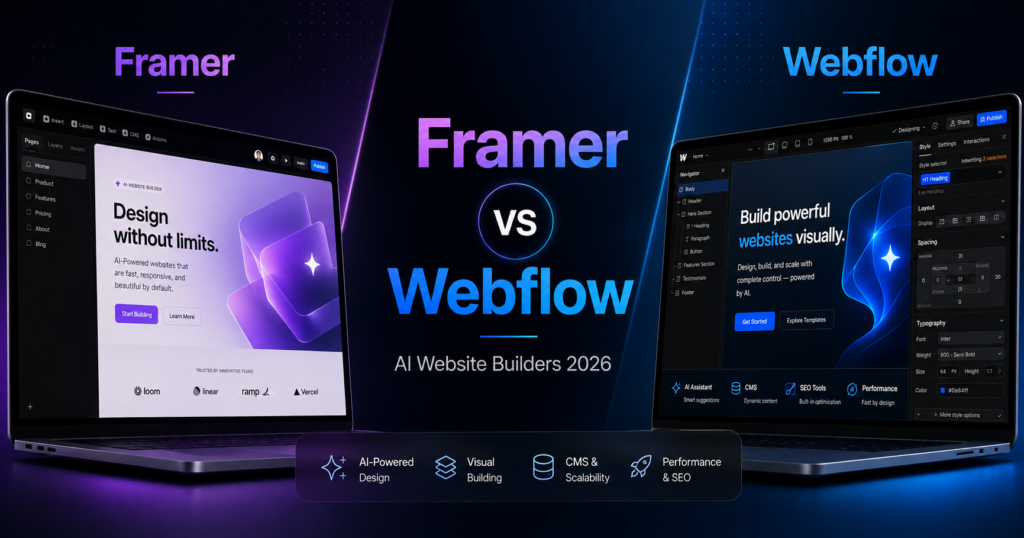
Framer and Webflow are two of the strongest website-building platforms for design-led teams in 2026, and both have moved aggressively into AI.
Framer 3.0 introduced Agents directly into the canvas, letting users generate pages, rewrite content, create code components, work with CMS data, review SEO and accessibility, analyze sites, and continue iterating without leaving the design environment.
Webflow now combines an AI Site Builder, AI section generation, CMS assistance, code components, SEO/AEO tools, AI credits, and an MCP server that can connect external tools such as ChatGPT, Claude, Codex, and Cursor.
The result is an unusually close comparison. Both platforms are far more advanced than basic prompt-to-page generators. Both can power serious marketing sites. Both support professional design workflows. But their strengths are not identical.
In this Framer vs Webflow comparison, we look at AI, ease of use, design control, CMS, SEO, AEO, collaboration, pricing, AI credits, hosting, scalability, and which platform is better for different types of users in 2026.
ToolMetria methodology: This comparison uses current 2026 official documentation and pricing from Framer and Webflow together with our editorial framework. We will add measured hands-on results after running the same standardized build test on both platforms.
Framer vs Webflow: Quick Answer
Choose Framer if your priority is design speed, visual polish, a canvas-first workflow, and AI that feels integrated into creative work.
Choose Webflow if your priority is structured CMS content, production workflows, advanced marketing sites, SEO/AEO infrastructure, and long-term scalability.
| Category | Winner | Why |
|---|---|---|
| AI design workflow | Framer | Agents work directly on the canvas and feel tightly integrated with design |
| Initial AI site generation | Webflow | Strong multi-page generation with a structured design-system foundation |
| Ease of use | Framer | More approachable for design-oriented users |
| Visual design control | Framer | Excellent creative workflow and fast iteration |
| CMS depth | Webflow | More mature for large structured marketing sites |
| SEO/AEO | Webflow | Broader platform-level SEO/AEO tooling |
| Collaboration | Webflow | More mature production and publishing workflows |
| Branching | Tie | Both now offer serious branching/staging concepts |
| Entry pricing | Framer | Basic is currently $10/month on yearly billing |
| Professional pricing | Depends | Framer Pro and Webflow Premium target different needs |
| Best for agencies | Webflow | Stronger structured production and CMS workflows |
| Best for design-led startups | Framer | Faster creative workflow and excellent visual control |
| Best overall | Depends | Framer wins on design speed; Webflow wins on structured scale |
Read our full individual reviews here: Framer AI Website Builder Review and Webflow AI Website Builder Review.
Framer vs Webflow at a Glance
| Feature | Framer | Webflow |
|---|---|---|
| Free plan | Yes | Yes |
| Entry paid plan | Basic: $10/mo yearly | Basic: $15/mo yearly |
| Professional plan | Pro: $30/mo yearly | Premium: $25/mo yearly |
| AI system | Agents on the canvas | AI Site Builder + Webflow AI |
| AI credits | 1,000 Basic / 3,000 Pro monthly | Workspace-level credit system |
| CMS | Built in | Built in on Premium and higher |
| Branching | Available on Pro | Advanced workflows on higher tiers |
| SEO | Strong built-in SEO | Advanced SEO + AEO direction |
| External AI integrations | External agents in preview | MCP server for compatible AI tools |
| Best fit | Design-led teams | Structured marketing teams |
1. AI Workflow: Framer Wins for Creative Iteration
Framer’s biggest 2026 change is the arrival of Framer 3.0 and Agents.
Framer’s Agents work directly inside the canvas. They can help create pages, change copy, update layouts, build breakpoints, create code components, connect to CMS content, organize styles, analyze site traffic, and review SEO or accessibility issues.
This matters because AI is not separated from the design workflow.
A designer can ask an Agent to create something, inspect the result visually, adjust it manually, ask for another change, and continue without switching tools.
Framer’s current Agents documentation also shows site-wide tasks such as replacing brand names across a project, updating pricing, or changing dates everywhere at once.
Webflow’s AI workflow
Webflow takes a broader platform approach.
Its AI Site Builder can create a structured multi-page site, while Webflow AI can also generate sections, copy, CMS content, code components, and SEO/AEO improvements.
Webflow’s strength is breadth. AI reaches into design, content, CMS, optimization, and even external tool connectivity.
But for the feeling of “AI inside the creative canvas,” Framer currently feels more direct.
Winner: Framer
2. AI Site Generation: Webflow Wins for Structure
Framer can build websites from scratch through Agents, and the output remains editable.
Webflow’s AI Site Builder, however, places more emphasis on generating a structured site foundation.
Webflow can generate multiple pages and create a design-system base using the Flowkit framework, which helps keep styles and components more consistent as the site expands.
For users who want a professional starting architecture rather than only a polished first screen, that structure is valuable.
Winner: Webflow
3. Ease of Use: Framer Wins
Neither platform is a beginner-first website builder in the same way Hostinger is.
However, Framer tends to feel more immediately understandable to people familiar with modern visual design tools.
Its canvas-first workflow makes common design operations feel direct:
- select;
- move;
- resize;
- change typography;
- adjust layout;
- preview;
- ask AI for help.
Webflow exposes more concepts that resemble front-end web development:
- classes;
- layout systems;
- CMS structures;
- components;
- responsive breakpoints;
- interactions;
- publishing workflows;
- workspace/site-plan distinctions.
That power is useful, but it creates a steeper learning curve.
Winner: Framer
4. Design Control: Framer Wins Narrowly
Both platforms offer excellent design control.
Webflow remains one of the most powerful no-code visual development environments available.
Framer, however, is more design-centric in how it presents that power.
Its workflow around typography, layout, effects, breakpoints, interactions, and design iteration feels optimized for teams that care deeply about visual output.
Framer’s Agents now reinforce that advantage because AI-generated changes remain editable in the same canvas.
Winner: Framer
This is a narrow win. Advanced Webflow users can build extremely sophisticated visual experiences.
5. CMS: Webflow Wins
Framer has a capable native CMS.
Its current pricing page includes:
- 2 CMS collections on Basic;
- 10 CMS collections on Pro;
- 1,000 CMS items on Basic;
- 2,500 CMS items on Pro.
Webflow is more established for large structured marketing sites.
Its 2026 Premium Site plan combines the old CMS and Business plans and substantially increases CMS limits for content-rich sites.
Webflow’s CMS is particularly well suited to:
- large blogs;
- resource libraries;
- case studies;
- directories;
- job boards;
- multi-location pages;
- dynamic landing pages;
- large structured content programs.
Winner: Webflow
6. SEO: Webflow Wins for Advanced Teams
Framer’s SEO capabilities are strong.
Its SEO documentation covers custom metadata, sitemap.xml, robots.txt, indexing controls, site redirects, semantic heading tags, image alt text, analytics, and structured data through JSON-LD.
Framer Agents can also help identify SEO and accessibility issues.
Webflow offers similarly strong technical controls but is moving more aggressively into AEO — answer engine optimization.
Its 2026 platform direction includes AI-assisted metadata, schema support, audits, AEO tooling on higher plans, and its MCP ecosystem.
Winner: Webflow
For ordinary SEO, both are strong. Webflow wins because its platform strategy currently goes further into enterprise marketing and AEO workflows.
7. AI Search and External Agents: Webflow Has the More Mature Ecosystem
Both platforms are opening their environments to external AI tools.
Framer’s pricing page currently lists External Agents in preview, and its help center includes guidance for connecting tools such as Claude Code, Codex in ChatGPT, Cursor, and other external agents.
Webflow has a dedicated MCP server with documented support for compatible tools including ChatGPT, Claude, Codex, and Cursor.
Webflow’s approach currently feels more explicitly positioned as an AI-native web-production infrastructure layer.
Winner: Webflow
8. Pricing: Framer Wins at Entry Level
Current official yearly pricing is relatively straightforward on both platforms.
Framer pricing
| Plan | Price* | Key fit |
|---|---|---|
| Free | $0 | Testing and design exploration |
| Basic | $10/month | Personal and smaller professional sites |
| Pro | $30/month | Growing professional sites and teams |
| Enterprise | Custom | Large organizations |
*Current yearly-billing pricing at the time of writing.
Framer Basic includes a custom domain, 2 CMS collections, 50 GB bandwidth, built-in SEO, and 1,000 AI credits per month.
Pro includes 10 CMS collections, 100 GB bandwidth, redirects, staging, branching with previews, and 3,000 AI credits per month.
Webflow pricing
| Plan | Price* | Key fit |
|---|---|---|
| Starter | Free | Testing |
| Basic | $15/month | Simple sites without full CMS needs |
| Premium | $25/month | Content-rich CMS sites |
| Team | High-end annual contract | Large growth teams |
| Enterprise | Custom | Enterprise organizations |
*Current yearly-billing pricing for self-serve Site plans at the time of writing.
Webflow also has Workspace pricing, which can add cost for professional collaboration.
Winner: Framer for solo users
Framer Basic is cheaper and includes a CMS.
For a content-heavy site, Webflow Premium at $25 can be a compelling value relative to Framer Pro at $30, depending on requirements.
9. AI Credits: Framer Is Easier to Understand
Framer’s pricing page makes its included AI credits clear:
- Free: 500 trial credits when the workspace has no active subscription;
- Basic: 1,000 credits per month;
- Pro: 3,000 credits per month.
Credits are shared across the workspace and can power Agents and other AI features.
Webflow’s AI credits are tied to Workspace plans rather than Site plans.
Current self-serve allowances include:
- Starter Workspace: 200 credits per month;
- Core / Freelancer: 300 credits per month;
- Growth / Agency: 400 credits per month.
Not every Webflow AI feature consumes credits, and additional credit packs are available.
Winner: Framer for clarity
Neither system is inherently better because a “credit” does not necessarily represent identical work across platforms.
10. Collaboration: Webflow Wins
Framer has become much stronger for teams.
Framer 3.0 introduced Branching, and Pro includes staging and branch previews.
Framer also supports viewers, additional editors, content editors, roles, and permissions.
Webflow has a deeper history of marketing-team workflows and offers:
- site roles;
- content editing;
- publishing permissions;
- workspace controls;
- review workflows;
- higher-tier governance;
- single-page publishing on advanced plans;
- branching and professional production controls.
Winner: Webflow
11. Branching and Staging: Tie
This used to be a major Webflow advantage, but Framer 3.0 narrowed the gap considerably.
Framer Pro now includes:
- site redirects;
- staging;
- branching with previews.
Webflow also offers professional staging, branching, and publishing workflows at different plan levels.
Winner: Tie
The better implementation for your team depends on how complex your approval and publishing process becomes.
12. Hosting and Performance: Both Are Strong
Both platforms include managed hosting.
Framer Basic currently lists a global content delivery network across 20 locations, while Pro uses 300+ locations.
Webflow also uses global infrastructure and a CDN as part of its hosted platform.
Neither platform requires a user to configure traditional hosting, caching plugins, or server software for an ordinary site.
Real performance still depends heavily on the site itself — media, scripts, interactions, fonts, tracking, code, and page complexity all matter.
Winner: Tie
13. A/B Testing and Optimization: Framer Has a Clear Add-On
Framer offers Convert as an add-on for A/B testing, funnels, and trigger-based personalization.
Framer currently lists Convert from $50 per 500,000 events.
Webflow has its own optimization and experimentation products and has increasingly integrated AI into site analysis and optimization.
The right choice depends on whether you want optimization tightly integrated into Framer’s design environment or as part of Webflow’s broader marketing platform.
Winner: Tie
14. Learning Curve: Framer Wins
Framer is easier to recommend to someone who is already comfortable with visual design software but is not a front-end developer.
Webflow’s power becomes easier to appreciate once you understand concepts such as:
- classes;
- CSS-like layout behavior;
- CMS architecture;
- components;
- workspaces;
- site plans;
- publishing roles.
That learning investment can be valuable, but it is still an investment.
Winner: Framer
15. Which Is Better for Agencies?
Webflow is our pick for larger or more structured agencies.
Its strengths around CMS, permissions, team workflows, structured design systems, and production scale are hard to ignore.
Framer is extremely attractive for smaller creative agencies that prioritize fast landing-page production, visual polish, and rapid iteration.
A studio producing high-end launch sites may prefer Framer.
An agency running large CMS-driven client platforms may prefer Webflow.
16. Which Is Better for Startups?
Framer is particularly compelling for early-stage startups.
A startup can move from:
idea → landing page → design iteration → launch
very quickly.
Webflow becomes increasingly attractive as the site evolves into a more structured growth platform with:
- large CMS collections;
- multiple campaigns;
- marketing teams;
- advanced SEO;
- governance;
- production workflows.
Winner: Framer early, Webflow at scale
17. Which Is Better for SEO-Driven Content?
For a small marketing site with a modest blog, either platform can work very well.
For a site that expects hundreds or thousands of structured content pages, Webflow’s CMS and platform orientation make it the safer choice.
Winner: Webflow
18. Which Is Better for Designers?
Framer.
This is the clearest Framer win.
The platform is built around a visual canvas and a workflow that feels natural for designers. Framer Agents now reinforce this by allowing AI to participate directly in that same environment.
19. Which Is Better for Developers?
This depends on what the developer wants to do.
Webflow provides a more structured environment for teams combining designers, marketers, and developers across large production websites.
Framer’s AI-generated code components and External Agents are making it increasingly interesting for hybrid design-development work.
Neither platform replaces a fully custom software stack, but both can significantly reduce the amount of custom front-end work required for marketing sites.
Framer vs Webflow: Final Scorecard
| Category | Framer | Webflow |
|---|---|---|
| AI creative workflow | Winner | Excellent |
| AI site structure | Strong | Winner |
| Ease of use | Winner | More complex |
| Design control | Winner | Excellent |
| CMS | Strong | Winner |
| SEO | Strong | Winner |
| AEO / AI ecosystem | Growing | Winner |
| Collaboration | Strong | Winner |
| Branching | Excellent | Excellent |
| Entry price | Winner | Higher |
| Design-led startups | Winner | Strong |
| Large marketing sites | Strong | Winner |
| Overall | Best for design | Best for structured scale |
Our Recommendation
If you are a designer, creative startup, small agency, or product-marketing team that cares about visual quality and wants AI to accelerate the design process, choose Framer.
If you are building a larger marketing property with a serious CMS, structured content, multiple stakeholders, advanced SEO/AEO requirements, and long-term production workflows, choose Webflow.
Neither platform is universally better.
The key difference is:
Framer optimizes for creative speed.
Webflow optimizes for structured web production.
Frequently Asked Questions
Is Framer better than Webflow in 2026?
Framer is better for many design-led teams because it is faster to learn and its Agents are deeply integrated into the canvas. Webflow is better for structured CMS-heavy marketing sites, advanced SEO/AEO, and larger production workflows.
Which is easier to use, Framer or Webflow?
Framer is generally easier for visual designers and users familiar with tools such as Figma. Webflow has a steeper learning curve because it exposes more web-development and CMS concepts.
Which is cheaper, Framer or Webflow?
Framer Basic is currently cheaper at $10 per month on yearly billing, compared with Webflow Basic at $15 per month. Webflow Premium is $25 per month and includes CMS features, while Framer Pro is $30 per month.
Which has better AI?
Framer currently offers one of the most integrated creative AI workflows through Agents on the canvas. Webflow offers a broader AI platform spanning site generation, content, CMS, SEO, AEO, code components, and external AI connectivity.
Which is better for CMS websites?
Webflow is our pick for larger, more structured CMS-driven websites. Framer’s CMS is capable and works very well for smaller and medium-sized marketing sites.
Which is better for SEO?
Both platforms have strong SEO foundations. Webflow is the stronger choice for teams that want deeper platform-level SEO and emerging AEO workflows.
Can Framer connect to external AI agents?
Yes. Framer currently supports External Agents in preview and provides guidance for tools including Claude Code, Codex in ChatGPT, Cursor, and other compatible agents.
Can Webflow connect to ChatGPT or Claude?
Yes. Webflow operates an MCP server designed to connect supported tools including ChatGPT, Claude, Codex, Cursor, and other MCP-compatible clients.
Final Verdict: Framer or Webflow?
Framer is our winner for design-first AI website creation.
Its canvas, Agents, responsive tools, code components, and fast creative workflow make it particularly strong for modern landing pages, startup sites, portfolios, and design-led marketing teams.
Webflow is our winner for advanced marketing websites and structured scale.
Its CMS, production workflows, SEO/AEO direction, collaboration tools, and AI ecosystem make it particularly compelling for agencies and larger marketing organizations.
If you want the simplest summary:
Framer = faster creative freedom.
Webflow = deeper structured control.
For more alternatives, see our Best AI Website Builders in 2026 guide.