Claude Team and Notion Business are two of the strongest AI products for knowledge-heavy teams in 2026, but they approach work from opposite directions.
Claude Team is an AI-first workspace built around writing, analysis, research, coding, enterprise search, connectors and deep professional work.
Notion Business is a workspace-first platform built around documents, databases, projects, wikis, meeting notes, internal knowledge and increasingly autonomous AI agents.
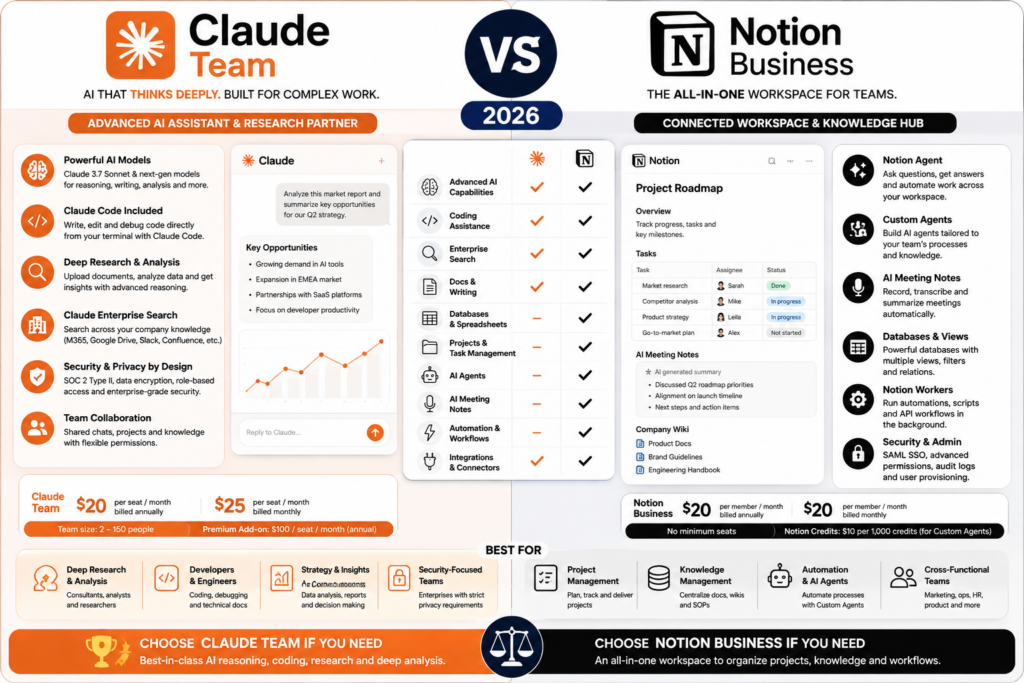
The headline pricing is also close. Claude Team Standard currently costs $20 per seat per month when billed annually or $25 monthly and requires at least two members. Notion Business is currently listed at $20 per member per month.
So the real decision is not about price. It is about where your work lives.
In this Claude Team vs Notion Business comparison, we examine pricing, writing, coding, company knowledge, projects, databases, meeting notes, agents, automation, connectors, privacy, administration and which platform is better for different types of teams.
ToolMetria methodology: This comparison uses current 2026 official Anthropic and Notion documentation together with our editorial framework. We will add standardized hands-on scores after testing equivalent workflows in both products.
Claude Team vs Notion Business: Quick Answer
Choose Claude Team if your team primarily needs deep AI for writing, research, coding, document analysis and cross-company knowledge work.
Choose Notion Business if your team wants AI embedded directly into projects, databases, internal documentation, meeting notes and operational workflows.
Claude is the stronger AI-first tool.
Notion is the stronger structured workspace.
| Category | Winner | Why |
|---|---|---|
| Headline price | Tie | Both are around $20 per seat/member per month at headline annual/business pricing |
| Deep AI work | Claude Team | AI is the core product |
| Writing | Claude Team | Excellent long-form and professional writing workflows |
| Coding | Claude Team | Claude Code is included with every Team seat |
| Projects | Notion Business | Native project and task system |
| Databases | Notion Business | Core Notion capability |
| Company knowledge | Tie | Claude Enterprise Search vs Notion Enterprise Search/native workspace context |
| Meeting notes | Notion Business | AI Meeting Notes is built into the workspace |
| Autonomous internal workflows | Notion Business | Custom Agents + database context + Workers |
| Cross-tool reasoning | Claude Team | Strong connectors, MCP and enterprise search |
| Microsoft 365 | Claude Team | Deep Outlook, Teams, SharePoint and OneDrive integration |
| Operational tracking | Notion Business | Persistent tasks, databases and dashboards |
| Power users | Claude Team | Premium seats provide 5x Standard usage |
| Best for developers | Claude Team | Claude Code |
| Best for operations teams | Notion Business | Structured workspace + automation |
Read the individual reviews: Claude Team Review and Notion Business Review.
Pricing: Very Similar at the Standard Level
Claude Team currently offers two seat types.
| Claude Team seat | Annual billing | Monthly billing |
|---|---|---|
| Standard | $20/seat/month | $25/seat/month |
| Premium | $100/seat/month | $125/seat/month |
Claude Team currently supports teams of 2 to 150 members.
Premium seats provide five times the usage of Standard seats, and an organization can mix Standard and Premium seats.
Notion Business is currently listed at $20 per member per month.
The headline price is therefore close enough that workflow fit should dominate the decision.
Winner: Tie at headline Business/Standard pricing
What You Get with Claude Team
Claude Team currently includes:
- Claude across web, desktop and mobile;
- Claude Code;
- Claude Cowork;
- Claude Design;
- Claude Science;
- Research;
- Projects;
- Artifacts;
- connectors;
- enterprise search;
- Microsoft 365 connectivity;
- central billing and administration;
- SSO;
- admin controls for connectors;
- no model training on Team content by default.
Claude Team is therefore much broader than a simple chat subscription.
What You Get with Notion Business
Notion Business combines:
- documents and wikis;
- projects and tasks;
- databases;
- forms;
- dashboards;
- Notion Agent;
- AI Meeting Notes;
- Enterprise Search;
- Research Mode;
- advanced permissions;
- SAML SSO;
- 90-day page history;
- Custom Agents with Notion credits;
- developer platform and Workers.
The key difference is persistence: Notion is where the structured work itself can live.
Deep AI Work: Claude Team Wins
Claude is the stronger environment when the task begins with complex reasoning.
Typical Claude Team workflows include:
- reviewing a large report;
- comparing long documents;
- researching a technical subject;
- drafting professional content;
- analyzing internal knowledge;
- working through multi-step decisions;
- coding and debugging.
Notion Agent can perform sophisticated work, but its biggest value appears when that work needs to happen inside the Notion workspace.
Winner: Claude Team
Writing: Claude Team Wins
Claude remains particularly strong for long-form writing and document-heavy professional work.
It is well suited to:
- reports;
- proposals;
- technical documents;
- editing;
- research synthesis;
- structured analysis;
- policy documents.
Notion AI is extremely convenient when the final document is already being created inside Notion.
But for the writing process itself, Claude Team is our preferred option.
Winner: Claude Team
Coding: Claude Team Wins Clearly
Claude Code is included with every Claude Team seat.
Claude Code works in the terminal and supported IDEs and is designed for real software-development workflows.
Potential uses include:
- repository understanding;
- feature development;
- debugging;
- refactoring;
- code review;
- technical documentation;
- automation.
Notion has an increasingly capable developer platform and can coordinate external coding agents, but it is not itself primarily a coding environment.
Winner: Claude Team
Projects and Task Management: Notion Business Wins
Claude Projects help organize chats, files and context around a body of work.
Notion Projects are a full operational system.
Teams can create:
- tasks;
- owners;
- statuses;
- deadlines;
- roadmaps;
- dependencies;
- views;
- dashboards;
- linked documentation.
This is a major difference.
Claude can help you think about a project.
Notion can be the place where the project is actually tracked.
Winner: Notion Business
Databases: Notion Business Wins Easily
Notion databases can power:
- content calendars;
- project trackers;
- roadmaps;
- lightweight CRMs;
- research libraries;
- customer feedback;
- asset inventories;
- operational systems.
AI can then work with this structured information.
Claude can analyze databases and connected information, but it does not provide a comparable persistent relational workspace.
Winner: Notion Business
Company Knowledge: Claude Enterprise Search
Claude Team includes Enterprise Search.
Anthropic provides a dedicated organizational search experience that can work across approved connected tools.
Current Team capabilities include connectors to services such as:
- Google Drive;
- Gmail;
- Google Calendar;
- GitHub;
- Microsoft 365;
- Slack;
- custom connectors through MCP.
This is especially useful when company knowledge is distributed across multiple systems.
Company Knowledge: Notion Enterprise Search
Notion Business also includes Enterprise Search.
Its advantage is that much of the company’s information may already exist directly in:
- Notion pages;
- databases;
- projects;
- wikis;
- meeting notes;
- connected apps.
Notion also includes Research Mode for deeper reports using workspace information, connected tools and the web.
Winner: Tie
Claude is stronger when knowledge is spread across many different external systems.
Notion is stronger when Notion itself is already the company’s source of truth.
Microsoft 365: Claude Team Wins
Claude Team has a strong Microsoft 365 connector.
Claude can work with:
- Outlook;
- Teams;
- OneDrive;
- SharePoint.
Depending on administrator settings, supported write actions can also let Claude perform tasks involving email, calendar and files.
Notion can connect to Microsoft services, but Claude’s Microsoft integration is a much stronger reason to choose it for a Microsoft-centric company.
Winner: Claude Team
AI Meeting Notes: Notion Business Wins
Notion Business includes AI Meeting Notes.
The feature can:
- transcribe meetings;
- summarize discussions;
- identify decisions;
- extract action items;
- store the meeting directly in company context.
The meeting output can then feed project and agent workflows.
Claude can summarize meeting transcripts or connected information, but it does not provide the same native meeting-to-workspace pipeline.
Winner: Notion Business
Notion Agent vs Claude
Notion Agent is designed to operate inside the company workspace.
It can help with tasks such as:
- creating pages;
- updating databases;
- building project plans;
- finding internal information;
- organizing content;
- working across connected context.
Claude is a broader general-purpose professional AI environment.
The distinction is:
Claude = stronger general intelligence workspace.
Notion Agent = stronger native workspace operator.
Custom Agents: Notion’s Automation Advantage
Notion Business and Enterprise customers can create Custom Agents for recurring autonomous workflows.
Examples include:
- policy Q&A;
- task routing;
- status updates;
- daily briefings;
- inbox triage;
- database maintenance.
Custom Agents can run repeatedly and use Notion context to take actions.
Custom Agent Pricing
Custom Agents use Notion credits.
Notion currently prices monthly credits at $10 per 1,000 credits.
Usage varies depending on:
- how much content the agent reads;
- how many actions it performs;
- how complex the workflow is;
- how often it runs.
Notion Agent, AI Meeting Notes and Enterprise Search remain included in Business and Enterprise without this separate Custom Agent credit charge.
Claude Team Usage Model
Claude uses a different model.
Standard Team seats include more usage than Claude Pro.
Premium seats provide five times Standard usage.
Anthropic also allows additional usage capacity for teams that need more.
This makes Claude’s cost structure more seat-centric, while Notion’s advanced automation can create an additional usage-based credit layer.
Workers: Notion’s Deterministic Automation Layer
Notion Workers run custom code in the background.
They are designed for tasks such as:
- data synchronization;
- webhook handling;
- external API calls;
- reliable automated updates;
- tools used by Custom Agents.
This creates an interesting architecture:
Custom Agent decides what to do → Worker executes the deterministic step.
Workers are part of Notion’s evolving developer platform and use Notion’s credit system according to current beta/pricing rules.
Winner for workspace-native automation: Notion Business
Claude MCP and Connectors
Claude has a different automation and integration strength: the Model Context Protocol ecosystem.
Remote MCP connectors can give Claude access to external business tools and context.
This can make Claude highly flexible for organizations whose workflows extend far beyond one workspace.
Winner for cross-tool extensibility: Claude Team
External Agents in Notion
Notion has also started positioning itself as a coordination layer for external agents.
Supported or highlighted integrations include agents such as:
- Claude;
- Cursor;
- additional tools over time.
This means the comparison is not always Claude or Notion.
Notion can potentially become the project-management layer through which Claude and other agents receive and report work.
Research: Claude Team Wins
Claude includes Research and strong web-search capabilities.
Notion’s Research Mode is valuable because it can combine workspace context, connected tools and the web.
For pure deep research and analytical reasoning, we would still choose Claude.
For research that needs to immediately update a Notion project or database, Notion can be more operationally convenient.
Winner: Claude Team
Operational Tracking: Notion Business Wins
Notion keeps work persistent.
A research result can become:
- a task;
- a database row;
- a project update;
- a knowledge page;
- a recurring workflow;
- a dashboard metric.
Claude can generate or analyze the information, but the organization still needs a structured system to track it.
Winner: Notion Business
Privacy: Both Are Built for Business Use
Anthropic states that Claude Team content is not used for model training by default.
Notion states that it does not train its AI models on customer content, while Custom Agents follow existing workspace permissions and log their activity.
Enterprise plans on both platforms add more advanced governance and security controls.
Winner: Tie
Administration
Claude Team includes:
- central billing;
- administration;
- SSO;
- connector controls;
- seat management;
- desktop deployment controls.
Notion Business includes:
- SAML SSO;
- private teamspaces;
- advanced database permissions;
- verified pages;
- agent controls;
- credit monitoring;
- workspace administration.
Winner: Tie
Which Is Better for Developers?
Claude Team.
Claude Code is included with every Team seat and is built for professional software workflows.
Notion remains useful as the documentation, roadmap and project layer around the development process.
Which Is Better for Product Teams?
This is much closer.
Claude is stronger for:
- technical analysis;
- spec writing;
- research;
- coding support.
Notion is stronger for:
- roadmaps;
- tasks;
- requirements;
- meeting notes;
- project status;
- team knowledge.
Many product teams will benefit from using both.
Which Is Better for Consultants?
Claude Team is usually the stronger primary AI tool for consultants who spend most of their time on:
- research;
- analysis;
- reports;
- documents;
- client deliverables.
Notion is stronger if the consultancy uses Notion to manage client portals, projects, deliverables and recurring workflows.
Winner overall: Claude Team
Which Is Better for Operations?
Notion Business.
Operations teams often need persistent structured systems rather than one-off answers.
Notion databases, dashboards, Custom Agents, Workers and project context make it particularly well suited to operational workflows.
Which Is Better for Marketing?
Claude is stronger for:
- research;
- long-form writing;
- analysis;
- strategy.
Notion is stronger for:
- content calendars;
- campaign tracking;
- briefs;
- meeting workflows;
- knowledge organization.
For visual content creation, see our Canva Business Review.
Can Claude Team Replace Notion?
Not if Notion is being used as a real project and operations system.
Claude does not replace:
- persistent project boards;
- task databases;
- roadmaps;
- team wiki structure;
- operational dashboards;
- relational project data.
It can make employees dramatically better at working with that information, but the information still needs somewhere to live.
Can Notion Business Replace Claude Team?
For some teams, yes.
If most AI usage involves:
- workspace search;
- project updates;
- internal documentation;
- meeting notes;
- database workflows;
- recurring internal agents;
then Notion Business may provide enough AI.
If employees regularly need:
- professional coding;
- deep research;
- large-document analysis;
- cross-platform enterprise search;
- high-end writing and reasoning;
Claude Team remains meaningfully different.
Do You Need Both?
For many knowledge-work organizations, this is one of the strongest combinations available.
A logical setup is:
- Notion Business = structured company workspace;
- Claude Team = deep AI layer for coding, writing, research and analysis.
Notion’s external-agent direction makes this combination even more interesting because Claude can increasingly participate in workflows coordinated through Notion.
Final Scorecard
| Category | Claude Team | Notion Business |
|---|---|---|
| Headline price | Tie | Tie |
| Deep AI | Winner | Strong |
| Writing | Winner | Excellent in workspace |
| Coding | Winner | Developer platform / external agents |
| Projects | Context/projects | Winner |
| Databases | Can analyze | Winner |
| Company knowledge | Excellent | Excellent |
| Microsoft 365 | Winner | Connector support |
| Meeting notes | Can analyze transcripts | Winner |
| Custom recurring agents | Agentic workflows | Winner for workspace-native tasks |
| Cross-tool extensibility | Winner | Strong |
| Operational tracking | Not core product | Winner |
| Developers | Winner | Excellent surrounding workspace |
| Operations | Strong analysis | Winner |
Our Recommendation
Choose Claude Team if you want the stronger AI-first product for developers, researchers, writers, analysts and knowledge workers.
Claude Code, Enterprise Search, Research, Microsoft 365 connectors and Premium seats make it especially attractive for heavy professional AI use.
Choose Notion Business if your main goal is to create an AI-native operating system around projects, databases, documents, meetings and recurring internal workflows.
The shortest recommendation:
Claude Team = better at doing deep knowledge work.
Notion Business = better at organizing and operationalizing that work.
For many teams, the best answer may eventually be both.
Frequently Asked Questions
Is Claude Team the same price as Notion Business?
The headline prices are very close. Claude Team Standard costs $20 per seat per month when billed annually or $25 monthly. Notion Business is currently listed at $20 per member per month.
How many users does Claude Team require?
Claude Team currently supports teams of 2 to 150 members and requires at least two members.
Does Claude Team include Claude Code?
Yes. Claude Code is included with every Team seat. Premium seats provide more usage for heavy users.
Does Notion Business include AI?
Yes. Notion Agent, AI Meeting Notes, Enterprise Search and Research Mode are included in Business. Custom Agents use Notion credits.
How much do Notion Custom Agents cost?
Notion currently prices monthly credits at $10 per 1,000 credits. The amount an agent uses depends on the context it reads, the actions it performs and how often it runs.
Which is better for project management?
Notion Business. Projects, databases, tasks, dashboards and operational tracking are native product capabilities.
Which is better for coding?
Claude Team. Claude Code is included directly in the Team subscription.
Which is better for internal company search?
Both are strong. Claude Enterprise Search is particularly useful when knowledge is distributed across multiple systems. Notion Enterprise Search is especially strong when Notion is already the company’s primary knowledge workspace.
Does Anthropic train on Claude Team content?
Anthropic states that Team content is not used for model training by default.
Can Claude and Notion work together?
Yes. Notion supports an expanding external-agent ecosystem and has highlighted Claude among the agents that can participate in workspace workflows.
Final Verdict: Claude Team or Notion Business?
Claude Team wins as the AI product.
It is the stronger environment for coding, writing, research, analysis and deep professional reasoning.
Notion Business wins as the operating workspace.
It gives teams a persistent structure for projects, databases, company knowledge, meeting notes, agents and automation.
If you want the shortest possible answer:
Claude Team = intelligence.
Notion Business = structure and execution.
For more recommendations, see Best AI Tools for Small Business in 2026.