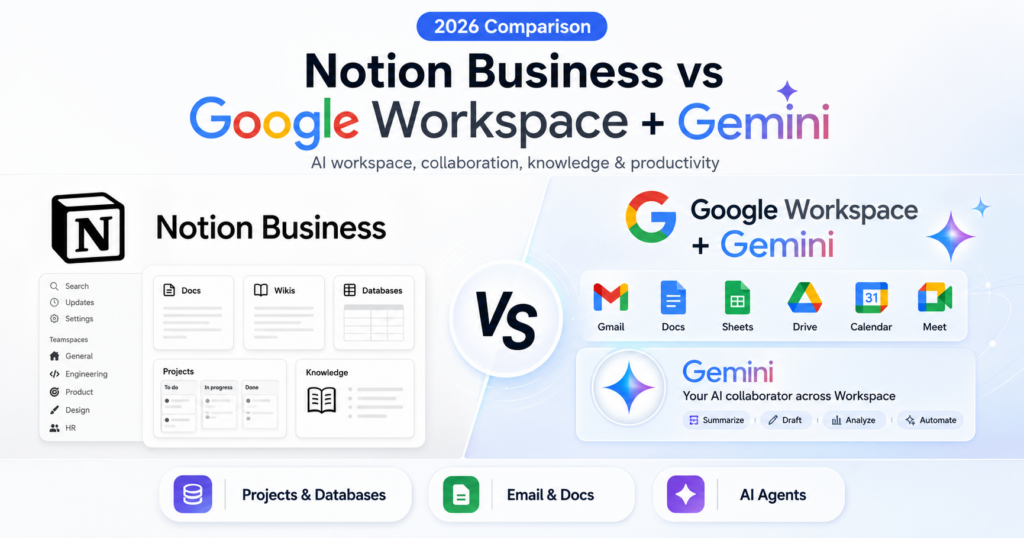
Notion Business and Google Workspace with Gemini increasingly compete for the same role inside a company: becoming the place where employees create, organize, search and automate their work.
The products arrive from different directions.
Notion Business is built around documents, wikis, databases, projects, internal knowledge, meeting notes and AI agents.
Google Workspace with Gemini is built around email, cloud storage, documents, spreadsheets, meetings, calendars and collaboration, with Gemini increasingly embedded across the entire suite.
Current headline pricing also creates a meaningful difference. Notion Business is currently listed at $20 per member per month. Google Workspace Business Standard is currently listed at $14 per user per month on an annual commitment in the US and includes 2 TB of pooled storage per user, business Gmail and premium Gemini features across Workspace.
So which workspace is better for a small or growing company?
In this Notion Business vs Google Workspace with Gemini comparison, we examine pricing, documents, databases, email, spreadsheets, company knowledge, meetings, agents, automation, storage, collaboration, privacy and the best platform for different teams in 2026.
ToolMetria methodology: This comparison uses current official Notion and Google Workspace documentation together with our editorial framework. We will add measured hands-on scores after completing equivalent team workflows in both products.
Notion Business vs Google Workspace with Gemini: Quick Answer
Choose Notion Business if your team wants an AI-native workspace built around projects, databases, company knowledge and operational workflows.
Choose Google Workspace Business Standard if your team needs the complete business productivity stack — Gmail, Docs, Sheets, Drive, Meet and Calendar — with Gemini integrated directly into those applications.
For most companies starting from scratch, Google Workspace is the stronger complete software bundle.
For companies that already rely heavily on Notion for project management and internal knowledge, Notion Business can be the more powerful operational layer.
| Category | Winner | Why |
|---|---|---|
| Headline annual price | Google Workspace | $14/user/month for Business Standard vs Notion Business at $20/member/month displayed pricing |
| Business email | Google Workspace | Custom Gmail is included |
| Documents and wiki | Notion Business | More flexible company knowledge and wiki structure |
| Traditional office documents | Google Workspace | Docs, Sheets and Slides are native mature office apps |
| Projects and databases | Notion Business | Native databases, roadmaps, task systems and structured project workflows |
| Spreadsheets | Google Workspace | Sheets + Gemini |
| Company knowledge | Tie | Notion Enterprise Search vs Workspace Intelligence/native Workspace context |
| Meeting workflows | Tie | Notion AI Meeting Notes vs Google Meet + Gemini |
| Agents | Tie | Notion Custom Agents vs Workspace Studio |
| Developer automation | Notion Business | Workers, webhooks and external agents are unusually flexible |
| Storage | Google Workspace | 2 TB pooled per Standard user |
| Real-time collaboration | Google Workspace | Deep collaboration across Docs, Sheets, Slides, Meet and Gmail |
| Operational workspace | Notion Business | Databases + projects + agents + knowledge in one place |
| Best complete business suite | Google Workspace | More fundamental IT/productivity infrastructure included |
Read our individual reviews: Notion Business Review and Google Workspace with Gemini Review.
Pricing: Google Workspace Business Standard Is Cheaper
Notion’s current pricing page lists:
- Free: $0;
- Plus: $10 per member/month;
- Business: $20 per member/month;
- Enterprise: contact sales.
Google Workspace currently lists Business Standard at $14 per user per month on the standard annual pricing in the US.
Google may display temporary introductory promotions depending on country and date, so businesses should compare the normal list price rather than assume a promotional checkout rate will remain available.
| Product | Standard headline price | What is included beyond AI? |
|---|---|---|
| Notion Business | $20/member/month | Docs, wiki, databases, projects, forms, knowledge and workflow tools |
| Google Workspace Business Standard | $14/user/month annual | Gmail, 2 TB storage, Docs, Sheets, Slides, Drive, Meet, Calendar and more |
Winner: Google Workspace
Why the Price Comparison Is More Complicated Than It Looks
Notion and Workspace replace different software.
A company buying Google Workspace may be replacing:
- business email hosting;
- cloud storage;
- document software;
- spreadsheet software;
- video meeting software;
- calendar;
- team collaboration.
A company buying Notion may be replacing:
- wiki software;
- project-management software;
- task trackers;
- internal documentation tools;
- lightweight CRM systems;
- meeting-note tools;
- some workflow automation.
This is why many businesses eventually use both products.
Documents and Company Wiki: Notion Business Wins
Google Docs is a mature collaborative word processor.
Notion is more flexible as an interconnected company knowledge system.
Notion pages can combine:
- documents;
- databases;
- tasks;
- embeds;
- projects;
- linked views;
- verified knowledge;
- AI context.
For a company wiki, internal handbook or project knowledge system, Notion is usually easier to structure around relationships rather than isolated files.
Winner: Notion Business
Traditional Office Documents: Google Workspace Wins
When employees need conventional business documents, Google has the advantage.
Workspace gives teams mature native applications for:
- Docs;
- Sheets;
- Slides;
- Drive;
- real-time commenting;
- editing;
- sharing;
- versioning.
Gemini now operates inside these applications rather than requiring employees to copy material into another AI product.
Winner: Google Workspace
Email: Google Workspace Wins Easily
Google Workspace includes secure custom business email through Gmail.
Gemini in Gmail can help with:
- drafting;
- rewriting;
- summarizing threads;
- finding information;
- preparing replies;
- working with existing email context.
Notion can receive, store and automate information related to email, but it does not replace the company’s email infrastructure.
Winner: Google Workspace
Projects and Databases: Notion Business Wins Clearly
This is Notion’s strongest category.
Notion databases can be adapted into:
- project trackers;
- roadmaps;
- content calendars;
- task systems;
- customer-feedback systems;
- sales pipelines;
- lightweight CRMs;
- research libraries;
- operational dashboards.
Business also includes granular database permissions, allowing teams to collaborate without necessarily exposing every row to every user.
Winner: Notion Business
Spreadsheets: Google Workspace Wins
Notion databases can handle a surprising amount of structured business information.
They are not a replacement for a full spreadsheet environment when users need:
- complex formulas;
- large calculations;
- financial models;
- advanced data analysis;
- pivot-style workflows;
- spreadsheet-native collaboration.
Gemini in Sheets has expanded substantially in 2026.
Google has added capabilities around:
- building and editing spreadsheets;
- data analysis;
- formula assistance;
- optimization;
- automated data entry;
- Fill with Gemini.
Winner: Google Workspace
Company Knowledge: Notion Enterprise Search
Notion Business currently includes Enterprise Search.
Notion says it can search across:
- the workspace itself;
- structured databases;
- connected applications;
- company knowledge.
Current Business pricing highlights connected sources such as Slack and GitHub, with additional integrations supported across the product.
Verified pages can also appear with verification indicators in search and AI citations, helping users distinguish trusted knowledge from stale documentation.
Company Knowledge: Workspace Intelligence
Google introduced Workspace Intelligence in April 2026.
Google describes it as a unified, real-time understanding layer for agentic work.
It is designed to understand relationships across:
- Gmail;
- Docs;
- Slides;
- projects;
- collaborators;
- organizational domain knowledge;
- other Workspace context.
This goes beyond simple search by trying to understand how the company’s work fits together.
Winner: Tie
Notion is stronger when the company intentionally organizes knowledge inside Notion databases and pages.
Google is stronger when the company’s knowledge naturally accumulates across email, Drive and Workspace applications.
Notion Agent
Notion Business includes Notion Agent.
Notion describes the Agent as capable of multi-step work using:
- Notion context;
- connected applications;
- the web.
Potential uses include:
- creating project plans;
- updating databases;
- researching company information;
- organizing workspace content;
- building structured reports;
- maintaining ongoing operational systems.
Google Workspace Studio
Google Workspace Studio is Google’s environment for building, managing and sharing AI agents inside Workspace.
Google made Studio generally available as a no-code way to automate everyday work.
Example workflows include:
- triaging important emails;
- extracting action items;
- processing invoices;
- routing information;
- creating recurring reports;
- connecting workflows to services such as Asana, Jira, Mailchimp and Salesforce.
Winner: Tie
Notion’s agents are stronger when the work is centered on projects, databases and the Notion knowledge graph.
Workspace Studio is stronger when the workflow starts with Gmail, Drive, Docs, Sheets or Calendar.
Custom Agents: A Major Notion Advantage
Notion has aggressively expanded Custom Agents during 2026.
Agents can now:
- run on triggers;
- run after meetings;
- use shared workspace context;
- interact with connected systems;
- automate recurring work;
- operate from a dedicated Agent directory;
- be accessed through the Notion Agents iOS app.
On July 31, Notion added the ability for AI Meeting Notes to trigger Custom Agents automatically.
That means a completed meeting can initiate:
- project updates;
- Slack or email recaps;
- engineering tickets;
- follow-up workflows.
Custom Agents Have Usage Costs
One important difference from ordinary workspace features is that advanced Notion agent workflows can consume Notion credits.
Businesses should therefore evaluate the total cost of:
- Business seats;
- Custom Agent usage;
- Workers;
- other credit-consuming automation.
This makes Notion potentially more powerful than the headline $20 price suggests — but also potentially more expensive.
Notion Workers
Workers are one of Notion’s most technically interesting 2026 features.
Workers run custom code on Notion’s infrastructure and can:
- sync data;
- respond to webhooks;
- power tools used by agents;
- call external APIs;
- trigger business automation.
Notion also allows Workers to be shared across teams.
This creates a useful combination:
AI agent reasoning + deterministic code execution.
Winner for developer-oriented workspace automation: Notion Business
External Agents: Notion as an Agent Orchestration Layer
Notion 3.6 added support for coordinating external agents alongside human teammates.
Notion specifically highlighted tools such as:
- Claude;
- Cursor;
- additional agents planned over time.
Teams can assign work through shared boards and make external agent activity visible alongside human project work.
This is a different approach from Workspace Studio: Notion is trying to become a place where multiple agent systems can coordinate around the company’s projects.
Meetings: Notion AI Meeting Notes vs Google Meet
Notion Business includes AI Meeting Notes.
It can:
- transcribe meetings;
- summarize discussions;
- identify decisions;
- extract action items;
- store the knowledge directly in Notion.
Google Workspace Business Standard includes Google Meet and current AI meeting capabilities such as:
- AI note taking;
- real-time speech translation;
- recordings;
- noise cancellation;
- up to 150 participants.
Winner: Tie
Google wins as the complete meeting platform.
Notion wins when the value is turning the meeting directly into persistent project context and agent workflows.
Storage: Google Workspace Wins
Google Workspace Business Standard includes 2 TB of pooled storage per user.
This is general-purpose cloud storage for the company’s real files.
Notion’s paid plans support large file uploads inside the workspace, but Notion is not designed to replace Drive as the company’s universal file-storage layer.
Winner: Google Workspace
Video: Google Workspace Wins
Workspace includes Google Vids, an AI-powered video creation and editing environment.
Google continued expanding Vids in 2026 with AI-generated content, avatars and voice capabilities.
Notion can embed video and work with multimedia project information, but it does not provide a direct equivalent to a full native business-video creation product.
Winner: Google Workspace
Real-Time Collaboration: Google Workspace Wins
Notion has excellent collaborative editing.
Google remains extremely strong when multiple people need to work simultaneously in:
- Docs;
- Sheets;
- Slides;
- Meet;
- Drive;
- Gmail.
For conventional office collaboration, Workspace remains the stronger environment.
Winner: Google Workspace
Flexible Workspace Design: Notion Wins
Notion allows teams to create highly customized systems without traditional software development.
One workspace can combine:
- wiki;
- roadmap;
- CRM;
- content calendar;
- project tracker;
- customer research;
- team directory;
- meeting notes;
- agents.
This flexibility is one of the strongest reasons to choose Notion.
Winner: Notion Business
Security and Administration
Notion Business currently includes:
- SAML SSO;
- granular database permissions;
- private teamspaces;
- verified pages;
- 90-day page history;
- administrative controls around agents and integrations.
Google Workspace has a mature administrative layer covering:
- users;
- email;
- Drive;
- sharing;
- devices;
- AI controls;
- security policies;
- identity;
- retention and compliance features depending on plan.
Winner: Google Workspace for complete IT administration
Privacy and AI Data
Both products are built for business use and provide stronger controls than ordinary consumer AI tools.
Google states that Workspace business data is not used to train generative AI models outside the customer’s domain without permission.
Notion provides organization-level permissions and administrative control over AI, agents, search and workspace access.
Businesses with regulated or highly sensitive workloads should still review the exact contractual, retention and compliance terms that apply to their chosen plan.
Which Is Better for a Solo Business?
Google Workspace is usually the stronger foundation.
A solo business often needs:
- professional email;
- documents;
- storage;
- calendar;
- meetings;
- spreadsheets.
Workspace Standard covers those needs while adding Gemini.
Notion can then be added if project organization and internal systems justify another subscription.
Winner: Google Workspace
Which Is Better for a Startup?
This is much closer.
Google Workspace is almost foundational infrastructure for many startups.
Notion can then become the startup’s operating layer for:
- roadmaps;
- company wiki;
- project tracking;
- research;
- meeting notes;
- customer feedback;
- AI agents.
If forced to choose one from scratch, we would choose Workspace first.
If the startup already has email and file infrastructure, Notion Business may create the larger incremental gain.
Which Is Better for Marketing?
Google Workspace is stronger for:
- email;
- Docs;
- Sheets;
- presentations;
- Drive;
- Meet;
- Vids.
Notion is stronger for:
- content calendars;
- campaign databases;
- briefs;
- project tracking;
- meeting follow-ups;
- knowledge and recurring workflows.
For visual creative production, see our Canva Business Review.
Which Is Better for Operations?
Notion Business is particularly strong if the company wants to build custom operational systems without buying a separate specialist application for every workflow.
Databases, Custom Agents, Workers and webhooks can turn Notion into an adaptable operating layer.
Google is stronger when operations are primarily centered on:
- email;
- spreadsheets;
- calendar;
- Drive;
- Meet.
Winner: Notion Business for custom operations
Which Is Better for Sales?
Google has an advantage for communication and scheduling.
Notion can be a compelling lightweight sales-operations layer.
A small company could create a Notion database for:
- prospects;
- opportunities;
- meeting notes;
- follow-ups;
- account research.
But companies that need a full CRM should still evaluate dedicated CRM software.
Can Notion Replace Google Workspace?
Usually not completely.
Notion does not replace core infrastructure such as:
- business email;
- full spreadsheet software;
- company-wide cloud drive;
- native calendar infrastructure;
- full video conferencing.
Notion can replace a surprising amount of project and knowledge software, but most companies will still need an office/productivity suite.
Can Google Workspace Replace Notion?
For some companies, yes.
Teams can organize a lot of work using:
- Drive;
- Docs;
- Sheets;
- Chat;
- Calendar;
- Workspace Studio.
But companies that rely on flexible relational databases, interconnected project systems, advanced internal wikis and Notion-native agents may find Workspace less elegant for that operational layer.
Do You Need Both?
For many companies, yes.
A very logical stack is:
- Google Workspace = email, documents, storage, spreadsheets, meetings and fundamental collaboration;
- Notion Business = project system, wiki, internal knowledge, databases and agentic operations.
The overlap is growing, but the products remain highly complementary.
Final Scorecard
| Category | Notion Business | Google Workspace + Gemini |
|---|---|---|
| Headline price | $20/member | Winner — $14/user Standard |
| Business email | No | Winner |
| Company wiki | Winner | Strong through Drive/Docs |
| Traditional documents | Flexible pages | Winner |
| Projects/databases | Winner | Can be built with Sheets/other tools |
| Spreadsheets | Database-oriented | Winner |
| Company knowledge | Excellent | Excellent |
| Agents | Excellent | Excellent |
| Developer automation | Winner | Apps Script / Studio |
| Meetings | Excellent notes/workflows | Winner as meeting platform |
| Storage | Workspace attachments | Winner |
| Video | Embed/workflow support | Winner |
| Real-time office collaboration | Strong | Winner |
| Flexible operating system | Winner | Strong productivity suite |
| Complete business infrastructure | Complementary | Winner |
Our Recommendation
Choose Google Workspace Business Standard if you need the complete productivity foundation for a company.
At the current $14 annual list price, business Gmail, 2 TB of storage, Docs, Sheets, Drive, Meet, Calendar and Gemini make it an exceptionally strong bundle.
Choose Notion Business if your company already has basic office infrastructure and now needs a more flexible operating system for projects, knowledge, databases and AI agents.
The shortest recommendation is:
Google Workspace = better company infrastructure.
Notion Business = better flexible company operating layer.
For many growing businesses, the strongest answer is ultimately to use both.
Frequently Asked Questions
Is Notion Business more expensive than Google Workspace Business Standard?
At current US list pricing, yes. Notion Business is listed at $20 per member per month, while Google Workspace Business Standard is $14 per user per month on annual commitment.
Does Notion Business include AI?
Yes. Business includes Notion Agent, AI Meeting Notes, Enterprise Search and advanced AI capabilities. Custom Agents and Workers can also use Notion credits.
Does Google Workspace Business Standard include Gemini?
Yes. Business Standard includes premium Gemini functionality across Gmail, Docs, Drive, Sheets, Meet and additional Workspace applications, plus expanded Gemini app and Gemini Notebook access.
Which is better for project management?
Notion Business. Databases, roadmaps, project views and structured operational systems are core strengths.
Which is better for email and spreadsheets?
Google Workspace. Gmail and Sheets are native core products with Gemini integrated directly into them.
Which has better AI agents?
They are strong in different ways. Notion Custom Agents are excellent for project/database-centric recurring work, while Workspace Studio is ideal for Gmail, Drive and Workspace-native automation.
What are Notion Workers?
Workers are hosted code runtimes that can sync data, receive webhooks, power tools for Custom Agents and call external APIs.
Can Notion AI Meeting Notes trigger automations?
Yes. Notion added the ability for completed AI Meeting Notes to trigger Custom Agents, enabling automated follow-ups such as project updates, recaps and ticket creation.
Do I still need Google Workspace if I use Notion?
Most businesses will still need an office/email platform. Notion can replace many project and knowledge tools, but it usually does not replace business email, full spreadsheets, general cloud storage and video conferencing.
Can I use both?
Yes. The combination is common and logical: Google Workspace handles core productivity infrastructure while Notion handles projects, knowledge, databases and agentic operations.
Final Verdict: Notion Business or Google Workspace with Gemini?
Google Workspace is the winner if you need one foundational business software purchase.
It provides more essential infrastructure for less money at current annual list pricing.
Notion Business is the winner if you already have that infrastructure and want a flexible AI-native operational workspace.
Its projects, databases, knowledge system, Custom Agents, AI Meeting Notes, Workers and external-agent support create workflows that traditional office suites do not reproduce as naturally.
If you want the shortest answer:
Google Workspace = run the office.
Notion Business = organize and automate the work.
For more recommendations, see Best AI Tools for Small Business in 2026.
Official Sources Reviewed
- Notion Pricing
- AI Meeting Notes Can Trigger Custom Agents
- Notion Workers and Credits
- Share Notion Workers Across Teams
- Notion 3.6: External Agents
- Notion Developer Platform and Workers
- Google Workspace Pricing
- Introducing Workspace Intelligence
- Introducing Google Workspace Studio
- May 2026 Workspace AI Updates