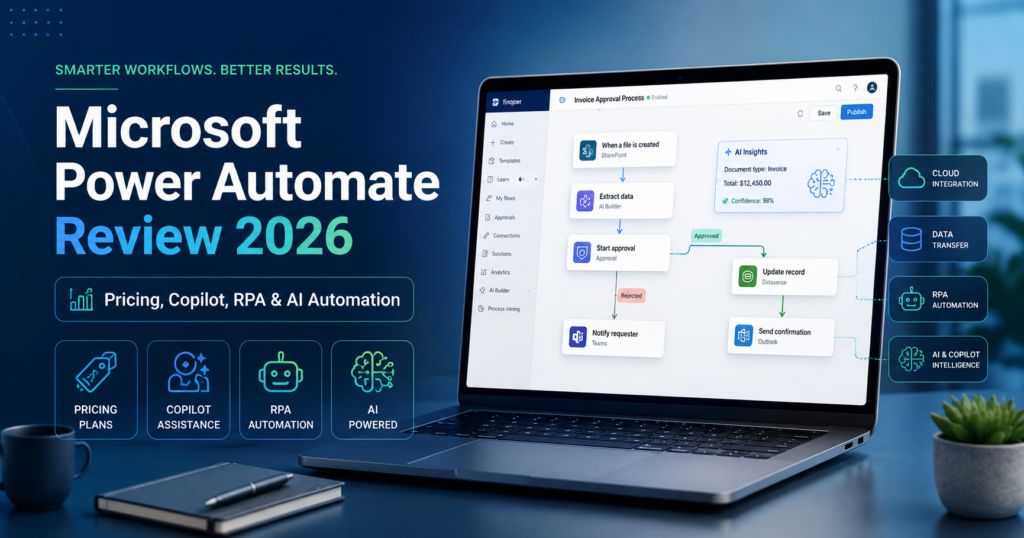
Microsoft Power Automate is one of the most complete automation platforms for businesses already invested in Microsoft 365, Dynamics 365 and the broader Power Platform.
Unlike lightweight automation tools that focus mainly on connecting cloud applications, Power Automate spans several categories at once:
- cloud workflows;
- desktop robotic process automation (RPA);
- unattended bots;
- process and task mining;
- AI Builder;
- Copilot-assisted workflow creation;
- custom connectors;
- Microsoft Dataverse;
- enterprise governance.
The platform is particularly compelling when a company needs to automate both modern SaaS applications and older desktop software that may not expose a clean API.
Current US list pricing starts at $15 per user per month for Power Automate Premium. Unattended automation starts at $150 per bot per month with Power Automate Process, while Hosted Process costs $215 per bot per month and includes a Microsoft-hosted virtual machine.
In this Microsoft Power Automate review, we examine pricing, cloud flows, desktop RPA, Copilot, AI Builder, connectors, process mining, Dataverse, security, licensing complexity, use cases and how Power Automate compares with Make, n8n and Zapier in 2026.
ToolMetria testing status: This review uses Microsoft’s current 2026 pricing, licensing documentation and Power Automate release information. We will add a numerical ToolMetria Score after completing a standardized hands-on automation benchmark.
Microsoft Power Automate Review: Quick Verdict
Power Automate is one of the strongest automation platforms for organizations that already use Microsoft 365, Teams, SharePoint, Outlook, Excel, Dynamics or Azure.
Its biggest strengths are:
- deep Microsoft ecosystem integration;
- 1,000+ connectors across Power Platform;
- cloud flows;
- attended and unattended desktop RPA;
- Copilot-assisted flow creation;
- process and task mining;
- AI Builder;
- Dataverse integration;
- custom connectors;
- enterprise administration and governance.
Its biggest weakness is licensing complexity.
Power Automate can be inexpensive for one user running attended automations, but costs rise quickly when a company needs unattended bots, hosted machines, process mining capacity or large-scale AI usage.
For small businesses that primarily want cloud-to-cloud automation, Make or n8n may be easier to understand.
Read our Make Review 2026 and n8n Review 2026.
Power Automate at a Glance
| Area | ToolMetria view |
|---|---|
| Best for | Microsoft-centric businesses, RPA, enterprise workflows and legacy app automation |
| Free trial | 30 days |
| Premium | $15/user/month annually |
| Process | $150/bot/month annually |
| Hosted Process | $215/bot/month annually |
| Process Mining add-on | $5,000/tenant/month annually |
| Connectors | 1,000+ across Power Platform |
| Cloud flows | Included |
| Attended RPA | Included with Premium |
| Unattended RPA | Process / Hosted Process |
| Hosted VM | Hosted Process |
| Copilot | Natural-language flow creation and editing |
| AI Builder | Available with capacity / credits |
| Dataverse | Included entitlements vary by plan |
| Main strength | Microsoft ecosystem + RPA depth |
| Main drawback | Licensing and capacity rules are complicated |
What Is Microsoft Power Automate?
Microsoft Power Automate is a low-code process automation platform inside Microsoft Power Platform.
It can automate work across:
- cloud applications;
- Microsoft 365;
- Dynamics 365;
- desktop applications;
- websites;
- databases;
- APIs;
- legacy systems;
- AI services.
Power Automate workflows are usually called flows.
Power Automate Pricing in 2026
Microsoft currently offers several main licensing options.
| Plan | Current US list price | Main use |
|---|---|---|
| Free Trial | $0 for 30 days | Testing Power Automate |
| Power Automate Premium | $15/user/month annually | Cloud flows + attended desktop RPA |
| Power Automate Process | $150/bot/month annually | Unattended RPA or autonomous cloud-flow capacity |
| Power Automate Hosted Process | $215/bot/month annually | Unattended RPA with Microsoft-hosted VM |
| Process Mining add-on | $5,000/tenant/month annually | Large-scale process discovery and mining |
Regional pricing can differ substantially, so businesses should check Microsoft’s local pricing page before purchasing.
Power Automate Premium
Power Automate Premium is the main individual-user plan.
At the current $15 per user per month annual price, it includes:
- cloud flows;
- attended desktop flows;
- standard connectors;
- premium connectors;
- custom connectors;
- process and task mining;
- Dataverse storage entitlements;
- AI Builder capacity under current transition rules.
For a single employee automating their own business processes, Premium is the most logical starting point.
Power Automate Process
Power Automate Process is licensed per bot rather than per user.
It currently costs $150 per bot per month.
Process can be assigned to:
- a cloud flow;
- a standard machine used for unattended desktop automation.
This is important because a Process license can allow a business process to run independently of individual users.
Microsoft currently gives a Process-licensed cloud flow a limit of 250,000 Power Platform requests per 24 hours.
Power Automate Hosted Process
Hosted Process currently costs $215 per bot per month.
It includes:
- unattended desktop RPA;
- cloud flows;
- a Microsoft-hosted virtual machine;
- the same broad connector rights as Process;
- Dataverse entitlements.
This removes the need to provision and maintain the Windows machine used by the bot.
For companies that want unattended RPA without managing their own infrastructure, Hosted Process can be easier operationally despite the higher price.
What Are Cloud Flows?
Cloud flows automate tasks across connected cloud services.
Microsoft currently supports several common trigger patterns:
- automated flows triggered by an event;
- instant flows triggered manually;
- scheduled flows triggered at a specific time.
Examples include:
- when a SharePoint item is created, notify Teams;
- when an email arrives, save an attachment to OneDrive;
- every morning, send a business report;
- when a CRM opportunity changes, trigger an approval;
- when a form is submitted, update several systems.
Copilot Can Build Cloud Flows from Natural Language
Copilot is now deeply integrated into Power Automate’s cloud-flow builder.
A user can describe what they want in natural language.
Copilot can then:
- understand the automation goal;
- suggest a trigger;
- suggest actions;
- configure parameters;
- help establish connections;
- edit an existing flow;
- answer questions about the flow;
- generate a flow description.
Example prompt
When an invoice PDF arrives in the finance mailbox, save it to SharePoint, notify the finance channel in Teams and create an approval request.
Copilot can create the initial flow structure and let the user refine it in the visual designer.
Desktop Flows and RPA
Desktop flows are where Power Automate becomes very different from ordinary SaaS automation tools.
RPA can automate software through the user interface.
This is useful when an application:
- has no API;
- is old;
- runs only on Windows;
- requires clicks, typing or screen interaction;
- is a legacy ERP or internal application.
Power Automate can automate interactions with desktop and web applications similarly to how a human employee would perform them.
Attended vs Unattended RPA
The difference is important.
Attended RPA
Attended automation runs with a user present.
The employee initiates or participates in the automation on their workstation.
Power Automate Premium includes one attended RPA entitlement.
Unattended RPA
Unattended automation runs without a person actively using the computer.
This is appropriate for:
- overnight processing;
- high-volume back-office work;
- scheduled legacy-system tasks;
- automated data entry;
- batch processing.
Unattended RPA requires Process or Hosted Process licensing.
Copilot in Power Automate Desktop
Microsoft is also bringing Copilot into desktop-flow creation.
Current preview capabilities include creating desktop flows from natural-language descriptions and adding actions to existing desktop flows.
Copilot can also help users understand Power Automate Desktop concepts and summarize actions or subflows.
Availability still depends on region and Microsoft’s rollout status, so companies should verify current support in their tenant.
1,000+ Connectors
Power Platform currently offers more than 1,000 connectors across Microsoft and verified third-party services.
Common examples include:
- Microsoft 365;
- SharePoint;
- Teams;
- Outlook;
- Excel;
- Dynamics 365;
- Salesforce;
- Dropbox;
- Google services;
- GitHub;
- SQL databases.
Connectors expose triggers and actions that flows can use.
Standard vs Premium Connectors
Not all connectors are licensed equally.
Microsoft separates connectors into categories including standard and premium.
A user may have Power Automate capabilities through Microsoft 365 but still need a Premium license when a workflow uses:
- premium connectors;
- custom connectors;
- advanced RPA functionality.
This is one reason Power Automate licensing can feel complicated compared with Make or Zapier.
Custom Connectors
When a prebuilt connector does not exist, Power Automate supports custom connectors.
Businesses can build a wrapper around a REST or SOAP API and expose custom triggers and actions.
This significantly extends the platform beyond the official connector catalog.
Premium licensing is required for flows that use custom connectors.
Microsoft Dataverse
Dataverse is Microsoft’s structured cloud data layer for Power Platform.
Power Automate can use Dataverse to:
- store business records;
- trigger flows when records change;
- share structured data with Power Apps;
- support Dynamics workflows;
- control access through enterprise permissions.
Current Power Automate licenses include different amounts of Dataverse storage.
Premium currently includes 250 MB of Dataverse database capacity and 2 GB of file capacity per license.
AI Builder
AI Builder brings prebuilt and configurable AI capabilities into Power Platform.
Potential automation use cases include:
- invoice processing;
- receipt processing;
- document extraction;
- classification;
- prediction;
- text processing;
- generative AI prompts.
An AI Builder action can be inserted directly into a Power Automate flow.
Important 2026 AI Builder Licensing Change
This is a particularly important detail for buyers in 2026.
Power Automate Premium currently seeds 5,000 AI Builder credits per month under Microsoft’s transition rules.
However, Microsoft is phasing out seeded AI Builder credits.
On November 1, 2026, seeded AI Builder credits included with licenses such as Power Automate Premium are scheduled to be removed.
Microsoft is moving customers toward Copilot Credits for continued AI Builder consumption.
Businesses planning document processing or high-volume AI workflows should therefore not build a long-term cost model assuming the current seeded credits will remain indefinitely.
Process Mining
Process mining attempts to answer a different question from ordinary automation:
What should we automate?
Microsoft’s Process Mining capabilities help organizations analyze how work actually happens.
Teams can use process data to identify:
- bottlenecks;
- delays;
- rework;
- unexpected process variants;
- automation opportunities.
Premium includes limited process and task mining capacity for individual users.
Process Mining Add-On
Microsoft also sells a large-scale Process Mining add-on.
It currently costs $5,000 per tenant per month and is available as an add-on to Power Automate Premium.
The current package includes 100 GB of process-mining data storage plus additional Dataverse capacity.
This is clearly an enterprise-level product rather than a normal small-business purchase.
Copilot in Process Mining
Copilot can assist with process-mining ingestion and analysis.
Microsoft documents capabilities that help users:
- navigate data ingestion;
- ask questions in natural language;
- summarize process findings;
- interpret quantitative and qualitative results.
Approvals
Approvals are one of Power Automate’s strongest practical Microsoft 365 workflows.
Businesses can create approval processes for:
- expenses;
- purchase requests;
- documents;
- leave requests;
- discounts;
- contracts;
- content publication.
Approvals can interact with Teams, Outlook and other Microsoft services.
Power Platform Request Limits
Power Automate is not unlimited.
Microsoft currently applies Power Platform request limits.
Official limits include:
- Power Automate Premium: 40,000 requests per user per 24 hours;
- Power Automate Process: 250,000 requests per license per 24 hours;
- Hosted Process: 250,000 requests per license per 24 hours.
Individual connectors can also enforce their own rate limits and throttling.
Desktop flow executions do not consume Power Platform requests under Microsoft’s current rules.
Why Request Limits Matter
Every cloud-flow action can generate requests.
Loops can multiply usage.
Retries and pagination can also create additional requests.
For example, a flow that processes 10,000 records through several actions may consume significantly more than 10,000 total requests.
Large-scale workflows therefore need capacity planning.
Version Control for Desktop Flows
Microsoft’s 2026 release wave added stronger lifecycle functionality for desktop automation.
Version control for desktop flows reached general availability in May 2026.
This is valuable because RPA automation should increasingly be treated like production software rather than personal macros.
Desktop Flow Video Logs
Microsoft has also previewed video logging for unattended desktop-flow runs.
Video logs can make RPA troubleshooting easier because administrators can visually inspect what the bot saw when an unattended run failed.
Microsoft 365 Integration
Power Automate’s strongest competitive advantage is Microsoft integration.
A Microsoft-centric company can automate workflows involving:
- Outlook;
- Teams;
- SharePoint;
- OneDrive;
- Excel;
- Forms;
- Planner;
- Dynamics 365;
- Power BI;
- Dataverse;
- Power Apps.
The same Microsoft identity, security and administration environment can govern many of these connections.
Power Automate for Finance
Finance teams can automate:
- invoice extraction;
- approval routing;
- ERP data entry;
- expense workflows;
- Excel reporting;
- reconciliation support;
- legacy-system automation.
RPA is especially valuable when finance systems have limited APIs.
Power Automate for HR
HR workflows can include:
- employee onboarding;
- leave approvals;
- document collection;
- account provisioning requests;
- training reminders;
- Teams notifications;
- SharePoint record updates.
Power Automate for Operations
Operations is one of the platform’s strongest use cases.
Teams can automate:
- business approvals;
- exception handling;
- notifications;
- data movement;
- legacy desktop systems;
- scheduled reports;
- quality processes;
- back-office workflows.
Power Automate for Sales
Sales teams can automate:
- Dynamics 365 updates;
- lead routing;
- Teams notifications;
- proposal approvals;
- follow-up reminders;
- CRM synchronization;
- Excel reporting.
Power Automate for Small Businesses
Power Automate can be excellent for a small business already paying for Microsoft 365.
However, the right level of complexity matters.
A small company should be cautious about immediately adopting:
- unattended bots;
- hosted machines;
- large Process Mining capacity;
- complex Dataverse architectures.
Start with one or two cloud flows and attended automations before adding enterprise-level capacity.
Power Automate vs Make
| Area | Power Automate | Make |
|---|---|---|
| Microsoft 365 | Winner | Strong integrations |
| Visual cloud automation | Strong | Winner for visual clarity |
| Desktop RPA | Winner | Not the core product |
| Legacy software | Winner | API/webhook oriented |
| Pricing simplicity | Complex | Usually easier to understand |
| AI flow builder | Copilot | Maia |
| Best for | Microsoft + RPA | Visual cross-app automation |
Read our Make Review 2026.
Power Automate vs n8n
| Area | Power Automate | n8n |
|---|---|---|
| Microsoft ecosystem | Winner | Strong connectors |
| Self-hosting | Enterprise/Power Platform architecture | Winner with Community Edition |
| Developer control | Strong Power Platform ecosystem | Winner for code/API-first workflows |
| Desktop RPA | Winner | Not core product |
| AI agents | Power Platform + Copilot Studio ecosystem | Strong built-in agent workflows |
| Licensing | More complex | More straightforward execution model |
Read our n8n Review 2026.
Power Automate vs Zapier
Zapier is generally easier for smaller teams that want quick SaaS integrations.
Power Automate is stronger for companies that need:
- Microsoft 365;
- Dynamics 365;
- desktop RPA;
- unattended bots;
- Dataverse;
- enterprise governance;
- legacy-system automation.
Zapier remains compelling for its very broad app ecosystem and easier initial setup.
Read our Zapier Agents Review.
Power Automate and Copilot Studio
Power Automate is also part of Microsoft’s larger agent ecosystem.
Copilot Studio can use Power Platform connectors and Power Automate flows as tools.
This makes it possible to create an agent that reasons conversationally and invokes a deterministic Power Automate process when action is required.
The architecture is similar to a broader industry pattern:
agent decides → automation executes.
Pros and Cons
Pros
- Excellent Microsoft 365 integration.
- 1,000+ connectors across Power Platform.
- Cloud flows and desktop RPA in one ecosystem.
- Attended RPA included with Premium.
- Unattended and hosted automation available.
- Copilot can create and edit cloud flows using natural language.
- AI Builder integrates document and AI processing.
- Process mining can identify automation opportunities.
- Dataverse provides a structured enterprise data layer.
- Custom connectors extend the platform.
- Strong enterprise governance.
Cons
- Licensing is complicated.
- Unattended RPA becomes expensive quickly.
- Hosted Process costs $215 per bot/month.
- Large-scale Process Mining is expensive.
- AI Builder licensing is changing in November 2026.
- Connector tiers can create unexpected Premium requirements.
- Power Platform request limits require capacity planning.
- The product can feel heavy for very simple automations.
Who Should Use Power Automate?
We would shortlist Power Automate for:
- Microsoft 365 businesses;
- Dynamics 365 customers;
- finance teams;
- operations teams;
- HR departments;
- enterprises with legacy desktop software;
- companies that need attended or unattended RPA;
- Power Platform users;
- organizations with strong Microsoft governance requirements.
Who Should Probably Skip It?
Power Automate may not be the best first choice when:
- the company barely uses Microsoft software;
- all automation is simple SaaS-to-SaaS integration;
- the team wants the simplest possible pricing model;
- there is no need for desktop RPA;
- a small technical team would rather self-host automation.
Which Power Automate Plan Should You Choose?
Premium
Choose Premium when one employee needs cloud flows, premium connectors and attended desktop automation.
Process
Choose Process when an automation needs to run independently of one licensed user or requires unattended desktop RPA on your own machine.
Hosted Process
Choose Hosted Process when you need unattended RPA but do not want to maintain the Windows virtual machine yourself.
Process Mining add-on
Choose the large Process Mining add-on only when the organization has enough process volume and business value to justify enterprise-scale process analysis.
How We Would Start with Power Automate
- Use the 30-day trial.
- Build one cloud flow inside Microsoft 365.
- Use Copilot to create the first draft.
- Learn standard vs premium connectors.
- Measure request volume.
- Test attended desktop RPA if legacy applications are involved.
- Add approvals and error handling.
- Model AI Builder usage carefully because licensing changes in November 2026.
- Move to unattended RPA only when the ROI is clear.
- Document licensing before scaling bots across departments.
What ToolMetria Will Test Hands-On
Our standardized Power Automate benchmark will measure:
- first cloud flow build time;
- Copilot flow generation;
- Outlook / Teams / SharePoint workflow;
- premium connector setup;
- custom connector experience;
- desktop flow creation;
- attended RPA;
- AI Builder document processing;
- approval workflows;
- execution debugging;
- request consumption;
- overall value.
Frequently Asked Questions
How much does Power Automate cost in 2026?
Current US list pricing is $15 per user per month annually for Power Automate Premium, $150 per bot per month for Power Automate Process and $215 per bot per month for Hosted Process. The large Process Mining add-on is $5,000 per tenant per month.
Does Power Automate include desktop RPA?
Yes. Premium includes attended desktop RPA. Process and Hosted Process support unattended desktop automation.
Can Copilot build Power Automate flows?
Yes. Copilot can create cloud flows from natural-language descriptions, edit existing flows, configure parameters and answer questions about the workflow.
How many connectors does Power Automate support?
Microsoft Power Platform currently offers more than 1,000 connectors across Microsoft and verified third-party services, with connector availability varying by product and license.
What is the difference between attended and unattended RPA?
Attended RPA runs with a user present on the workstation. Unattended RPA runs automatically without an employee actively controlling the machine.
What is Power Automate Hosted Process?
Hosted Process provides unattended RPA together with a Windows virtual machine hosted and managed by Microsoft on Azure infrastructure.
Does Power Automate include AI Builder credits?
Power Automate Premium currently seeds 5,000 AI Builder credits per month under Microsoft’s transition rules, but those seeded credits are scheduled to be removed on November 1, 2026. Microsoft is moving AI Builder consumption toward Copilot Credits.
Is Power Automate better than Make?
Power Automate is stronger for Microsoft 365, Dynamics and desktop RPA. Make is often easier for visual cross-app cloud automation and has a simpler automation-focused product structure.
Is Power Automate better than n8n?
Power Automate is better for Microsoft-centric enterprise workflows and RPA. n8n is generally stronger for self-hosting, developer control and code-heavy automation.
Is Power Automate included with Microsoft 365?
Some Power Automate capabilities and standard connectors are available through certain Microsoft 365 licenses, but premium connectors, attended RPA and advanced features can require separate Power Automate licensing.
Final Verdict
Microsoft Power Automate is one of the deepest automation platforms available in 2026.
It is not the simplest.
It is not always the cheapest.
But few competitors combine:
- cloud automation;
- desktop RPA;
- Microsoft 365;
- Dynamics;
- Dataverse;
- process mining;
- AI Builder;
- Copilot;
- enterprise governance.
For a Microsoft-centric organization, the integration advantage can outweigh the licensing complexity.
For a small company that only needs straightforward cloud automation, Make, Zapier or n8n may be easier.
For organizations that need to automate both modern cloud services and legacy Windows applications, Microsoft Power Automate remains one of ToolMetria’s strongest enterprise automation candidates for 2026.
ToolMetria preliminary verdict: Best candidate for Microsoft-native automation and desktop RPA. Final score pending standardized hands-on testing.