Zapier Agents is one of the most practical examples of how AI is moving from answering questions to carrying out real business work.
Instead of operating only inside a chat window, a Zapier agent can work with connected applications, browse the web, use live data sources, search attached knowledge and execute configured actions across the software a company already uses.
That matters because most small businesses do not need another chatbot. They need fewer repetitive tasks.
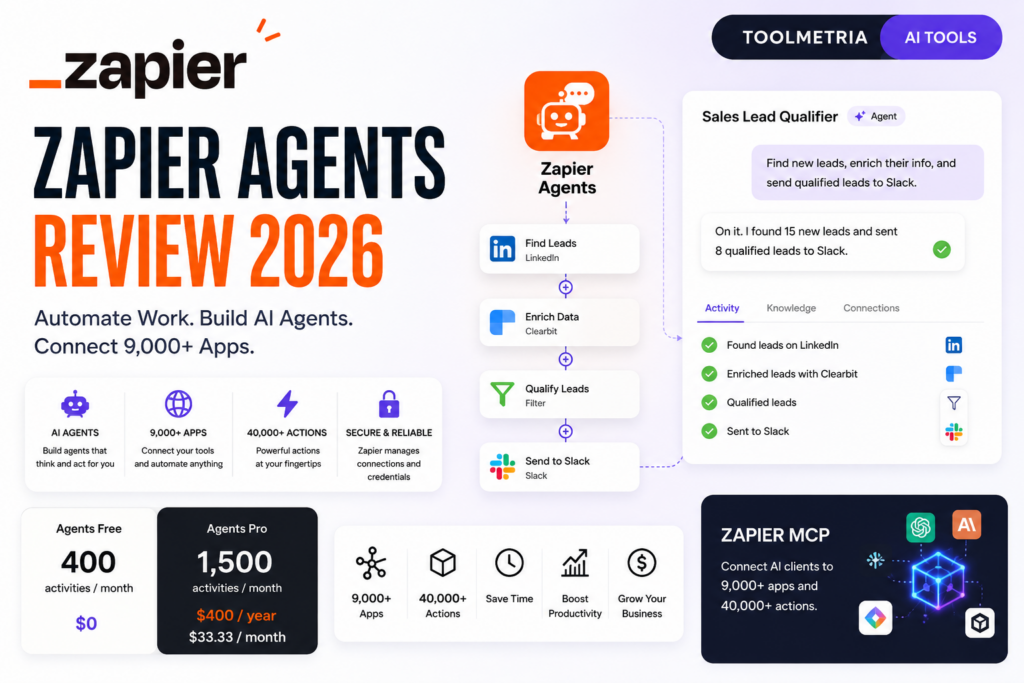
Zapier currently connects to more than 9,000 applications, and its broader AI infrastructure includes Zap workflows, Agents, MCP, Tables, Forms, Chatbots and other automation tools.
In this Zapier Agents review, we examine current 2026 pricing, activities, usage limits, app connections, web browsing, live data, Agent-to-Zap workflows, Zapier MCP, reliability, Enterprise controls, best use cases, limitations and whether Agents Pro is worth $33.33 per month.
ToolMetria testing status: This review is based on Zapier’s current 2026 pricing and official documentation. We will add a numerical ToolMetria Score after completing a standardized hands-on agent automation test.
Zapier Agents Review: Quick Verdict
Zapier Agents is one of the most compelling AI tools for small businesses that already use several SaaS applications and want AI to execute work between them.
Its biggest advantage is not the underlying AI model.
It is Zapier’s integration layer.
Agents can work with applications a company already uses and perform real actions based on instructions and connected data.
Current Agents plans include:
- Free: 400 activities per month;
- Pro: 1,500 activities per month for $400 billed annually, equivalent to $33.33/month;
- Enterprise: custom pricing and activity limits.
Agents Free is unusually useful for testing because it includes live data sources, web browsing and Chrome-extension interaction.
Pro becomes more attractive when a business has found a repeatable agent workflow that genuinely saves time.
The main limitation is that pricing is based on activities. A single agent run can consume multiple activities, so 1,500 activities does not necessarily mean 1,500 completed business workflows.
For our wider recommendations, see Best AI Tools for Small Business in 2026.
Zapier Agents at a Glance
| Area | ToolMetria view |
|---|---|
| Best for | Cross-app automation, operations, lead workflows and repetitive business tasks |
| Free plan | 400 activities/month |
| Pro plan | $400/year ($33.33/month equivalent) |
| Pro activities | 1,500/month |
| Apps | 9,000+ across Zapier |
| Web browsing | Included |
| Live data sources | Included |
| Chrome extension | Supported |
| Trigger agent from a Zap | Supported |
| Pro activities per individual run | Up to 40 |
| Enterprise sharing | Organization-wide agent sharing |
| Enterprise audit logs | Included |
| Zapier MCP | AI clients can access 9,000+ apps and 40,000+ actions |
| Main strength | Real actions across a massive app ecosystem |
| Main drawback | Activity-based usage can be difficult to estimate in advance |
What Is Zapier Agents?
Zapier Agents lets users create AI-powered agents that can perform automated behaviors using instructions, data and connected applications.
A normal AI assistant might tell you what to do.
A Zapier agent can potentially do parts of the work itself.
Depending on its setup, an agent can:
- search information;
- browse the web;
- use attached knowledge;
- work with live data sources;
- call app actions;
- update records;
- draft content;
- route information;
- trigger or participate in automated workflows.
The agent can only use the applications and actions that have been connected and configured for it.
Zapier Agents Pricing in 2026
Zapier currently offers three Agents tiers.
| Plan | Price | Activities per month | Activities per run |
|---|---|---|---|
| Agents Free | $0 | 400 | 10 |
| Agents Pro | $400 billed annually ($33.33/month equivalent) | 1,500 | 40 |
| Agents Enterprise | Contact sales | Custom | 40 |
Zapier’s current pricing page also confirms that Free and Pro include live data sources, web browsing and Chrome-extension interaction.
What Is an Activity?
This is the most important concept to understand before paying for Agents.
Zapier measures Agents usage through activities.
According to Zapier’s current usage documentation, an activity can include actions such as:
- an app action performed by the agent;
- a chat interaction;
- web browsing;
- looking up information from attached knowledge.
This means one completed business task can consume several activities.
Example
Imagine an agent that handles an inbound lead.
It might:
- read the lead information;
- search the company website;
- look up CRM context;
- classify the lead;
- update the CRM;
- draft a message;
- send information to Slack.
That workflow can consume several activities during one run.
Therefore, comparing “1,500 activities” with “1,500 tasks” is misleading.
Testing Usage on Free vs Pro
Zapier currently treats testing differently by plan.
On the Free Agents plan, testing counts toward the 400-activity monthly quota.
On Pro and Enterprise, testing does not count toward the monthly activity allocation.
This makes Pro more practical when building and iterating on serious agents.
Activities Per Run
Zapier also limits how many activities a single agent run can consume.
- Free: up to 10 activities per run;
- Pro: up to 40 activities per run;
- Enterprise: up to 40 activities per run.
Zapier describes this as a safeguard to prevent one run from consuming the entire monthly quota.
If the agent reaches the limit and still has work to do, it can request user input before continuing.
9,000+ App Integrations
The biggest reason to consider Zapier Agents is the surrounding integration ecosystem.
Zapier’s current app directory lists more than 9,000 applications.
Popular examples include:
- Google Sheets;
- Gmail;
- Slack;
- Salesforce;
- HubSpot;
- Notion;
- Microsoft applications;
- WordPress;
- Airtable;
- many CRM, marketing, ecommerce and productivity tools.
Not every app exposes identical actions, but the integration footprint is the platform’s key competitive advantage.
What App Actions Can Agents Perform?
Zapier states that Agents can only take actions in applications the user has connected and through triggers/actions that have been configured.
This is important from both a security and reliability perspective.
An agent should not be treated as having unrestricted access to every application in the Zapier account.
The workflow designer controls the tools available to the agent.
Live Data Sources
Both Agents Free and Pro currently support live data sources.
This helps agents make decisions using current information rather than only information embedded in a static prompt.
Potential use cases include:
- checking CRM data;
- working with current spreadsheet information;
- reviewing project data;
- using live operational information;
- looking up current business records before taking an action.
Web Browsing
Zapier Agents can browse the web.
This gives agents another data source when a workflow needs external information.
For example, an agent might:
- research a lead;
- check a company website;
- collect public background information;
- review a public webpage before updating a CRM record.
Businesses should still verify critical external information before letting it drive important automated decisions.
Chrome Extension
Zapier currently allows users to interact with Agents from its Chrome extension.
This can reduce context switching for workflows where the employee is already working in a browser.
It also makes Agents feel less like a separate standalone app and more like an assistant available during everyday work.
Trigger an Agent from a Zap
Zapier Agents can be launched from traditional Zap workflows.
Zapier’s current documentation explains that a Zap can use a Run Agent action to start an agent.
This creates an important combination:
deterministic automation + agentic decision-making.
A Zap can detect the event, and an agent can decide how to handle the less predictable part of the workflow.
Example
A new support request arrives.
A Zap triggers automatically.
The agent then:
- reads the message;
- checks customer context;
- classifies urgency;
- researches supporting information;
- updates the relevant system;
- prepares the next action.
This hybrid model is often more reliable than attempting to make every part of a workflow autonomous.
Zapier MCP
Zapier MCP is one of the platform’s most important AI infrastructure products in 2026.
MCP stands for Model Context Protocol, an open standard that allows AI clients to connect to external tools and data.
Zapier’s implementation can give compatible AI clients access to:
- 9,000+ applications;
- 40,000+ actions;
- Zapier-managed app authentication;
- credentials and rate-limit handling.
This means a user can potentially work from an AI client while Zapier provides the action layer behind it.
Which AI Clients Can Use Zapier MCP?
Zapier’s current MCP documentation includes setup guidance for compatible AI clients, and Zapier describes support for clients such as:
- Claude;
- Cursor;
- ChatGPT and other compatible environments depending on available MCP support;
- other MCP-compatible clients.
The key idea is that the AI interface and the automation infrastructure no longer need to be the same product.
A company can use its preferred AI client while Zapier provides connections to business applications.
Zapier Agents vs Zapier MCP
These products are related but not identical.
Zapier Agents lets you create agents inside Zapier.
Zapier MCP lets an external compatible AI client access Zapier-connected actions.
In practical terms:
- use Agents when you want Zapier itself to host and run the agent workflow;
- use MCP when you want another AI client to be the interface while Zapier supplies the action layer.
Zapier Agents vs Traditional Zaps
A traditional Zap is ideal when the workflow is predictable.
For example:
When a form is submitted → create CRM contact → send Slack notification.
An agent becomes more useful when the process requires interpretation.
For example:
When a form is submitted → understand the lead → research it → decide priority → choose the right next action.
| Workflow type | Traditional Zap | Agent |
|---|---|---|
| Fixed trigger/action | Excellent | Usually unnecessary |
| Classification | Possible with AI steps | Strong |
| Research | More rigid | Strong |
| Multi-step decisions | Complex | Strong use case |
| Deterministic reliability | Winner | Less predictable |
| Adaptive behavior | Limited | Winner |
Reliability: The Biggest Agent Challenge
Zapier explicitly acknowledges that AI agents are non-deterministic.
This means identical inputs may not always produce identical decisions or outputs.
That is fundamentally different from a traditional automation.
A business should therefore avoid giving an agent unrestricted autonomy over high-risk processes without appropriate review.
How to Make Agents More Reliable
In our view, stronger agent workflows have several characteristics:
- clear instructions;
- limited tool access;
- high-quality data sources;
- defined output formats;
- specific success criteria;
- human approval for high-impact actions;
- fallback paths;
- activity review and testing.
The goal should not be “make one agent run the entire company.”
The goal should be “give one agent a narrow job it can perform reliably.”
Reviewing Agent Activity
Zapier provides activity views that let users inspect agent runs.
The current activity documentation says users can review information including:
- run status;
- apps used;
- date and time;
- specific agent activity;
- pod activity;
- all-agent activity.
This visibility is important when debugging unreliable behavior or understanding how an agent populated a field.
Zapier Agents for Lead Management
Lead workflows are one of the strongest use cases.
An agent could:
- read a new lead;
- research the company;
- check existing CRM data;
- classify fit;
- score urgency;
- update the CRM;
- draft a personalized follow-up;
- alert the right salesperson.
This combines research, judgment and execution — exactly the kind of process that traditional fixed automation can struggle with.
Zapier Agents for Sales
Sales teams could use Agents for:
- account research;
- lead enrichment;
- meeting preparation;
- CRM hygiene;
- follow-up drafting;
- pipeline monitoring;
- routing opportunities;
- summarizing account activity.
Zapier Agents for Marketing
Marketing workflows could include:
- campaign research;
- content routing;
- lead qualification;
- competitive monitoring;
- social monitoring;
- moving data between campaign tools;
- preparing reports;
- updating marketing databases.
Zapier Agents for Customer Support
Support teams can combine an agent with help desk, CRM and knowledge tools.
Potential workflows include:
- classifying tickets;
- checking account history;
- finding relevant documentation;
- drafting responses;
- routing urgent issues;
- updating customer records;
- escalating unusual cases.
High-risk or sensitive customer interactions should retain human oversight.
Zapier Agents for Operations
Operations may be the strongest overall fit.
Possible uses include:
- vendor research;
- record maintenance;
- onboarding preparation;
- cross-app data checks;
- daily reports;
- monitoring workflows;
- document routing;
- exception handling.
Zapier Agents Free: Is It Actually Useful?
Yes.
The Free plan includes:
- 400 activities per month;
- live data sources;
- web browsing;
- Chrome-extension interaction.
The main constraints are:
- 10 activities per run;
- testing consumes the monthly quota;
- no organization-wide agent sharing.
For testing one narrow use case, Free is enough to understand whether Agents fits your workflow.
Is Agents Pro Worth $33.33 per Month?
Pro becomes compelling when one agent saves more time than the subscription costs.
At $400 per year, the plan does not need to eliminate many hours of skilled work to produce a return.
But the important condition is repeatability.
Do not upgrade because an agent produced an impressive one-off demo.
Upgrade when you have a workflow that:
- runs repeatedly;
- uses several applications;
- requires interpretation;
- can operate safely;
- saves measurable employee time.
Enterprise Plan
Zapier currently lists Agents Enterprise with custom pricing.
Enterprise adds capabilities such as:
- custom monthly activities;
- organization-wide agent sharing;
- enterprise-grade audit logs;
- restricted-app support;
- Pro functionality.
These features become relevant when agents are being deployed across a larger organization rather than by one automation enthusiast.
Zapier Agents vs ChatGPT Business
These are complementary products.
ChatGPT Business is a broad AI workspace for research, writing, analysis, coding and company context.
Zapier Agents is stronger when the objective is to perform actions across business software.
A powerful stack can use ChatGPT as the thinking interface and Zapier as part of the execution layer.
Read our ChatGPT Business Review.
Zapier Agents vs Claude Team
Claude Team is stronger for deep knowledge work, coding and documents.
Zapier Agents is stronger for app-to-app operational execution.
Zapier MCP can also make Zapier’s action ecosystem available to compatible Claude workflows.
Read our Claude Team Review.
Zapier Agents vs Notion Custom Agents
| Area | Zapier Agents | Notion Custom Agents |
|---|---|---|
| Core advantage | Huge external app ecosystem | Deep Notion workspace context |
| Apps/data | 9,000+ Zapier apps | Notion + supported connected apps |
| Pricing unit | Activities | Notion credits |
| Best fit | Cross-app operations | Knowledge/project workflows |
Read our Notion Business Review.
Zapier Agents vs Google Workspace Studio
Google Workspace Studio is particularly strong when the company already lives inside Gmail, Drive, Docs, Sheets and other Google applications.
Zapier has the broader third-party app ecosystem.
If most of the automation stays inside Google, Workspace Studio may be enough.
If the workflow spans CRM, marketing, finance, project management and many other SaaS products, Zapier becomes more compelling.
Read our Google Workspace with Gemini Review.
Pros and Cons
Pros
- Access to Zapier’s 9,000+ app ecosystem.
- Useful Free plan with 400 activities.
- Live data sources.
- Web browsing.
- Chrome-extension access.
- Agents can be triggered from traditional Zaps.
- Pro supports up to 40 activities in a single run.
- Activity history helps with debugging.
- Zapier MCP extends app actions to external AI clients.
- Enterprise adds sharing and audit logs.
- Strong fit for real operational automation.
Cons
- Activity pricing is not as intuitive as a simple task count.
- Complex runs can consume many activities.
- AI agents are non-deterministic.
- Reliability requires careful workflow design.
- Free testing consumes activities.
- Not every app exposes every desired action.
- High-impact actions need governance and human oversight.
- Pro does not include organization-wide agent sharing.
Who Should Buy Zapier Agents?
We would shortlist Agents for:
- small businesses using several SaaS tools;
- operations teams;
- sales teams;
- marketing operations;
- agencies;
- customer-success teams;
- businesses already using Zapier;
- teams with repeatable workflows requiring some judgment;
- companies experimenting with agentic automation.
Who Should Probably Skip It?
Zapier Agents is less compelling when:
- all workflows are simple fixed automations;
- the business uses very few apps;
- the required apps are not supported;
- AI decisions would introduce unacceptable risk;
- the team does not have time to design and test workflows;
- the objective is primarily writing, research or coding rather than execution.
How We Would Start With Zapier Agents
- Use the Free plan first.
- Choose one narrow repetitive workflow.
- Give the agent access only to the apps/actions required.
- Write explicit instructions and success criteria.
- Test edge cases.
- Review the activity log.
- Measure activities per successful run.
- Calculate the real monthly capacity.
- Upgrade to Pro only after proving the workflow.
- Add human approval before irreversible or sensitive actions.
What ToolMetria Will Test Hands-On
Our standardized Zapier Agents test will measure:
- agent setup time;
- instruction quality;
- app connection workflow;
- web browsing;
- live data use;
- lead-research workflow;
- CRM updates;
- Agent triggered from a Zap;
- activities consumed per workflow;
- failure and retry behavior;
- activity-log usefulness;
- Zapier MCP setup;
- overall value.
Frequently Asked Questions
How much does Zapier Agents cost in 2026?
Agents Free includes 400 activities per month. Agents Pro costs $400 billed annually, equivalent to $33.33 per month, and includes 1,500 activities. Enterprise uses custom pricing.
What is a Zapier Agents activity?
An activity is a billable unit of agent work. Examples include app actions, chat interactions, web browsing and retrieving information from attached knowledge.
Does one agent run equal one activity?
No. A single agent run can use multiple activities depending on how many steps, lookups, chats or actions are required.
How many activities can one agent run use?
The current limit is 10 activities per run on Free and 40 per run on Pro and Enterprise.
Does Zapier Agents browse the web?
Yes. Web browsing is currently included on Agents Free and Pro.
Can Zapier Agents use live business data?
Yes. Zapier includes live data sources as a core Agents feature.
Can a Zap trigger an AI agent?
Yes. Zapier allows a Zap workflow to use a Run Agent action to trigger an Agent.
How many apps does Zapier connect to?
Zapier currently lists more than 9,000 apps in its integration directory.
What is Zapier MCP?
Zapier MCP is Zapier’s implementation of Model Context Protocol. It lets compatible AI clients access Zapier-connected tools and currently provides access to 9,000+ apps and 40,000+ actions.
Is Zapier Agents better than ChatGPT?
They solve different problems. ChatGPT is a broad AI workspace. Zapier Agents is specialized around agents that can take actions across business applications.
Final Verdict
Zapier Agents is one of the clearest examples of where business AI is heading.
The value is no longer simply generating faster answers.
The value is connecting reasoning with action.
Zapier’s 9,000+ integrations give Agents access to a huge existing business-software ecosystem, while traditional Zaps and Zapier MCP provide additional ways to combine deterministic automation with AI.
The activity-based pricing model requires careful measurement, and businesses should not expect agents to behave with the absolute predictability of traditional automation.
But for workflows that involve research, judgment and multiple applications, Zapier Agents is currently one of ToolMetria’s strongest AI automation candidates for 2026.
ToolMetria preliminary verdict: Best candidate for cross-app AI automation in small businesses. Final score pending standardized hands-on testing.