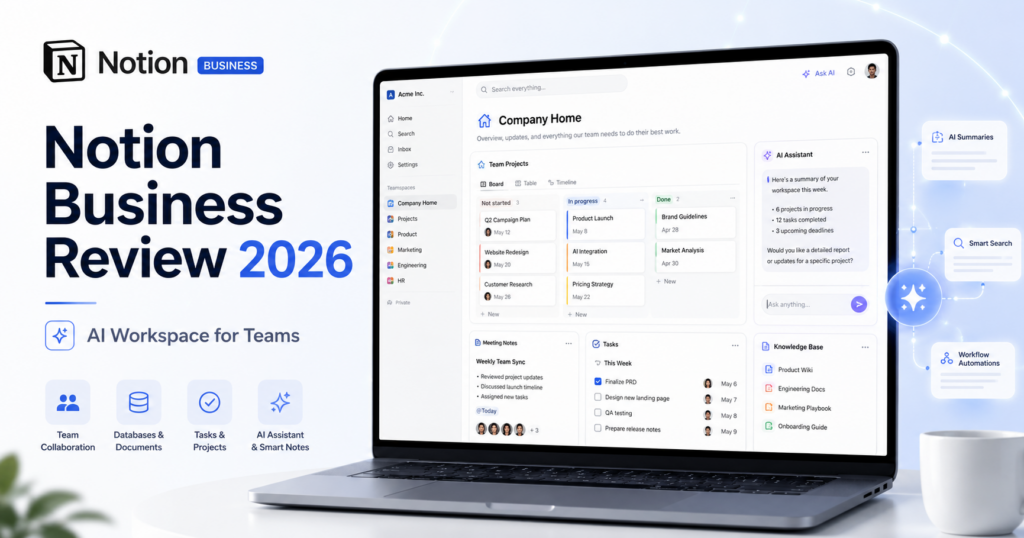
Notion Business has evolved into one of the most ambitious AI workspaces for teams in 2026.
Instead of treating AI as a separate chatbot, Notion increasingly places agents, enterprise search, meeting notes, databases, projects, connected apps, automation and company knowledge inside the same workspace where teams already organize their work.
The current Business plan is listed at $20 per member per month on Notion’s pricing page and includes Notion Agent, AI Meeting Notes, Enterprise Search, SAML SSO, advanced database permissions and the broader collaboration features from Notion Plus.
Notion has also spent 2026 pushing further into agentic work. Custom Agents can handle recurring multi-step tasks, Workers can run code and webhook automations, and Notion 3.6 introduced support for coordinating external agents such as Claude and Cursor from the same shared workspace.
In this Notion Business review, we examine pricing, Notion Agent, AI Meeting Notes, Enterprise Search, Custom Agents, Notion credits, Workers, external agents, databases, projects, permissions, pros, cons and how Notion compares with ChatGPT Business, Claude Team and Google Workspace with Gemini.
ToolMetria testing status: This review is based on Notion’s current 2026 pricing, help documentation and product releases. We will add a numerical ToolMetria Score after completing a standardized hands-on team test.
Notion Business Review: Quick Verdict
Notion Business is one of the strongest AI workspaces for teams that want their documents, projects, meetings, databases and company knowledge in one place.
Its biggest advantage is context.
Notion AI does not have to work only from a prompt. It can use information already stored in the workspace and, through supported connectors, search external tools such as Slack, Google Drive, Microsoft Teams, Jira and others.
The Business plan currently includes:
- Notion Agent;
- AI Meeting Notes;
- Enterprise Search;
- Notion AI Connectors;
- advanced collaboration and database permissions;
- SAML SSO;
- 90-day page history;
- private teamspaces;
- Custom Agents and Notion-credit workflows;
- access to newer agentic capabilities such as Workers on eligible plans.
Its biggest weakness is that Notion can become complicated when a company has poor information architecture. AI does not automatically fix messy databases, duplicated pages, weak naming conventions or unclear ownership.
For our broader recommendations, see Best AI Tools for Small Business in 2026.
Notion Business at a Glance
| Area | ToolMetria view |
|---|---|
| Best for | Knowledge-heavy teams, projects, documentation and internal operations |
| Current Business price | $20/member/month |
| Business trial | 30 days for eligible teams with professional domains |
| Notion Agent | Included |
| AI Meeting Notes | Included, currently beta |
| Enterprise Search | Included |
| Connected sources | Slack, Google Drive, Microsoft Teams, Jira and more |
| Custom Agents | Available on Business and Enterprise using Notion credits |
| Workers | Available on Business/Enterprise; credit-based from August 11, 2026 |
| SAML SSO | Included |
| Page history | 90 days |
| Main strength | AI operating directly on company knowledge and structured work |
| Main drawback | Requires good workspace organization to reach its full value |
What Is Notion Business?
Notion Business is the company-focused tier of Notion’s workspace platform.
It combines:
- documents;
- wikis;
- projects;
- databases;
- forms;
- calendars;
- AI;
- meeting notes;
- enterprise search;
- automation;
- permissions;
- connected business tools.
The important point is that Notion is not selling AI in isolation.
The AI operates inside a system where the company’s work already lives.
Notion Pricing in 2026
Notion currently lists four main tiers:
| Plan | Current displayed price* | Typical fit |
|---|---|---|
| Free | $0/member/month | Individuals and basic experimentation |
| Plus | $10/member/month | Small collaborative teams |
| Business | $20/member/month | Growing teams that want Notion AI and advanced integrations |
| Enterprise | Contact sales | Larger organizations with advanced governance |
*Prices are those displayed on Notion’s official pricing page at the time of writing. Notion offers monthly and yearly billing options and says yearly billing can save up to 20%. Exact checkout pricing, taxes and regional pricing can vary.
Notion Business Trial
Eligible teams can currently receive a 30-day Business trial.
According to Notion’s official trial documentation, the Business trial includes full Business features such as:
- Notion AI;
- AI Meeting Notes;
- Research Mode;
- AI connectors;
- verified pages;
- private teamspaces;
- SAML SSO;
- integrations.
Eligibility generally requires a professional company domain.
Notion Agent
Notion Agent is one of the central reasons to consider the Business plan.
Notion describes its Agent as capable of completing complex multi-step work using context from:
- Notion;
- connected applications;
- the web.
This moves the product beyond simple writing assistance.
Potential workflows include:
- building project plans;
- researching company information;
- updating databases;
- creating documentation;
- summarizing projects;
- organizing knowledge;
- working across multiple pages and data sources.
Why Context Matters
Many AI tools become less useful when employees have to explain the same business context repeatedly.
Notion’s advantage is that the workspace may already contain:
- project plans;
- product documentation;
- customer research;
- meeting notes;
- roadmaps;
- policies;
- team responsibilities;
- databases;
- operating procedures.
An AI system with access to that structured context can potentially provide more relevant output than an isolated chatbot.
Enterprise Search
Enterprise Search is available on Business and Enterprise plans.
It searches both the Notion workspace and supported connected applications.
Notion currently lists connectors for services including:
- Slack;
- Google Drive;
- Microsoft Teams;
- Jira;
- and additional supported sources.
When Enterprise Search answers using connected information, Notion says it cites the source so users can return to the original material.
Search databases, relations and properties
Enterprise Search can also work with structured Notion databases, including views, relations and properties.
That is important because company knowledge is often not stored as ordinary documents.
It may be stored in project databases, CRM-style tables, task systems or operational trackers.
AI Meeting Notes
AI Meeting Notes is currently available in beta for Business and Enterprise users.
It can transcribe meetings, identify important points and extract action items.
Unlike meeting tools that rely on a bot joining the call, Notion positions AI Meeting Notes as part of the user’s workspace.
Potential benefits include:
- less manual note-taking;
- faster follow-up;
- action-item extraction;
- automatic project context;
- searchable meeting knowledge;
- better continuity between meetings and project work.
Meeting Notes can trigger Custom Agents
Notion continued expanding this workflow in July 2026.
AI Meeting Notes can now trigger Custom Agents, letting a completed meeting initiate follow-up work automatically.
This could support flows such as:
- create tasks from action items;
- send project updates;
- update a CRM database;
- prepare follow-up documents;
- route decisions to another team.
Custom Agents
Custom Agents are one of Notion’s most important 2026 capabilities.
Instead of asking the same question repeatedly, teams can create agents designed around recurring work.
Examples include:
- Q&A agents for company policies;
- task-routing agents;
- weekly status agents;
- email-triage agents;
- daily briefing agents;
- database-maintenance agents;
- sales enablement agents.
Custom Agents can read context, make decisions and take multiple actions.
Notion Credits: Custom Agents Are Usage-Based
Custom Agents are not simply unlimited within the $20 Business subscription.
They use Notion credits.
According to Notion’s current credit documentation, 1,000 credits correspond to approximately $10 of usage.
The cost depends on how much the agent reads, how many actions it takes and how frequently it runs.
| Example workflow | Estimated cost per run* |
|---|---|
| Q&A agent | About $0.03–$0.11 |
| Task-routing agent | About $0.05–$0.15 |
| Status-update agent | About $0.08–$0.18 |
| Email-triage agent | About $0.04–$0.10 |
| Daily briefing agent | About $0.10–$0.30 |
*Notion’s examples are estimates. Actual usage varies by model, context, actions and frequency.
This pricing model is important when comparing Notion with AI products that bundle more agent activity into the base subscription.
What Happens When Credits Run Out?
Notion says Custom Agents pause automatically if the workspace does not have enough credits.
Admins receive alerts when the workspace reaches 80% and 100% of its configured credit usage.
Additional credits can be purchased through the Notion credits dashboard, and administrators can configure automatic adjustment.
Workers: Notion’s Hosted Automation Runtime
Notion introduced Workers as part of its developer platform in 2026.
Workers run custom code on Notion’s infrastructure and can:
- sync data;
- respond to webhooks;
- power tools used by Custom Agents;
- call external APIs;
- automate reliable background steps.
This is different from an AI agent.
An agent can decide what should happen. A Worker can execute deterministic code to make it happen.
Workers became credit-based in August 2026
Notion allowed Workers to be tested free during beta on Business and Enterprise plans.
Its current documentation states that from August 11, 2026, Workers require Notion credits.
This means advanced Notion automation now has a measurable usage cost that teams should include in their software budget.
Notion 3.6 and External Agents
Notion 3.6, released in July 2026, expanded the workspace into an orchestration environment for outside agents.
Notion says users can coordinate external agents such as Claude and Cursor, with more integrations planned.
Instead of each agent operating invisibly inside its own application, teams can assign tasks from shared boards and monitor the work alongside human teammates.
This is strategically important.
Notion is positioning itself not only as an AI product but as a workspace where multiple AI systems can collaborate around company work.
Notion Workers and External APIs
Workers can also close gaps between Notion and specialized business tools.
Notion gives examples such as:
- updating a CRM when a subscription changes;
- closing tasks when a pull request is merged;
- creating onboarding documents when an offer is signed;
- syncing external databases;
- triggering webhook automations.
This makes Notion increasingly relevant to technical operations teams as well as ordinary knowledge workers.
Databases: A Major Notion Advantage
Notion databases are one of the platform’s biggest structural strengths.
They can be used to build:
- project trackers;
- content calendars;
- lightweight CRMs;
- roadmaps;
- task systems;
- asset libraries;
- research repositories;
- customer-feedback databases;
- operating dashboards.
AI can work with this structured information instead of only free-form text.
This gives Notion a different profile from AI chat tools that primarily operate through conversations and files.
AI Autofill
Notion offers AI-powered database autofill.
Its current credit documentation distinguishes between:
- Basic Autofill — included on Business and Enterprise and does not use Notion credits;
- Custom Agent Autofill — uses credits because it can use richer context and advanced reasoning.
This distinction is useful because ordinary database enrichment does not necessarily create extra usage charges.
Projects and Documentation in One System
Notion’s main competitive advantage over a standalone AI assistant is that the action can happen where the project already lives.
A team can keep:
- the project brief;
- tasks;
- meeting notes;
- research;
- documents;
- status updates;
- databases;
- AI agents
inside the same environment.
This reduces the number of handoffs between “AI tool,” “documentation tool” and “project-management tool.”
Permissions and SAML SSO
Business adds organizational controls that are important for growing teams.
The plan currently includes:
- SAML SSO;
- private teamspaces;
- granular database permissions;
- 90-day page history;
- verified pages;
- advanced integrations.
Database permissions are particularly useful when teams need people to collaborate only on relevant rows instead of exposing the entire database.
Verified Pages
Business users can mark pages as verified.
Notion says verification badges appear in search results and AI citations.
This can help teams distinguish trusted, current internal knowledge from outdated documents.
That becomes more important as AI systems start answering questions automatically from internal content.
Notion Business for Small Businesses
Notion Business is strongest when a small company already uses Notion as a central workspace.
A five-person team may use it to combine:
- company wiki;
- project management;
- meeting notes;
- content calendar;
- sales documentation;
- research;
- lightweight CRM;
- AI search;
- agents.
In that situation, $20 per member can be easier to justify because the platform may replace several separate tools.
Notion Business for Marketing Teams
Marketing teams can use Notion for:
- content planning;
- campaign briefs;
- editorial calendars;
- competitive research;
- meeting notes;
- asset tracking;
- status reporting;
- AI-assisted content workflows;
- Custom Agents that route and enrich campaign work.
Notion Business for Operations
Operations is where Custom Agents and Workers become especially interesting.
Potential uses include:
- daily business briefs;
- task routing;
- policy Q&A;
- database maintenance;
- email triage;
- status reporting;
- webhook automation;
- cross-tool data synchronization.
Notion Business for Product and Engineering Teams
Product teams can combine roadmaps, specs, research, projects and meeting knowledge.
Engineering teams can use external agents and Workers to connect coding workflows back into Notion.
The July 2026 External Agents release is particularly interesting because tools such as Claude and Cursor can participate in shared team workflows instead of remaining isolated in developer interfaces.
Notion Business vs ChatGPT Business
| Area | Notion Business | ChatGPT Business |
|---|---|---|
| Current headline price | $20/member/month | $20/user/month annual |
| Core strength | Workspace + knowledge + projects + agents | Broad dedicated AI workspace |
| Documents/projects | Native core product | AI can work with content but does not replace full project workspace |
| Company search | Enterprise Search | Company Knowledge |
| Agents | Notion Agent + Custom Agents | Team agents and plugins |
| Automation pricing | Custom Agents/Workers can use credits | Different product-specific limits and policies |
| Coding | External agents + Workers | Codex included |
| Best fit | Teams living in Notion | Teams wanting a broad AI-first workspace |
Read our full ChatGPT Business Review.
Notion Business vs Claude Team
Claude Team is stronger as a dedicated deep-work and coding AI environment.
Notion Business is stronger as a structured company workspace where AI operates alongside projects, databases, documents and meetings.
If your team already lives in Notion, the integrated context can be a major advantage.
If long-form analysis, coding and advanced Claude workflows dominate, Claude Team may be the better primary AI subscription.
Read our Claude Team Review.
Notion Business vs Google Workspace with Gemini
Google Workspace is the stronger complete office suite.
It includes business email, Drive, Docs, Sheets, Meet and Gemini across that ecosystem.
Notion is stronger as a flexible knowledge/project/database layer.
Many companies will actually use both: Google Workspace for email and office files, and Notion for company knowledge and project operations.
Read our Google Workspace with Gemini Review.
Pros and Cons
Pros
- Excellent combination of company knowledge, documents, databases and AI.
- Notion Agent included on Business.
- AI Meeting Notes integrated into the workspace.
- Enterprise Search covers Notion and connected apps.
- Custom Agents can handle recurring multi-step work.
- Workers add hosted code and webhook automation.
- External Agents can coordinate Claude, Cursor and other tools.
- Strong database and project-management foundation.
- SAML SSO and advanced permissions.
- 30-day Business trial for eligible teams.
Cons
- $20 per member becomes expensive as teams grow.
- Custom Agents and Workers add usage-based credit costs.
- Messy workspaces reduce AI usefulness.
- Not a full replacement for Gmail/Google Workspace or Microsoft 365.
- Agentic features are evolving rapidly and pricing can change.
- Teams need governance around databases, permissions and automation.
Who Should Buy Notion Business?
We would shortlist Notion Business for:
- startups;
- agencies;
- consultancies;
- product teams;
- marketing teams;
- operations teams;
- remote companies;
- teams already using Notion heavily;
- companies that want documentation and projects in one AI-native workspace.
Who Should Probably Skip It?
Notion Business is less compelling when:
- the team does not already value Notion’s database/workspace model;
- only one person needs AI;
- email and office documents are the primary requirement;
- coding is the dominant AI use case;
- the company already has several overlapping project-management systems;
- nobody will maintain the workspace structure.
Is Notion Business Worth $20 per Member?
It can be, but only when Notion replaces enough other work.
If the company uses it only as a prettier notes app, $20 per employee is difficult to justify.
If it replaces or consolidates:
- wiki software;
- project tracking;
- meeting-note software;
- knowledge search;
- lightweight databases;
- AI writing;
- AI search;
- some automation;
then the economics become much stronger.
How We Would Roll Out Notion Business
- Clean up the workspace before enabling major AI workflows.
- Define owners for important databases and verified pages.
- Connect only the external tools that add useful context.
- Train the team on Enterprise Search and Notion Agent.
- Enable AI Meeting Notes for recurring meetings.
- Start with one or two Custom Agents.
- Track Notion credit usage for at least one billing cycle.
- Add Workers only where deterministic automation creates clear value.
What ToolMetria Will Test Hands-On
Our standardized Notion Business test will measure:
- workspace setup;
- Notion Agent quality;
- Enterprise Search;
- connected-app retrieval;
- AI Meeting Notes;
- database workflows;
- Custom Agent setup;
- credit consumption;
- Workers;
- external-agent coordination;
- permissions and SSO configuration;
- overall value.
Frequently Asked Questions
How much does Notion Business cost in 2026?
Notion’s current pricing page lists Business at $20 per member per month. Monthly and yearly billing options are available, and Notion advertises savings of up to 20% with yearly billing.
Does Notion Business include Notion AI?
Yes. Business includes Notion Agent, AI Meeting Notes, Enterprise Search and additional AI functionality.
Does Notion offer a Business trial?
Yes. Eligible new teams using a professional domain can currently receive a 30-day Business trial.
What is Notion Enterprise Search?
Enterprise Search lets Business and Enterprise users search across their Notion workspace and connected applications such as Slack, Google Drive, Microsoft Teams and Jira, with citations to supporting sources.
Do Notion Custom Agents cost extra?
Custom Agents use Notion credits. Their cost depends on how much context they read, how many actions they take and how often they run.
How much are Notion credits?
Notion’s current examples use 1,000 credits as approximately $10 of agent usage. Actual workflow costs vary substantially.
What are Notion Workers?
Workers are Notion’s hosted environment for running custom code, integrations and webhook-based automation. They became credit-based from August 11, 2026.
Can Notion work with Claude or Cursor agents?
Yes. Notion 3.6 introduced External Agents functionality that allows teams to coordinate supported external agents such as Claude and Cursor through shared Notion workflows.
Is Notion Business better than ChatGPT Business?
Notion is stronger when the team wants AI embedded directly into documentation, projects, databases and company knowledge. ChatGPT Business is our broader dedicated AI workspace choice.
Final Verdict
Notion Business is becoming much more than “Notion with AI.”
The combination of Agent, Enterprise Search, AI Meeting Notes, Custom Agents, Workers and external agent orchestration turns the platform into a potential operating layer for knowledge work.
Its greatest advantage is that AI sits beside the company’s actual projects, databases and documentation.
Its greatest risk is complexity. Poorly organized information produces poorly organized AI context, and usage-based agent automation can add costs beyond the base subscription.
For companies that already use Notion seriously, however, Notion Business is one of the strongest AI-native workspace products available in 2026.
ToolMetria preliminary verdict: Best candidate for AI-native company knowledge, projects and database-driven workflows. Final score pending standardized hands-on testing.