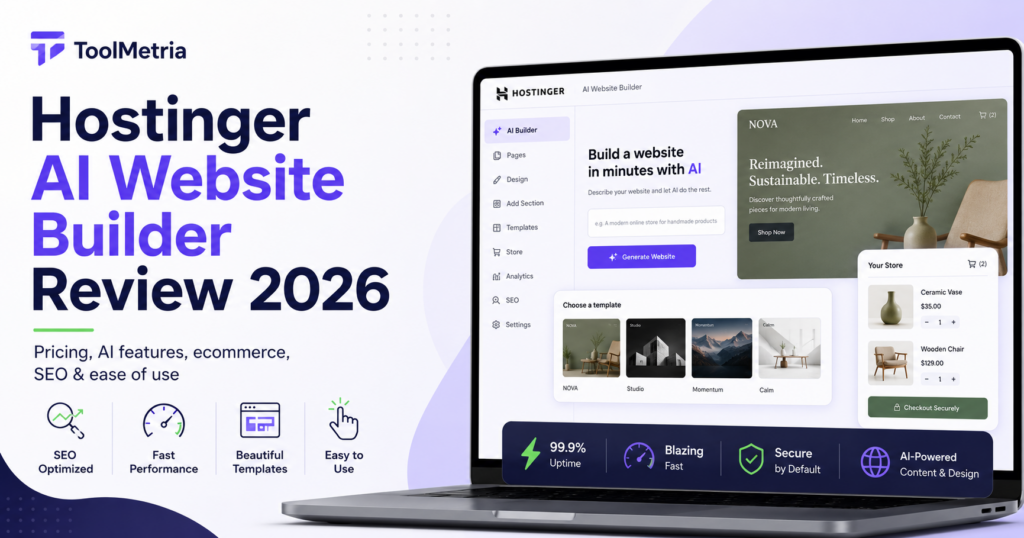
Hostinger has spent the last few years moving well beyond basic shared hosting. In 2026, its AI Website Builder is positioned as an all-in-one way to go from an idea to a published site without separately choosing hosting, installing a CMS, or starting from a blank template.
That simplicity is the main reason Hostinger is interesting. The platform currently combines AI-generated site creation, drag-and-drop editing, a prompt-driven “vibe coding” workflow for more complex projects, hosting, a domain on eligible plans, SSL, ecommerce tools, and built-in SEO features in one product.
But low introductory pricing and a fast setup do not automatically make it the right builder for everyone. Renewal prices are much higher than the initial promotional rates, AI usage is credit-based, and users who want the deepest visual control may prefer platforms such as Framer or Webflow.
This Hostinger AI Website Builder review looks at the current product, pricing, AI workflow, editing experience, ecommerce features, SEO tools, limitations, and the types of users it makes the most sense for in 2026.
Hostinger AI Website Builder Review: Quick Verdict
For beginners, freelancers, local businesses, portfolios, and small companies that want a site online quickly, Hostinger is one of the strongest value-focused AI website builders available in 2026.
Its biggest advantage is not one individual AI feature. It is the fact that so much of the website stack is bundled together. You can describe the site you want, generate a starting point, edit it visually, connect a domain, and publish without having to assemble several different services.
We would be more cautious if your priorities are highly custom visual design, complex editorial workflows, or maximum portability. In those cases, Framer, Webflow, or self-hosted WordPress may provide more long-term flexibility.
ToolMetria testing note: This review is based on Hostinger’s current product documentation, pricing, and feature set. We will add a full ToolMetria Score after completing a standardized hands-on website build using the same test brief we use for competing builders.
Hostinger AI Website Builder at a glance
| Area | ToolMetria view |
|---|---|
| Best for | Beginners, freelancers, local businesses, simple ecommerce |
| AI setup | Prompt-generated site plus conversational building options |
| Editing | Drag-and-drop for standard sites; AI-driven workflow for more complex projects |
| Hosting | Included |
| Domain | Included for the first year on eligible plans |
| Ecommerce | Available on higher plans, with 0% platform transaction fees |
| SEO | Built-in SEO tools and AI-assisted optimization features |
| Main strength | Value and simplicity |
| Main drawback | Renewal pricing and less granular design control than specialist design platforms |
How Hostinger’s AI website building works
Hostinger currently offers two different AI-led approaches to creating a website.
1. AI generation with drag-and-drop editing
This is the most familiar option. You describe the website you want, Hostinger generates an initial version, and you continue editing it visually.
For a straightforward project — a consultant site, portfolio, restaurant, local service business, personal brand, or small company site — this workflow is likely to make the most sense. You get the speed of AI generation without giving up the ability to adjust layouts, colors, fonts, images, and content manually.
Hostinger also offers hundreds of templates, so AI is not the only way to start.
2. Prompt-based “vibe coding”
For more complex projects, Hostinger also offers a conversational building workflow where creation and customization happen through AI prompts. Hostinger positions this approach for projects such as larger ecommerce stores, membership sites, learning platforms, portals, booking systems, and interactive web applications.
The idea is that instead of manually arranging every element, you describe what you want in natural language and let the system generate the result.
One limitation is worth knowing before you start: Hostinger says you cannot switch an existing project from one building approach to the other halfway through. You can start a new project using the alternative workflow, but the decision still matters at the beginning.
Ease of use
Ease of use is probably Hostinger’s strongest selling point.
The platform is designed around reducing the number of decisions a beginner has to make before a site exists. Hosting is already there. SSL is handled. A domain can be included. The builder is integrated. AI can create a starting point. Publishing is handled from the same ecosystem.
That is fundamentally different from a self-hosted WordPress setup, where a user may need to choose hosting, install WordPress, pick a theme, add plugins, configure caching, and connect several tools before focusing on the actual website.
For experienced developers, that extra control may be a benefit. For someone trying to launch a five-page business website this weekend, it can simply be friction.
AI tools and content creation
Hostinger’s current website plans include AI credits that can be used for site-building features. The exact number depends on the plan.
Beyond the initial site generation, Hostinger also promotes AI-assisted tools for tasks such as:
- writing and editing website copy;
- generating images;
- creating blog content;
- generating product descriptions;
- creating logos;
- assisting with SEO;
- managing parts of the website through its Kodee assistant.
The useful distinction here is between AI as a starting point and AI as an ongoing workflow. Hostinger is increasingly trying to cover both.
For ToolMetria, the more important question is whether those AI features still leave the user with enough control to correct the result. Generated copy, images, and layouts should always be treated as drafts rather than unquestioned final output.
Design and customization
Hostinger is not trying to be Framer.
That is not necessarily a criticism. Its editor is designed to be approachable and practical, with drag-and-drop controls that let non-designers change the generated site without learning a professional design system.
For standard business websites, that is likely to be enough. You can adjust layout, colors, typography, images, content, and page sections while keeping the workflow relatively simple.
Where Hostinger becomes less compelling is for users who enjoy fine-grained control over responsive behavior, advanced animation, detailed component systems, or highly custom design interactions. Those are areas where platforms such as Framer and Webflow are more naturally positioned.
If you are choosing between several builders, read our broader guide to the best AI website builders in 2026.
Hostinger pricing in 2026
At the time of writing, Hostinger’s US website lists promotional pricing starting at $2.99 per month for the Premium plan when purchased on a long initial term. The same page lists the Unlimited plan from $3.79 per month and Cloud Startup from $7.99 per month.
The headline price is only part of the story.
| Plan | Promotional price* | Published renewal price* | Typical fit |
|---|---|---|---|
| Premium | $2.99/mo | $10.99/mo | Personal sites and small businesses |
| Unlimited | $3.79/mo | $16.99/mo | Growing businesses and ecommerce |
| Cloud Startup | $7.99/mo | $25.99/mo | Higher-traffic and larger projects |
*Prices can change by market, promotion, tax, and contract length. Always check Hostinger’s current checkout price before buying.
This is one of the most important parts of the review: Hostinger is very inexpensive during the initial promotional term, but the published renewal prices are substantially higher.
That does not automatically make it poor value. It simply means a fair comparison should use the long-term cost rather than only the number shown in the biggest font on the landing page.
What is included?
Hostinger’s current plans combine more than just the page builder.
Depending on the plan and contract, features can include:
- web hosting;
- a custom domain free for the first year on eligible plans;
- SSL certificates;
- email mailboxes;
- AI website-building credits;
- templates;
- SEO tools;
- 24/7 support;
- ecommerce functionality on higher plans;
- AI agents and additional AI credits on higher tiers.
This bundled approach is one of the reasons Hostinger can be attractive to new business owners. Instead of comparing six separate subscriptions, you can start with one platform.
Ecommerce features
Hostinger supports online selling on its higher website-builder plans.
Its current ecommerce offering includes support for physical products, digital downloads, and services, as well as more than 100 payment methods. Hostinger also advertises 0% platform transaction fees, although payment processors can still charge their own processing fees.
For small stores, that is a compelling proposition.
However, “supports ecommerce” and “best ecommerce platform” are not the same thing. A business with a large catalog, complicated international tax requirements, advanced inventory operations, or a deep app ecosystem may still prefer a platform built primarily around commerce.
For a creator, consultant, restaurant, or small business adding a modest store to an existing website, Hostinger’s integrated approach is much easier to justify.
SEO features
Hostinger includes built-in SEO tools and has continued adding AI-assisted optimization features to its website-builder ecosystem.
For most small-business sites, the important SEO requirements are relatively straightforward:
- editable page titles and meta descriptions;
- clean URLs;
- mobile-friendly layouts;
- image alt text;
- fast hosting;
- SSL;
- indexing controls;
- basic structured content and site organization.
A website builder does not rank simply because it has an “AI SEO” button. Search performance still depends on useful content, search intent, authority, internal linking, site architecture, and competition.
Hostinger’s advantage is that a beginner does not have to assemble the technical basics from several plugins and services before starting.
Performance and hosting
Because Hostinger is also the hosting provider, the builder and infrastructure are managed within the same ecosystem.
This reduces setup complexity and means users do not have to separately configure hosting for a generated site.
Performance can still vary depending on page complexity, image sizes, third-party scripts, traffic, and the plan being used. The fact that hosting is integrated should be treated as a convenience advantage, not as a guarantee that every site will automatically achieve perfect Core Web Vitals.
Hostinger AI Website Builder: pros and cons
Pros
- Very competitive introductory pricing.
- Hosting, SSL, and website building are integrated.
- Beginner-friendly AI generation.
- Drag-and-drop editing after generation.
- Prompt-based building for more complex projects.
- Ecommerce available without Hostinger platform transaction fees.
- Built-in SEO and marketing tools.
- Good fit for small businesses that do not want to manage a technical stack.
Cons
- Renewal prices are much higher than promotional prices.
- AI usage is credit-based.
- You cannot switch the same project between the two AI-building approaches midway through.
- Advanced designers may prefer Framer or Webflow.
- All-in-one simplicity also means greater dependence on one platform.
Who should use Hostinger AI Website Builder?
Hostinger makes the most sense for users who care more about getting a good website online efficiently than about controlling every technical detail behind it.
We would shortlist it for:
- freelancers;
- consultants;
- local service businesses;
- restaurants;
- small ecommerce projects;
- portfolio sites;
- personal brands;
- small companies launching their first site;
- users who find self-hosted WordPress unnecessarily complicated.
Who should probably choose something else?
Hostinger is less obvious for users who need:
- advanced visual design systems;
- highly customized responsive interactions;
- a large plugin ecosystem;
- complex content publishing workflows;
- maximum hosting portability;
- enterprise-level ecommerce specialization.
Framer is particularly attractive for design-focused sites, while Webflow offers a more advanced visual-development environment. Self-hosted WordPress remains difficult to beat when ownership, plugins, publishing flexibility, and hosting freedom are the main priorities.
Hostinger vs Wix: which is better?
For most beginners, both are strong choices, but they emphasize different strengths.
Choose Hostinger if keeping the initial cost low and simplifying hosting are priorities.
Choose Wix if you want a broader all-in-one business ecosystem and a more established visual website-building environment.
We will cover this comparison in a dedicated ToolMetria article because pricing, ecommerce, design control, and AI workflows deserve a side-by-side test rather than a one-paragraph verdict.
Hostinger vs Framer: which is better?
The difference is clearer here.
Hostinger is the easier recommendation for a beginner who wants a practical business website with minimal setup.
Framer is the more interesting option for someone who cares deeply about visual design, modern landing pages, animation, and creative control.
Neither is universally better. They solve slightly different problems.
Frequently asked questions
Is Hostinger AI Website Builder good for beginners?
Yes. Beginner friendliness is one of its strongest advantages. Hosting, site generation, editing, SSL, and publishing are handled within the same ecosystem, reducing the amount of technical setup required.
How much does Hostinger AI Website Builder cost?
At the time of writing, Hostinger’s US site lists introductory website-builder pricing from $2.99 per month on a long-term Premium plan. Published renewal prices are higher, so compare the full contract cost rather than only the promotional monthly figure.
Can Hostinger AI build an online store?
Yes. Higher plans include ecommerce functionality for physical products, digital products, and services. Hostinger currently advertises 0% platform transaction fees, although payment processors may still charge processing fees.
Can I edit the website after AI creates it?
Yes. Hostinger’s standard AI workflow generates a starting site that can then be adjusted with visual drag-and-drop editing.
Can I move a Hostinger website to WordPress later?
You should not assume that moving a site-builder project to a different platform will be a one-click process. If long-term portability is a major requirement, evaluate that before building a large site inside any proprietary website-builder ecosystem.
Final verdict
Hostinger AI Website Builder is one of the easiest products to recommend to someone who wants to launch a credible website without turning website creation into a technical project.
Its combination of AI generation, visual editing, integrated hosting, domain options, ecommerce, SEO tools, and aggressive introductory pricing creates a strong value proposition.
The trade-off is straightforward: you get simplicity by accepting more dependence on Hostinger’s ecosystem, and the long-term price is considerably higher than the promotional headline rate. Overall, our Hostinger AI Website Builder review shows why the platform is particularly compelling for beginners and small businesses.
For a freelancer, local business, consultant, or small company starting from zero, that trade-off may be completely reasonable.
ToolMetria preliminary verdict: Hostinger belongs on the shortlist for value-focused AI website building in 2026. We will update this review with a numerical ToolMetria Score after completing our standardized hands-on build test.
Next: Compare Hostinger with the rest of our picks in Best AI Website Builders in 2026.