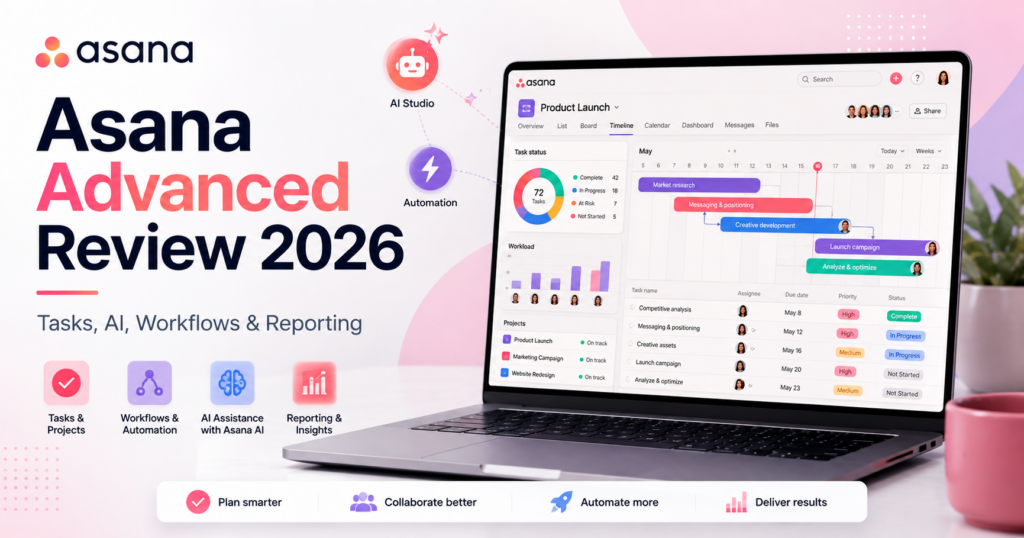
Asana has spent years building one of the most structured work-management platforms for teams, but 2026 is the year the product is becoming significantly more agentic.
Asana Advanced combines traditional portfolio and project management with goals, resource management, approvals, time tracking, formulas and integrations. On top of that foundation, Asana is adding AI Studio, AI Teammates, Asana Dash and AI connectors designed to let agents work directly inside team workflows.
The current Asana Advanced plan costs $24.99 per user per month when billed annually or $30.49 per user per month when billed monthly.
Advanced also includes AI Studio Basic with 75,000 credits per billing account per month. Higher AI Studio tiers are sold separately, while AI Teammates are available as an add-on to paid Asana plans.
In this Asana Advanced review, we examine pricing, portfolios, goals, resource management, approvals, time tracking, AI Studio, AI Teammates, Asana Dash, integrations, forms, reporting, security, use cases and how Asana compares with monday.com, ClickUp and Airtable in 2026.
ToolMetria testing status: This review uses Asana’s current August 2026 pricing and official product documentation. We will add a numerical ToolMetria Score after completing a standardized hands-on business-software benchmark.
Asana Advanced Review: Quick Verdict
Asana Advanced is one of the strongest choices for companies that need structured cross-functional project management, portfolio visibility and goal alignment.
Its biggest strengths are:
- unlimited portfolios;
- Goals;
- resource management;
- approvals and proofing;
- native time tracking;
- form branching and customization;
- formulas;
- more than 100 integrations;
- AI Studio Basic with 75,000 monthly credits per billing account;
- AI Teammates available as an add-on;
- Asana Dash and AI connectors as part of Asana’s broader agentic direction;
- excellent fit for PMO, marketing, operations and cross-functional work.
The biggest drawback is price.
At $24.99 per user per month annually, Advanced is more expensive than ClickUp Business and monday.com Pro.
Asana is most compelling when the company actually needs portfolio management, goals, resource planning and structured cross-team workflows rather than a simple task manager.
Read our monday.com Pro Review and ClickUp Business Review.
Asana Advanced at a Glance
| Area | ToolMetria view |
|---|---|
| Best for | PMO, operations, marketing, product and cross-functional portfolio management |
| Personal | $0 |
| Starter | $10.99/user/month annually |
| Advanced | $24.99/user/month annually |
| Advanced monthly | $30.49/user/month |
| Enterprise | Custom pricing |
| AI Studio Basic | 75,000 credits/billing account/month on Advanced |
| Portfolios | Unlimited |
| Goals | Included |
| Resource management | Included |
| Approvals | Included |
| Time tracking | Included |
| AI agents | AI Teammates add-on |
| Main strength | Structured portfolio and strategic work management |
| Main drawback | Higher per-user cost than several rivals |
What Is Asana?
Asana is a work-management platform designed to coordinate tasks, projects and goals across teams.
Its core structure includes:
- tasks;
- subtasks;
- projects;
- portfolios;
- goals;
- custom fields;
- forms;
- rules;
- dashboards;
- approvals;
- resource management.
The key advantage is that individual tasks can be connected to larger projects, portfolios and company goals.
Asana Pricing in 2026
| Plan | Current annual price | Main fit |
|---|---|---|
| Personal | $0 | Individuals and small personal projects |
| Starter | $10.99/user/month | Growing teams managing projects |
| Advanced | $24.99/user/month | Cross-functional portfolios, goals and resource management |
| Enterprise | Contact sales | Large organizations and governance |
| Enterprise+ | Contact sales | Advanced compliance and security requirements |
Advanced currently costs $30.49 per user per month when billed monthly.
Why Advanced Exists
Starter is enough for teams that mainly need project management.
Advanced is designed for companies that need to manage multiple projects and business objectives across departments.
It adds capabilities such as:
- unlimited portfolios;
- Goals;
- resource management;
- approvals and proofing;
- advanced reporting;
- time tracking;
- form branching;
- form customization;
- formulas;
- support for Salesforce, Tableau and Power BI integrations;
- AI Studio Basic with a larger credit allocation.
Unlimited Portfolios
Portfolios let managers group several projects into one higher-level view.
A portfolio can be used to track:
- project status;
- owners;
- risk;
- dates;
- progress;
- custom metrics.
This is especially useful for PMO, marketing operations, product portfolios and company initiatives.
Goals
Asana Goals connects day-to-day work with strategic objectives.
A company can create:
- company goals;
- department goals;
- team goals;
- measurable targets.
Projects can then be connected to those goals.
This helps answer an important question:
Are our projects actually moving the company toward its objectives?
Resource Management
Advanced includes resource-management functionality.
Managers can use it to understand:
- who is overloaded;
- who has capacity;
- where work is concentrated;
- which programs are at risk.
Asana also offers a separate Timesheets and Budgets add-on for deeper resource, cost and revenue analysis.
Approvals and Proofing
Advanced includes approvals and proofing.
Teams can create approval steps for:
- creative assets;
- documents;
- campaigns;
- requests;
- project deliverables.
Reviewers can comment directly on visual assets and PDFs.
This is particularly useful for creative and marketing operations.
Native Time Tracking
Advanced includes time tracking.
Teams can compare:
- estimated time;
- actual time;
- task effort;
- project effort.
This helps with planning, budgeting and future workload estimates.
Form Branching
Advanced expands Asana Forms with branching and additional customization.
A form can show different questions depending on previous answers.
For example:
If request type = Design → ask for format, dimensions and brand assets.
If request type = Copywriting → ask for audience, channel and word count.
This makes forms more useful as structured intake systems.
Formulas
Advanced includes formula custom fields.
Formulas can calculate values such as:
- project duration;
- budget totals;
- cost estimates;
- calculated scores.
This brings more structured operational logic into project data.
Reporting
Advanced is designed for multi-project reporting.
Managers can use dashboards and portfolio views to track:
- status;
- progress;
- risk;
- workload;
- custom metrics;
- goal progress.
AI Studio Basic
AI Studio is Asana’s no-code AI workflow builder.
AI Studio Basic is included on all paid plans.
Advanced currently receives 75,000 AI Studio Basic credits per billing account per month.
That is more than Starter’s current 50,000-credit allowance.
What Can AI Studio Do?
AI Studio can create AI-powered workflow logic for tasks such as:
- validating request completeness;
- detecting duplicates;
- classifying work;
- scoring requests;
- routing work;
- identifying risks;
- creating summaries;
- researching internal documents and the web;
- generating briefs;
- translating content;
- triggering connected tools.
No-Code AI Workflows
The builder is designed so teams can describe the workflow they want without writing code.
A smart workflow can combine:
- traditional Asana rules;
- AI conditions;
- AI actions;
- human approvals;
- external data.
This is a strong architecture because not every workflow decision needs an autonomous agent.
AI Studio Plus
Teams that exceed Basic limits can purchase AI Studio Plus.
Asana currently lists Plus at:
- $135 per billing account per month when billed annually;
- $150 per billing account per month when billed monthly.
Plus currently includes 100,000 credits per month.
AI Studio Pro
AI Studio Pro is aimed at complex business operations and uses sales-led pricing.
Asana currently lists:
- 5 million credits per quarter;
- scaled security and compliance;
- web search and research;
- advanced billing controls;
- implementation services available for purchase.
AI Teammates
AI Teammates are Asana’s collaborative AI agents.
They are designed to work inside real team workflows rather than only respond to isolated prompts.
Asana currently promotes 30 prebuilt AI Teammates for areas such as:
- marketing;
- operations;
- PMO;
- IT;
- product;
- engineering.
Examples of AI Teammates
Current roles include agents such as:
- Campaign Brief Writer;
- Brand Auditor;
- Launch Planner;
- IT Support Specialist;
- Trend Analyst;
- Compliance Specialist.
AI Teammates Are an Add-On
This is an important pricing distinction.
AI Teammates are available as an add-on to Starter, Advanced, Enterprise and Enterprise+.
They should not be treated as fully bundled into the $24.99 Advanced seat price.
Companies should request current pricing from Asana before calculating total cost.
Build Your Own AI Teammate
Asana lets teams create custom AI Teammates without coding.
A builder can define:
- role;
- responsibilities;
- context;
- permissions;
- connected tools.
The agent can then operate inside team projects.
Shared Memory and Work Graph Context
AI Teammates use Asana’s Work Graph as context.
This matters because the agent can understand relationships between:
- tasks;
- projects;
- portfolios;
- goals;
- people;
- decisions.
Asana positions this shared business context as a key difference from individual AI chatbots.
Human Checkpoints and Auditability
AI Teammates are designed to keep teams in the loop.
Asana emphasizes:
- checkpoints;
- permissions;
- audit trails;
- reversible actions;
- controlled access.
This makes the agent layer more appropriate for team workflows where transparency matters.
Asana Dash
Asana Dash is Asana’s proactive AI productivity assistant.
Rather than waiting for a prompt, Dash is designed to surface:
- blocked work;
- pending decisions;
- important priorities;
- recommended next actions.
Asana says Dash can also recommend the right AI Teammate to help move blocked work forward.
AI Connectors
Asana’s 2026 strategy also includes connectors that link external AI tools back into structured Asana work.
Asana says teams can initiate workstreams from conversations in tools such as:
- Claude;
- ChatGPT;
- Gemini.
From those AI tools, teams can create structured projects, assign work, monitor initiatives and flag risks inside Asana.
MCP and Agentic Work Management
Asana increasingly describes its AI direction as Agentic Work Management.
The broader layer combines:
- AI Teammates;
- AI Studio;
- Asana Dash;
- AI connectors;
- MCP connectivity.
The strategic idea is that AI should operate on structured company work rather than remain isolated in chat windows.
100+ Integrations
Advanced includes access to more than 100 integrations.
Examples include:
- Slack;
- Google Drive;
- Zoom;
- Salesforce;
- Tableau;
- Power BI;
- Microsoft ecosystem tools;
- developer tools.
Salesforce, Tableau and Power BI
Advanced specifically expands support for tools such as Salesforce, Tableau and Power BI.
This is useful when project and portfolio information needs to interact with:
- CRM data;
- business intelligence;
- executive reporting.
Asana for Marketing
Marketing is one of Asana’s strongest use cases.
Teams can manage:
- campaigns;
- creative production;
- content calendars;
- approvals;
- launches;
- requests;
- agency collaboration.
AI Teammates such as Campaign Brief Writer and Brand Auditor make the marketing use case even more interesting.
Asana for Operations
Operations teams can use Asana Advanced for:
- intake;
- onboarding;
- process management;
- vendor workflows;
- cross-functional initiatives;
- resource planning;
- portfolio visibility.
Asana for PMO
PMO is arguably the best Advanced-plan use case.
Advanced combines:
- portfolios;
- goals;
- resources;
- reporting;
- cross-project visibility;
- approvals;
- AI workflow automation.
Asana for Product Teams
Product teams can use Asana to coordinate:
- roadmaps;
- launches;
- cross-functional dependencies;
- research;
- design reviews;
- go-to-market execution.
Asana Advanced vs monday.com Pro
| Area | Asana Advanced | monday.com Pro |
|---|---|---|
| Annual price | $24.99/user | ~$19/seat |
| Portfolio management | Winner | Strong, broader Enterprise depth |
| Goals | Winner | Different workflow approach |
| Visual board flexibility | Strong | Winner |
| Automation volume | Rules + AI Studio | Winner for explicit 25k action allowance |
| AI agents | AI Teammates add-on | AI agent workforce |
| Best for | Structured cross-functional portfolio execution | Visual workflow management |
Read our monday.com Pro Review 2026.
Asana Advanced vs ClickUp Business
| Area | Asana Advanced | ClickUp Business |
|---|---|---|
| Annual price | $24.99/user | $12/user |
| Portfolio strategy | Winner | Strong |
| All-in-one breadth | Focused work management | Winner with Docs + Chat + broader feature set |
| Ease of structure | Cleaner conventions | More configurable |
| AI workflow layer | AI Studio + Teammates | Brain² + Super Agents |
| Best for | Structured PMO and cross-functional work | Highly configurable all-in-one work management |
Read our ClickUp Business Review 2026.
Asana Advanced vs Airtable Business
Airtable is stronger for relational operational data and custom internal apps.
Asana is stronger for conventional project execution, portfolios, goals and team coordination.
Read our Airtable Business Review 2026.
Asana vs Notion Business
Notion is stronger for documents, wikis and flexible knowledge management.
Asana is stronger for structured project execution, goals, portfolios and operational accountability.
Read our Notion Business Review.
Security and Privacy
Asana emphasizes that customer data is not used to train its AI models.
Its AI partners are also required to delete customer data after each query under Asana’s stated AI policies.
AI Teammates respect the same access controls applied to people and connected tools.
Enterprise and Enterprise+ add deeper security, administration and compliance features.
Pros and Cons
Pros
- Excellent portfolio management.
- Goals connect strategy to execution.
- Resource management included.
- Approvals and proofing.
- Native time tracking.
- Advanced Forms with branching.
- Formula fields.
- AI Studio Basic with 75,000 monthly credits per billing account.
- Powerful AI Teammates strategy.
- Asana Dash provides proactive AI assistance.
- Strong AI connectors and MCP direction.
- 100+ integrations.
Cons
- $24.99/user/month annually is expensive compared with ClickUp Business and monday Pro.
- AI Teammates are an additional add-on.
- AI Studio Plus also adds separate account-level cost.
- Less database-centric than Airtable.
- Less all-in-one than ClickUp if you want native chat and a very broad workspace.
- Some deeper enterprise governance requires Enterprise.
Who Should Use Asana Advanced?
We would shortlist Advanced for:
- PMO teams;
- marketing operations;
- product teams;
- business operations;
- cross-functional program management;
- companies managing many simultaneous initiatives;
- organizations that want goals tied directly to execution.
Who Should Probably Skip It?
Asana Advanced may not be the best fit when:
- the company only needs basic tasks and boards;
- the lowest per-seat price matters most;
- the organization primarily needs a database or internal app builder;
- the team wants chat, docs and project management bundled into one broad suite;
- portfolio and goal management are not important.
Which Asana Plan Should You Choose?
Personal
Choose Personal for individual use and lightweight projects.
Starter
Choose Starter when a growing team needs timelines, Gantt, forms, workflows and project-management structure without portfolio-level oversight.
Advanced
Choose Advanced when managers need portfolios, goals, resources, approvals, time tracking, formulas and stronger AI Studio capacity.
Enterprise
Choose Enterprise when security, administration, unlimited cross-department automation and enterprise governance become the main purchasing criteria.
Should You Buy AI Studio Plus?
Do not buy AI Studio Plus immediately.
Advanced already includes AI Studio Basic with 75,000 monthly credits per billing account.
Use those credits to identify:
- high-value AI workflows;
- credit consumption;
- time saved;
- quality improvements.
Upgrade to Plus only if Basic’s limits materially constrain useful production workflows.
Should You Add AI Teammates?
AI Teammates make the most sense when there is a repeatable collaborative role with enough work to justify an agent.
Good candidates include:
- campaign brief creation;
- brand review;
- launch planning;
- IT support;
- compliance review;
- portfolio reporting.
Measure the result against a human workflow before rolling agents out broadly.
How We Would Start with Asana Advanced
- Create one portfolio.
- Connect it to one or two goals.
- Standardize project templates.
- Create a structured intake form.
- Add approvals where they genuinely matter.
- Use workload to identify bottlenecks.
- Enable AI Studio Basic.
- Automate one repetitive intake or routing workflow.
- Test one AI Teammate role before adding several.
- Track portfolio-level reporting before expanding Asana across more departments.
What ToolMetria Will Test Hands-On
Our standardized Asana Advanced benchmark will measure:
- workspace setup;
- project creation;
- portfolios;
- Goals;
- resource management;
- approvals;
- forms and branching;
- time tracking;
- reporting;
- AI Studio;
- AI credit usage;
- AI Teammate setup;
- integrations;
- overall value.
Frequently Asked Questions
How much does Asana Advanced cost in 2026?
Asana Advanced currently costs $24.99 per user per month when billed annually or $30.49 per user per month when billed monthly.
Does Asana Advanced include AI?
Yes. Advanced includes AI Studio Basic with 75,000 credits per billing account per month.
How much does AI Studio Plus cost?
Asana currently lists AI Studio Plus at $135 per billing account per month when billed annually or $150 when billed monthly, including 100,000 credits per month.
Are AI Teammates included in Asana Advanced?
No. AI Teammates are currently offered as an add-on to Starter, Advanced, Enterprise and Enterprise+.
How many AI Teammates does Asana offer?
Asana currently promotes 30 prebuilt AI Teammates across areas such as marketing, operations, IT, product and engineering, while also allowing teams to build custom agents.
What is Asana Dash?
Asana Dash is a proactive AI assistant that surfaces blocked work, pending decisions, priorities and recommended next actions.
Does Asana Advanced include portfolios?
Yes. Advanced includes unlimited portfolios.
Does Asana Advanced include Goals?
Yes. Goals are one of the major differences between Advanced and Starter.
Is Asana Advanced better than monday Pro?
Asana Advanced is stronger for structured portfolios, goals and cross-functional program management. monday Pro is generally stronger for visual board flexibility and high-volume native automation.
Is Asana Advanced better than ClickUp Business?
Asana offers a cleaner and more structured approach to strategic project management. ClickUp Business is substantially cheaper and provides a broader all-in-one workspace with Docs, Chat and heavy customization.
Final Verdict
Asana Advanced is expensive compared with several popular work-management competitors.
But it also has one of the clearest strategic-work architectures.
Tasks roll into projects.
Projects roll into portfolios.
Portfolios connect to goals.
Resource management shows whether the organization has capacity to execute.
AI Studio automates routine workflow decisions.
AI Teammates are being designed to take on collaborative roles inside those workflows.
Asana Dash adds proactive guidance.
For companies that need serious cross-functional program management rather than a generic task board, Asana Advanced is one of ToolMetria’s strongest Business Software candidates for 2026.
ToolMetria preliminary verdict: Best candidate for strategic portfolio management and structured cross-functional execution with an increasingly strong agentic AI layer. Final score pending standardized hands-on testing.