monday.com has evolved far beyond a colorful project-management board.
In 2026, monday is positioning itself as an AI Work Platform where people and AI agents can manage projects, operations, workflows and business apps together.
The current monday.com Pro plan is particularly interesting because it combines serious work-management functionality with a much larger automation allowance than Standard, private boards, advanced views, time tracking, advanced columns, API access and a full set of AI tools.
monday currently lists Pro at approximately $19 per seat per month when billed annually. Pro also includes 25,000 automation actions per month, 25,000 integration actions per month, up to 20 workflows, 10,000 API calls per day and a Premium AI package with 3,000 AI credits per month under the current pricing structure.
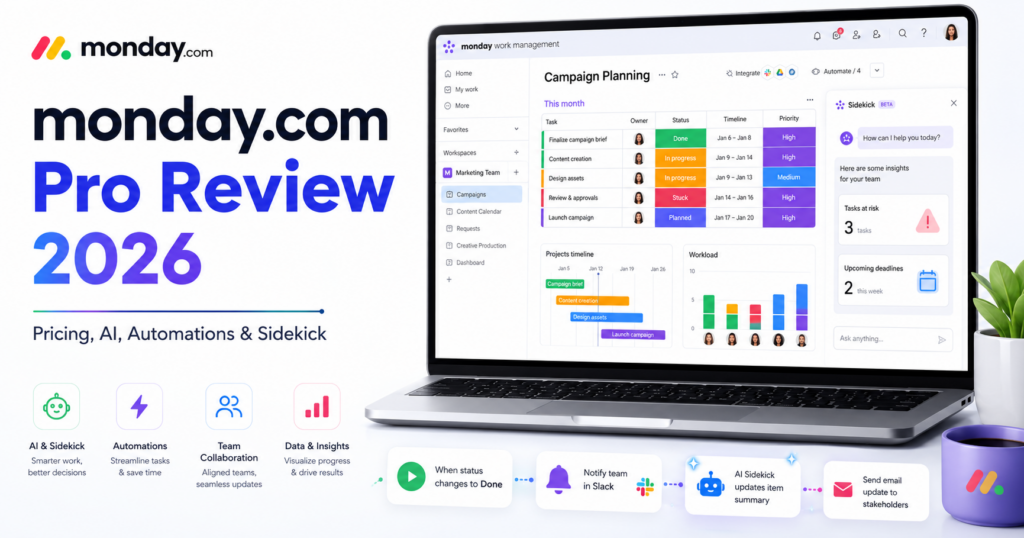
The AI layer now includes an AI agent workforce, AI meeting notetaker, Sidekick, Vibe, AI columns and an AI workflow builder.
In this monday.com Pro review, we examine pricing, boards, workflows, automations, integrations, dashboards, AI agents, Sidekick, Vibe, time tracking, API limits, security, use cases and how monday Pro compares with ClickUp Business, Airtable Business and other business software in 2026.
ToolMetria testing status: This review uses monday.com’s current August 2026 pricing and official support documentation. We will add a numerical ToolMetria Score after completing a standardized hands-on business-software benchmark.
monday.com Pro Review: Quick Verdict
monday.com Pro is one of the strongest work-management plans for teams that want visual project tracking, powerful automation and increasingly capable AI in the same platform.
Its biggest strengths are:
- visual and approachable work-management interface;
- 25,000 automations per month;
- 25,000 integration actions per month;
- 20 workflows;
- 3,000 AI credits per month under the current Pro AI package;
- AI agent workforce;
- AI meeting notetaker;
- Sidekick AI assistant;
- Vibe app builder;
- AI columns;
- AI workflow builder;
- private boards and docs;
- time tracking;
- advanced board views;
- 10,000 API calls per day.
The main drawback is product and pricing complexity.
monday now sells several distinct products — including Work Management, CRM, dev and service — and AI usage is increasingly tied to credits. Buyers need to make sure they are comparing the correct monday product and plan.
For a more all-in-one alternative with Docs, Chat and deeper native project structure, read our ClickUp Business Review.
monday.com Pro at a Glance
| Area | ToolMetria view |
|---|---|
| Best for | Cross-functional teams, project management, operations, marketing and PMO |
| Free | $0 for up to 2 seats |
| Basic | Approx. $9/seat/month annually |
| Standard | Approx. $12/seat/month annually |
| Pro | Approx. $19/seat/month annually |
| Enterprise | Custom pricing |
| Pro workflows | 20 |
| Pro automations | 25,000 actions/month |
| Pro integrations | 25,000 actions/month |
| Pro AI credits | 3,000/month under current pricing package |
| Pro API calls | 10,000/day |
| Main AI assistant | Sidekick |
| AI agents | AI agent workforce |
| App builder | Vibe |
| Main strength | Visual work management + strong automation |
| Main drawback | Plan/product/AI-credit complexity |
What Is monday.com?
monday.com is a work-management platform built around customizable boards.
Teams can use boards to manage:
- projects;
- tasks;
- clients;
- campaigns;
- requests;
- operations;
- product work;
- workflows.
Data is structured into rows called items and customizable columns.
monday Is Now an AI Work Platform
monday’s 2026 positioning goes beyond work tracking.
The platform is increasingly built around the idea that people and AI agents should operate in the same work system.
AI capabilities now sit alongside:
- boards;
- workflows;
- automations;
- integrations;
- dashboards;
- workdocs;
- custom business apps.
monday.com Pricing in 2026
Current Work Management pricing is approximately:
| Plan | Annual price | Main fit |
|---|---|---|
| Free | $0 | Individuals and tiny teams |
| Basic | ~$9/seat/month | Simple team work tracking |
| Standard | ~$12/seat/month | Collaboration and light automation |
| Pro | ~$19/seat/month | Advanced workflows, automation and AI |
| Enterprise | Custom | Large organizations and governance |
monday notes that final pricing depends on billing country, team size and taxes.
Why Pro Is the Most Interesting Plan
Standard is enough for basic collaboration, but its automation and integration allowances are limited.
Pro increases those allowances dramatically.
Compared with Standard, Pro adds or expands:
- 25,000 automations per month;
- 25,000 integration actions per month;
- 20 workflows;
- private boards and docs;
- advanced board views;
- time tracking;
- advanced columns;
- 10,000 API calls per day;
- Premium AI tools.
20 Workflows
monday Pro currently includes up to 20 workflows.
Workflows are higher-level orchestration layers that can connect:
- boards;
- conditions;
- automations;
- AI;
- agents;
- external integrations.
This is different from a simple board automation.
A workflow can coordinate several parts of a business process.
25,000 Automations Per Month
Pro currently includes 25,000 automation actions per month.
This is a huge increase over Standard, which currently includes 250.
Examples include:
- when status changes, assign a manager;
- when deadline passes, notify the owner;
- when form submission arrives, create and route work;
- when a project reaches a milestone, update dependent items;
- when conditions match, trigger a follow-up process.
25,000 Integration Actions Per Month
Pro also includes 25,000 integration actions per month.
Integrations can connect monday with services such as:
- Slack;
- Microsoft Teams;
- Gmail;
- Outlook;
- Google Drive;
- Zoom;
- Excel;
- Jira Cloud;
- GitHub;
- other business tools.
monday says it supports more than 200 integrations across collaboration, development, CRM, finance and reporting.
How Automation Actions Are Counted
monday measures automations and integrations in terms of actions.
A high-volume workflow can therefore consume many actions even if it is configured as one automation recipe.
This makes usage monitoring important for:
- email integrations;
- large recurring processes;
- CRM synchronization;
- high-frequency notifications.
AI Credits on Pro
Under monday’s current AI Work Platform pricing, Pro includes a Premium AI package with 3,000 AI credits per month.
Additional AI credits can be purchased.
AI credits power several different tools, which means teams should measure the value of AI usage rather than assuming all AI interactions are unlimited.
AI Agent Workforce
monday now includes an AI agent workforce.
Agents are intended to take on specialized business tasks across different functions.
Potential use cases include:
- operations;
- project updates;
- sales support;
- marketing workflows;
- service work;
- data processing.
The strategic advantage is that agents operate within the same monday context as boards, workflows and work items.
Sidekick AI Assistant
Sidekick is monday’s context-aware AI assistant.
It is designed to understand, connect and run work.
Potential use cases include:
- summarizing work;
- answering questions about boards;
- creating items;
- updating work;
- helping build workflows;
- finding relevant information.
Standard and Pro currently include Sidekick in a lighter package, while Enterprise provides Sidekick Plus.
AI Meeting Notetaker
Pro’s current Premium AI package also includes an AI meeting notetaker.
The tool is designed to:
- capture meetings;
- turn conversations into actionable information;
- reduce manual note taking;
- connect decisions back to work.
Vibe App Builder
Vibe is monday’s AI-powered business app builder.
The goal is to let users turn a business requirement into a custom application through natural-language instructions.
This moves monday closer to platforms such as Airtable and other no-code app builders.
Instead of only configuring boards manually, teams can use AI to accelerate app creation.
AI Columns
AI columns can run AI-powered work directly inside boards.
Potential uses include:
- classification;
- summarization;
- data extraction;
- content generation;
- record enrichment;
- routing.
This makes AI useful at scale because it can operate across many work items rather than only through one chat.
AI Workflow Builder
Pro includes an AI workflow builder.
The feature is intended to help users orchestrate workflows involving:
- boards;
- AI;
- agents;
- automations;
- integrations.
This is one of the most important changes in monday’s 2026 platform strategy.
Private Boards and Docs
Pro adds private boards and docs.
This matters when teams are managing:
- HR processes;
- finance;
- leadership work;
- sensitive client projects;
- confidential planning.
Advanced Board Views
Pro provides additional ways to visualize data through charts, graphs and advanced board views.
This can help teams understand:
- project progress;
- capacity;
- status distributions;
- performance;
- operational trends.
Time Tracking
Native time tracking is included in Pro.
This is particularly useful for:
- agencies;
- consultants;
- professional services;
- project profitability;
- capacity planning.
Advanced Columns
Pro adds advanced column functionality for more complex board logic.
This can include:
- dynamic dependencies;
- calculations;
- formula-style logic;
- more advanced data relationships.
10,000 API Calls Per Day
Pro currently allows approximately 10,000 API calls per day.
The API can be used by:
- custom apps;
- external agents;
- integration systems;
- internal tools;
- automation platforms.
Additional API capacity can be purchased when required.
Dashboards
Pro dashboards can combine information from up to 20 boards.
Dashboards can display:
- progress;
- workload;
- KPIs;
- project status;
- charts;
- operational metrics.
Boards and Items
Boards remain monday’s central data structure.
Items can represent:
- tasks;
- projects;
- customers;
- requests;
- campaigns;
- assets;
- tickets.
This flexibility makes monday useful across many departments.
Docs
monday Docs can be used for collaborative documentation tied to the workspace.
Examples include:
- project briefs;
- meeting notes;
- documentation;
- plans;
- team knowledge.
monday for Marketing
Marketing teams can use Pro for:
- campaign calendars;
- creative requests;
- approvals;
- content production;
- automated status updates;
- AI enrichment;
- reporting;
- cross-channel planning.
monday for Operations
Operations is one of monday’s strongest use cases.
Teams can manage:
- onboarding;
- requests;
- vendor workflows;
- approvals;
- recurring processes;
- service delivery;
- internal projects.
monday for PMO
Project Management Offices can use Pro for:
- multi-project tracking;
- dashboards;
- status reporting;
- automations;
- cross-functional coordination.
Enterprise becomes more compelling when portfolio and resource management must scale across a large organization.
monday for Agencies
Agencies can use monday for:
- client projects;
- campaign delivery;
- time tracking;
- dashboards;
- automations;
- forms;
- reporting.
monday Pro vs ClickUp Business
| Area | monday Pro | ClickUp Business |
|---|---|---|
| Annual price | ~$19/seat | $12/user |
| Ease of visual use | Winner | More feature-dense |
| Task/project depth | Strong | Winner |
| Automations | 25,000 actions/month | 5,000 automations/month |
| AI work platform | Very strong | Very strong with Brain² |
| Native Docs/Chat | Docs | Winner with Docs + Chat |
| Best for | Visual cross-functional workflows | All-in-one project/work management |
Read our ClickUp Business Review 2026.
monday Pro vs Airtable Business
Airtable is stronger for custom relational databases and internal app building.
monday is easier for conventional work management and project workflows.
Read our Airtable Business Review 2026.
monday Pro vs Notion Business
Notion remains stronger for documentation, knowledge bases and flexible wiki-style workspaces.
monday is stronger for visual workflows, operational boards and automation.
Read our Notion Business Review.
monday and Dedicated Automation Platforms
monday Pro has powerful native automation.
But platforms such as Make, n8n and Zapier remain more flexible for orchestration across many unrelated SaaS applications.
Read:
Enterprise
Enterprise expands the platform significantly.
Current capabilities include:
- 250 workflows;
- up to 250,000 automation actions;
- up to 250,000 integration actions;
- portfolio management;
- resource management;
- multi-level permissions;
- enterprise security and governance;
- 25,000 API calls per day;
- top-tier support;
- 99.9% uptime SLA;
- custom AI credits;
- Sidekick Plus.
Pros and Cons
Pros
- Very approachable visual interface.
- 25,000 monthly automation actions.
- 25,000 integration actions.
- 20 workflows.
- 3,000 AI credits on the current Pro package.
- AI agent workforce.
- Sidekick AI assistant.
- AI meeting notetaker.
- Vibe app builder.
- AI columns.
- AI workflow builder.
- Time tracking.
- Private boards and docs.
- 10,000 API calls per day.
Cons
- More expensive than ClickUp Business.
- AI credits introduce a separate usage constraint.
- monday now has several standalone product lines, which complicates purchasing.
- Standard’s 250-action automation limit is low, pushing serious users toward Pro.
- Advanced portfolio and resource management require Enterprise.
- Complex external automation may still require Make, Zapier or n8n.
Who Should Use monday.com Pro?
We would shortlist Pro for:
- marketing teams;
- operations teams;
- agencies;
- PMO teams;
- cross-functional departments;
- professional services;
- companies that value visual workflows;
- teams adopting AI agents inside work management.
Who Should Probably Skip It?
monday Pro may not be the best fit when:
- the company only needs a basic task manager;
- documentation and wiki content matter more than workflows;
- the organization wants the lowest possible per-seat cost;
- a highly relational internal database is the main requirement;
- the team primarily needs external automation rather than work management.
Which monday Plan Should You Choose?
Free
Choose Free for personal testing and very small teams.
Basic
Choose Basic when you mainly need unlimited work items and basic team organization.
Standard
Choose Standard when timeline, Gantt, calendar, guests and occasional automations are enough.
Pro
Choose Pro when monday becomes operational infrastructure and you need serious automation, AI, workflows, private boards, time tracking and stronger API capacity.
Enterprise
Choose Enterprise for portfolio management, resource management, governance, very high automation volume and enterprise-scale AI.
How We Would Start with monday Pro
- Build one team board.
- Create only the columns you genuinely need.
- Add one dashboard.
- Set up three automations.
- Measure automation actions for one month.
- Use workflows only for multi-board processes.
- Test Sidekick with real team data.
- Use AI columns on a small dataset before scaling.
- Track AI-credit consumption.
- Evaluate Vibe only when a custom app would clearly improve the process.
What ToolMetria Will Test Hands-On
Our standardized monday Pro benchmark will measure:
- workspace setup;
- board creation;
- views;
- dashboards;
- automations;
- integrations;
- workflow builder;
- Sidekick;
- AI columns;
- AI agent setup;
- Vibe;
- time tracking;
- API usage;
- AI-credit usage;
- overall value.
Frequently Asked Questions
How much does monday.com Pro cost in 2026?
monday currently lists Pro at approximately $19 per seat per month when billed annually, with final pricing depending on billing country, team size and taxes.
How many automations does monday Pro include?
Pro currently includes 25,000 automation actions per month.
How many integration actions does monday Pro include?
Pro currently includes 25,000 integration actions per month.
How many workflows does monday Pro include?
Pro currently includes 20 workflows.
How many AI credits does monday Pro include?
The current Premium AI package displayed for Pro includes 3,000 AI credits per month. Additional credits can be purchased.
What is monday Sidekick?
Sidekick is monday’s context-aware AI assistant designed to understand, connect and run work inside the monday platform.
Does monday have AI agents?
Yes. monday now promotes an AI agent workforce that can take on specialized tasks and support different business functions.
What is monday Vibe?
Vibe is monday’s AI-powered business app builder, designed to turn business requirements into custom software experiences using natural-language instructions.
Is monday Pro better than ClickUp Business?
monday Pro is generally easier visually and offers a very large automation allowance. ClickUp Business is cheaper and often provides deeper all-in-one project-management functionality.
Is monday Pro better than Airtable Business?
monday Pro is stronger for conventional work management and visual project workflows. Airtable Business is stronger for relational data, custom internal apps and database-centric operations.
Final Verdict
monday Pro is no longer just a premium project-management plan.
It is becoming the core tier of an AI-enabled work platform.
The combination of 25,000 automation actions, 25,000 integration actions, 20 workflows, AI agents, Sidekick, Vibe, AI columns and the AI workflow builder gives Pro a very broad feature set.
The trade-off is complexity around pricing, products and AI usage.
For companies that value visual work management and want AI embedded directly into operational workflows, monday.com Pro is one of ToolMetria’s strongest Business Software candidates for 2026.
ToolMetria preliminary verdict: Best candidate for visual cross-functional work management with high automation capacity and integrated AI. Final score pending standardized hands-on testing.