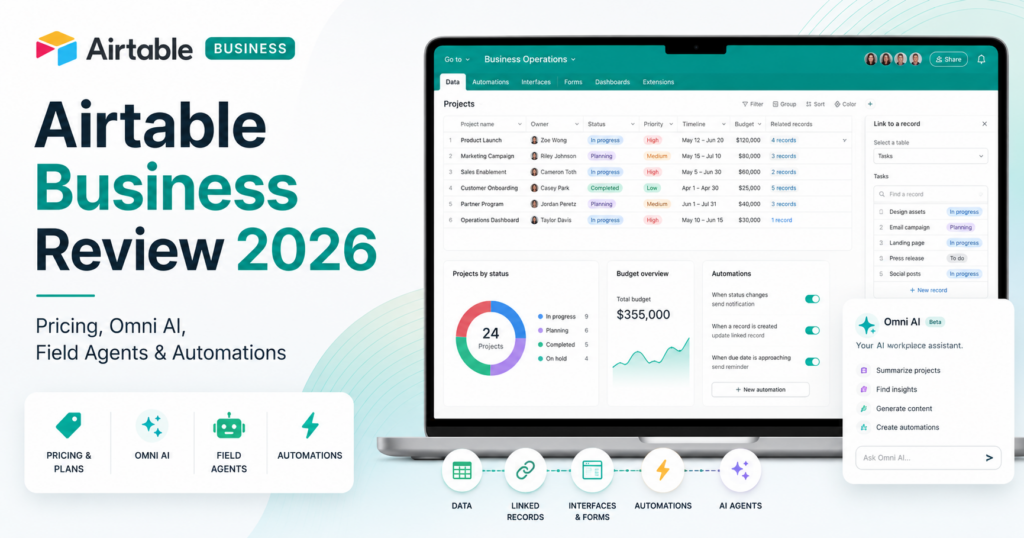
Airtable has changed dramatically in 2026.
It is no longer best understood as a spreadsheet-database hybrid.
Today, Airtable is positioning itself as an AI-native application platform where teams can build custom business apps, interfaces, automations and intelligent agents on top of structured operational data.
The company’s current AI layer includes Omni, which can build bases, interfaces and automations from natural language, and Field Agents, which can research, analyze and generate information directly inside Airtable records.
The current Airtable Business plan costs $45 per collaborator per month when billed annually or $54 per collaborator per month when billed monthly. It includes up to 125,000 records per base, unlimited API calls per workspace, 100 GB of attachment storage per base, two-way sync, an admin panel and 20,000 AI credits per paid user per month.
That makes Airtable Business significantly more expensive than many project-management products, but it is also solving a different problem. Airtable is strongest when a company wants to build its own structured operational software without hiring a development team for every internal workflow.
In this Airtable Business review, we examine pricing, records, interfaces, automations, Omni, Field Agents, AI credits, APIs, forms, sync, security, best use cases, limitations and how Airtable compares with ClickUp, Notion, Zapier and other business software in 2026.
ToolMetria testing status: This review uses Airtable’s current August 2026 pricing, product documentation and official AI announcements. We will add a numerical ToolMetria Score after completing a standardized hands-on business-software benchmark.
Airtable Business Review: Quick Verdict
Airtable Business is one of the strongest no-code platforms for companies that want to build custom operational apps around structured data.
Its biggest strengths are:
- flexible relational data model;
- custom interfaces;
- forms;
- automations;
- unlimited API calls on Business;
- two-way sync;
- 125,000 records per base;
- Omni AI;
- Field Agents;
- 20,000 AI credits per paid Business user;
- admin controls;
- excellent fit for workflows that do not fit traditional SaaS software.
The biggest drawback is price.
At $45 per paid collaborator per month annually, Airtable Business is materially more expensive than tools such as ClickUp Business, Notion Business or many automation platforms.
But if Airtable replaces a CRM, project database, content operations tool, inventory tracker and several spreadsheets, the economics can still make sense.
For a more conventional work-management platform, read our ClickUp Business Review.
Airtable Business at a Glance
| Area | ToolMetria view |
|---|---|
| Best for | Custom business apps, operations, product workflows, marketing ops and structured data |
| Free | $0 |
| Team | $20/collaborator/month annually |
| Business | $45/collaborator/month annually |
| Business monthly | $54/collaborator/month |
| Enterprise Scale | Custom pricing |
| Business records | 125,000 per base |
| API calls | Unlimited per workspace on Business |
| Attachment storage | 100 GB per base |
| History | 1 year revision/snapshot history |
| AI credits | 20,000 per paid Business user/month |
| AI assistant | Omni |
| AI fields | Field Agents |
| Main strength | Build custom operational systems without traditional development |
| Main drawback | High per-collaborator pricing |
What Is Airtable?
Airtable is a no-code application and database platform.
Its basic building blocks include:
- bases;
- tables;
- records;
- fields;
- views;
- interfaces;
- forms;
- automations;
- extensions;
- sync;
- AI agents.
The key advantage is that structured data can be turned into different business experiences without duplicating the underlying information.
Airtable Is More Than a Spreadsheet
Airtable looks familiar because grid view resembles a spreadsheet.
But the data model is much closer to a lightweight relational database.
Fields can represent:
- text;
- numbers;
- dates;
- attachments;
- linked records;
- rollups;
- lookups;
- formulas;
- AI-generated fields.
Linked records allow a company to connect entities such as customers, projects, campaigns and deliverables.
This is one reason Airtable can replace complex spreadsheet systems.
Airtable Pricing in 2026
| Plan | Annual price | Main fit |
|---|---|---|
| Free | $0 | Individuals and very small teams |
| Team | $20/collaborator/month | Teams building shared apps and workflows |
| Business | $45/collaborator/month | Departments needing advanced scale and administration |
| Enterprise Scale | Contact sales | Large organizations and governance |
Team costs $24 per collaborator per month when billed monthly.
Business costs $54 per collaborator per month when billed monthly.
Who Is Billable on Business?
Airtable’s Business billing model is important to understand.
On current self-serve Business workspaces, users with:
- Owner;
- Creator;
- Editor
permissions are billable.
Read-only collaborators and Commenters are currently non-billable on self-serve Business.
This can make Airtable more economical for organizations where many employees only consume information and a smaller group actively edits the system.
Private Business Email Domain Required
Business and Enterprise Scale currently require a private company email domain.
Public email domains such as Gmail or Yahoo are not eligible for Business upgrades.
This is a small detail but important for freelancers or very small organizations evaluating the plan.
125,000 Records Per Base
Airtable Business currently supports up to 125,000 records per base.
The total record limit is cumulative across tables inside the base.
For example, a base with five tables of 25,000 records each is already at the 125,000-record limit.
This is enough for many operational workflows but still much smaller than a traditional enterprise database.
Unlimited API Calls
Business currently includes unlimited API calls per workspace per month.
This is a meaningful upgrade over Team, which currently includes 100,000 API calls per workspace per month.
Unlimited workspace API volume makes Business more appropriate when Airtable is acting as a real operational backend connected to:
- internal applications;
- automation platforms;
- websites;
- data pipelines;
- custom scripts.
100 GB of Attachments Per Base
Business currently includes 100 GB of attachment storage per base.
This can support workflows involving:
- creative assets;
- documents;
- product files;
- contracts;
- campaign media;
- customer submissions.
One Year of Revision History
Business includes one year of revision and snapshot history.
This helps teams recover information and understand how operational data changed over time.
Views
Airtable can display the same data through different views.
Examples include:
- Grid;
- Calendar;
- Timeline;
- Gantt;
- Kanban;
- Gallery;
- locked views;
- personal views.
The ability to create different representations of the same records is one of Airtable’s strongest workflow advantages.
Interface Designer
Interface Designer lets builders create user-facing experiences on top of Airtable data.
An employee does not necessarily need to interact with the raw database grid.
A company can create an interface for:
- sales reps;
- project managers;
- executives;
- content teams;
- operations;
- customer support.
Each interface can show the data and controls relevant to that role.
Forms
Airtable Forms can feed structured data directly into a base.
Typical uses include:
- client intake;
- creative requests;
- employee requests;
- product feedback;
- event registrations;
- internal submissions.
Once submitted, the record can trigger Airtable automation or an external workflow.
Automations
Airtable includes a native automation engine.
Flows can be triggered by events such as:
- a record matching conditions;
- a form submission;
- a scheduled time;
- record updates;
- webhook events.
Actions can then:
- update records;
- send email;
- run scripts;
- create records;
- call external services;
- trigger conditional action groups.
Conditional Automation Logic
Airtable supports conditional groups inside automations.
This allows different action sequences depending on data values.
For example:
If contract value is above $50,000 → route to executive approval.
If contract value is below $50,000 → continue automatically.
Run a Script
Airtable supports scripting inside automations.
This is useful when native actions are not enough.
Scripts can:
- transform data;
- call external APIs;
- apply custom logic;
- process records;
- create or update batches of records.
Current automation-script limits include 512 MB of memory and temporary script execution limits that Airtable continues to tune.
Two-Way Sync
Business adds two-way sync.
This allows information to move between eligible Airtable sources while preserving more synchronized operational workflows.
For larger organizations, sync can reduce duplicated data across bases and teams.
Omni AI
Omni is Airtable’s integrated AI assistant.
It can interact with Airtable using natural language.
Current capabilities include:
- answering questions about base data;
- searching the web;
- analyzing fields;
- performing calculations;
- creating tables;
- creating views;
- creating fields;
- creating Field Agents;
- building interfaces;
- creating and updating automations;
- editing record data;
- analyzing uploaded documents;
- building standalone forms.
Why Omni Matters
Historically, Airtable’s flexibility also created a learning curve.
Users needed to understand:
- field types;
- linked records;
- views;
- interfaces;
- automations;
- formulas.
Omni reduces that barrier by letting a user describe the application or workflow they want.
This could materially expand the number of employees who can build useful Airtable systems.
Omni Can Build Apps
Omni is not limited to answering questions.
A user can ask it to create an operational application structure.
For example:
Create a vendor-management system with vendors, contracts, renewal dates and an interface showing contracts expiring in the next 60 days.
Omni can build much of that Airtable structure through conversation.
Omni in Slack
Airtable’s July 2026 product updates highlighted Omni in Slack.
This reflects a broader strategy: employees should be able to access Airtable intelligence from the communication tools where they already work rather than always opening a base directly.
Field Agents
Airtable refers to AI-powered fields as Field Agents.
A Field Agent can automatically retrieve, analyze or generate information for each record.
Unlike a normal formula, it can work with:
- unstructured text;
- documents;
- web research;
- AI reasoning.
Example
A lead table could contain:
- Company;
- Website;
- Industry;
- Employee Count;
- AI Research Summary;
- Qualification Score.
Field Agents could research the company and populate AI-generated information automatically for each lead.
Field Agents for Documents
Field Agents can analyze documents stored in Airtable.
Potential uses include:
- extracting contract terms;
- summarizing reports;
- classifying invoices;
- detecting sentiment;
- extracting product information;
- reviewing application documents.
20,000 AI Credits Per Paid Business User
Business currently includes 20,000 AI credits per paid user per month.
For comparison:
- Free currently includes 500 AI credits per editor and above;
- Team includes 15,000 per billable collaborator;
- Business includes 20,000 per paid user;
- Enterprise Scale includes 25,000 at list-price allocation.
AI credits are required for full Omni and Field Agent usage.
AI Credits Change Airtable Economics
Airtable Business should no longer be evaluated only on its $45 seat price.
If the company uses Field Agents heavily, it should also measure:
- AI credits per enriched record;
- records processed per month;
- web research usage;
- document-analysis usage;
- Omni building and analysis activity.
This is especially important for large-scale lead enrichment or document-processing systems.
Airtable AI Agents
Airtable’s AI platform increasingly emphasizes agents that work directly across operational data.
Current agent use cases highlighted by Airtable include:
- document analysis;
- web research;
- image generation;
- custom agent workflows;
- lead enrichment;
- content generation;
- feedback triage.
The advantage is scale: agents can operate over large numbers of structured records rather than one chat at a time.
Superagent
In January 2026, Airtable announced Superagent, a standalone multi-agent system.
Superagent is designed to coordinate multiple specialized agents in parallel and then synthesize the work into a completed deliverable.
It represents Airtable’s broader belief that complex work may be better handled by coordinated agent teams rather than one sequential assistant.
Important Distinction: Airtable Agents vs Superagent
Airtable’s embedded agents are primarily about operational workflows inside the Airtable platform.
Superagent is a separate standalone multi-agent product.
Businesses evaluating Airtable Business should not assume every Superagent capability is simply bundled into a Business seat.
MCP Skills
Airtable’s July 2026 product updates also highlighted MCP skills.
Model Context Protocol gives AI systems a standardized way to interact with tools and business data.
This suggests Airtable is expanding the ways external and internal agents can interact with Airtable systems.
Product Operations
Product teams are a strong Airtable use case.
A product operating system can connect:
- customer feedback;
- feature requests;
- product roadmap;
- launches;
- research;
- revenue impact;
- portfolio status.
Airtable’s structured model is particularly useful when product decisions depend on data from several teams.
Marketing Operations
Marketing teams can build systems for:
- campaign calendars;
- content production;
- creative assets;
- channel planning;
- approvals;
- budget tracking;
- performance data;
- AI content enrichment.
Sales Operations
Airtable can function as a lightweight or specialized CRM layer.
Teams can track:
- accounts;
- contacts;
- opportunities;
- territories;
- renewals;
- research;
- sales enablement assets.
For complex enterprise sales, a dedicated CRM such as Salesforce remains more appropriate.
But Airtable is excellent when the sales workflow does not fit a standard CRM schema.
Operations and Inventory
Operations teams can use Airtable for:
- inventory;
- vendor management;
- procurement;
- facilities;
- resource planning;
- asset tracking;
- compliance workflows.
Content Operations
Airtable is particularly strong for large content pipelines.
A content base can connect:
- ideas;
- briefs;
- writers;
- assets;
- channels;
- publication dates;
- approval status;
- performance metrics.
Field Agents can then classify, summarize or enrich that content.
Airtable Business vs ClickUp Business
| Area | Airtable Business | ClickUp Business |
|---|---|---|
| Annual price | $45/editor-level collaborator | $12/user |
| Project management | Highly customizable | Winner out of the box |
| Relational data | Winner | Less database-centric |
| Custom apps | Winner | Configurable work-management platform |
| Dashboards | Interfaces | Strong native dashboards |
| AI data processing | Winner with Field Agents | Strong Brain AI |
| Ease for standard projects | More setup | Winner |
| Best for | Custom operational systems | Project and work management |
Read our ClickUp Business Review 2026.
Airtable Business vs Notion Business
Notion is more document- and knowledge-centric.
Airtable is more structured-data and application-centric.
Notion is usually easier for:
- wikis;
- documents;
- project notes;
- company knowledge.
Airtable is usually stronger for:
- structured databases;
- large operational datasets;
- custom interfaces;
- automation;
- record-level AI.
Read our Notion Business Review.
Airtable Business vs Zapier
These products are complementary.
Airtable stores and structures business data.
Zapier connects thousands of external applications.
A common workflow is:
external SaaS apps → Zapier → Airtable operational database.
Read our Zapier Review 2026.
Airtable vs Dedicated Automation Platforms
Airtable’s native automation is powerful when the workflow is centered on Airtable records.
Dedicated platforms such as Make and n8n remain stronger when the workflow needs complex orchestration across many external systems.
Read our Make Review and n8n Review.
Security and Administration
Business includes an admin panel and stronger administrative control than Team.
Enterprise Scale adds deeper governance capabilities for large organizations.
Airtable’s role and permission model allows organizations to control who can:
- create;
- edit;
- comment;
- read;
- administer workspaces.
For sensitive use cases, companies should also review sales-led Business and Enterprise Scale options rather than assuming the self-serve Business tier contains every enterprise feature.
API and Developer Extensibility
Airtable can serve as an operational backend for internal apps.
Developers can use:
- Airtable APIs;
- webhooks;
- automation scripts;
- external automation tools;
- custom internal applications.
Business’s unlimited API-call allowance makes it especially attractive for integration-heavy teams.
Pros and Cons
Pros
- Extremely flexible relational data model.
- Custom business interfaces.
- 125,000 records per base on Business.
- Unlimited API calls per Business workspace.
- 100 GB attachment storage per base.
- Two-way sync.
- Omni can build apps, interfaces and automations.
- Field Agents can process data at record scale.
- 20,000 AI credits per paid Business user.
- Strong forms and automation system.
- Excellent for custom operational software.
Cons
- Business is expensive at $45 per paid collaborator annually.
- Database limits are still far below enterprise SQL systems.
- Complex bases require careful architecture.
- AI credits add another usage dimension.
- Standard project management requires more setup than ClickUp.
- Business requires a private email domain.
- Heavy users can create difficult-to-maintain systems without governance.
Who Should Use Airtable Business?
We would shortlist Airtable Business for:
- operations teams;
- marketing operations;
- product teams;
- content operations;
- sales operations;
- agencies;
- companies replacing spreadsheet-based internal systems;
- teams building lightweight internal software without traditional development.
Who Should Probably Skip It?
Airtable Business may not be the right fit when:
- the team only needs a simple task manager;
- documents and wiki content are the primary requirement;
- the organization needs millions of operational database rows;
- the company cannot justify $45 per editor-level collaborator;
- a dedicated CRM, ERP or project-management system already fits the workflow perfectly.
Which Airtable Plan Should You Choose?
Free
Choose Free to learn the Airtable data model and build small prototypes.
Team
Choose Team when a department needs serious Airtable apps but can operate within 50,000 records per base and 100,000 API calls per workspace per month.
Business
Choose Business when Airtable becomes operational infrastructure and you need 125,000 records, unlimited API calls, 100 GB attachments, two-way sync, admin controls and 20,000 AI credits per paid user.
Enterprise Scale
Choose Enterprise Scale when governance, large-company administration and enterprise contracts become more important than self-service simplicity.
How We Would Start with Airtable Business
- Start with one business process.
- Design the data model before creating many views.
- Separate core tables from presentation interfaces.
- Create forms for structured data entry.
- Add automations only after the manual workflow is clear.
- Use Omni to accelerate app building, not to replace data architecture thinking.
- Test Field Agents on a small record sample first.
- Measure AI-credit usage before applying AI to thousands of records.
- Use read-only and Commenter roles where possible to control seat cost.
- Document the base structure before scaling across departments.
What ToolMetria Will Test Hands-On
Our standardized Airtable Business benchmark will measure:
- workspace setup;
- base creation;
- linked records;
- views;
- Interface Designer;
- forms;
- automations;
- script actions;
- Omni app building;
- Omni automation building;
- Field Agents;
- AI-credit usage;
- API integration;
- overall value.
Frequently Asked Questions
How much does Airtable Business cost in 2026?
Airtable Business currently costs $45 per collaborator per month when billed annually or $54 per collaborator per month when billed monthly.
How many records does Airtable Business support?
Business currently supports up to 125,000 records per base, cumulative across all tables inside that base.
Does Airtable Business have unlimited API calls?
Yes. The current self-serve Business plan includes unlimited API calls per workspace per month.
How many AI credits does Airtable Business include?
Business currently includes 20,000 AI credits per paid user per month.
What is Airtable Omni?
Omni is Airtable’s integrated AI assistant. It can answer questions, analyze data, search the web, create tables and fields, build interfaces, create or update automations and edit Airtable data using natural-language instructions.
What are Airtable Field Agents?
Field Agents are AI-powered fields that can retrieve, analyze or generate information for Airtable records. They can research the web, analyze documents and create structured AI output at the record level.
Does Airtable have AI agents?
Yes. Airtable increasingly supports agents across its AI platform, including Field Agents and broader workflow agents. Airtable also introduced the separate Superagent multi-agent product in 2026.
Is Airtable better than ClickUp?
Airtable is stronger for custom relational data systems and internal app building. ClickUp is generally stronger for conventional project management, task execution and team work management out of the box.
Is Airtable better than Notion?
Airtable is stronger for structured operational data, custom interfaces and record-level automation. Notion is generally stronger for documents, wikis and flexible company knowledge.
Can Airtable replace a CRM?
For small or highly customized sales workflows, yes. Larger companies with complex enterprise sales requirements will often still prefer a dedicated CRM.
Final Verdict
Airtable Business is expensive, but it is also unusually flexible.
The $45 annual seat price does not make sense if a company only needs a project tracker.
It becomes much more compelling when Airtable is replacing multiple spreadsheet systems and acting as the structured operational layer for an entire department.
Omni lowers the barrier to building custom applications.
Field Agents bring AI directly into large structured datasets.
Unlimited API calls improve its usefulness as a connected business backend.
Interfaces make raw operational data usable by non-technical employees.
And native automations allow many processes to run without an external workflow platform.
For companies that need software tailored to their workflow but do not want to build traditional internal applications from scratch, Airtable Business is one of ToolMetria’s strongest Business Software candidates for 2026.
ToolMetria preliminary verdict: Best candidate for AI-native custom operational apps and structured business data. Final score pending standardized hands-on testing.